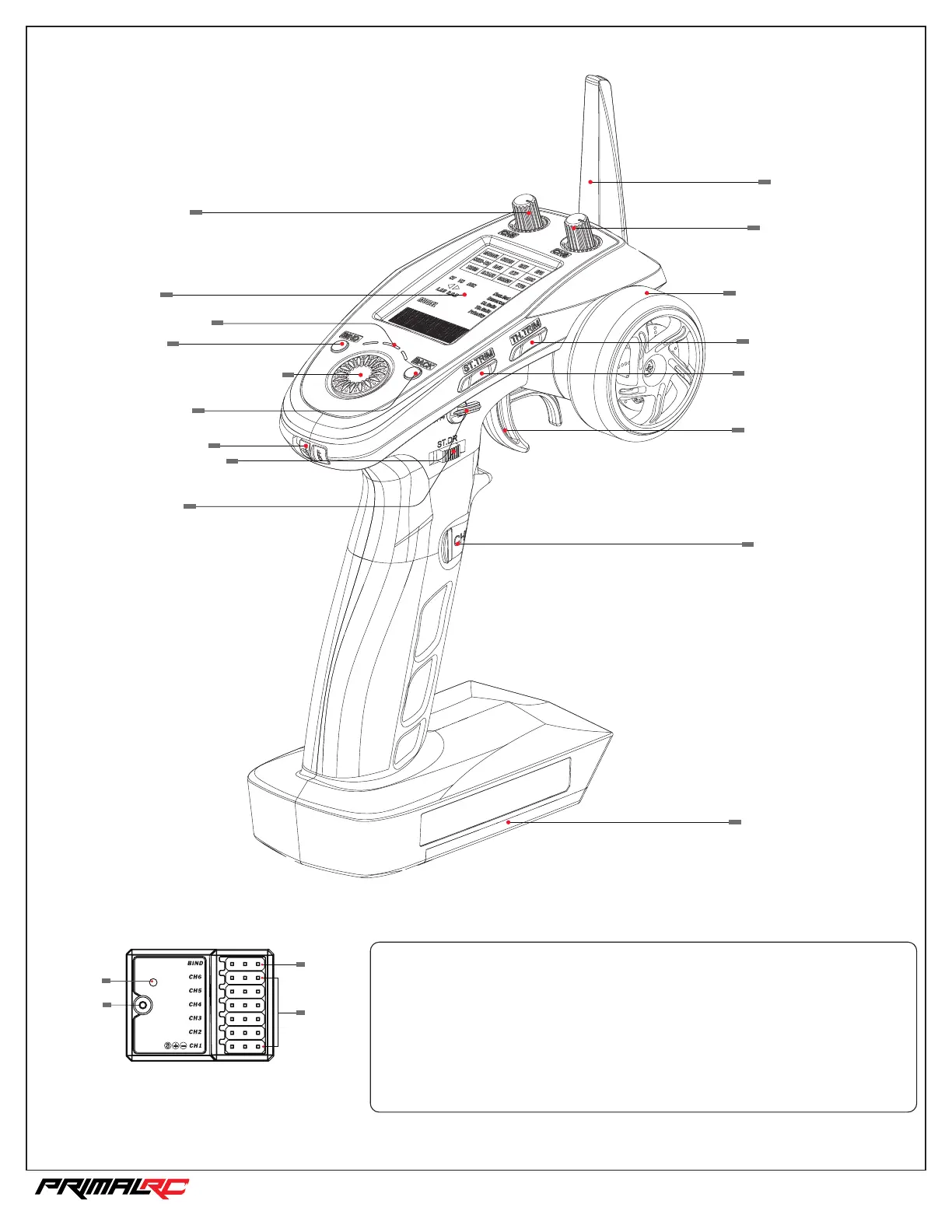
Radio Details
Bind/VCC
LED
Antenna
CH 1-6
Receiver
Battery
Compartment
Engine Kill Switch
(Channel 3)
Throttle/Brake
(Channel 2)
LCD
Channel 5
LED Indicator
BIND
NaviKey
(Rotate to “Select”, press to
“Confirm”)
BACK/Exit
Power Switch
Reverse Activation
(Channel 4)
Steering
D/R
Steering Trim
(Channel 1)
Throttle Trim
(Channel 2)
Steering Wheel
(Channel 1)
Channel 6
Antenna
Transmitter
5. Check to make sure everything functions as expected. If not repeat the steps above.
4. Once binding is complete the transmitter will exit bind mode. Remove the power and
bind cable from the receiver then apply power to the B/VCC port.
3. Press and hold the transmitter’s bind key and turn on the transmitter at the same time.
2. Connect power to any other port.
1. Connect the bind cable to the receiver’s B/VCC port.
The transmitter and receiver have been pre-bound.
If you are using another transmitter or receiver, follow the steps below to bind the
transmitter and receiver:
Binding setup
1/5th RAMINATOR MONSTER TRUCK



 To Next Page