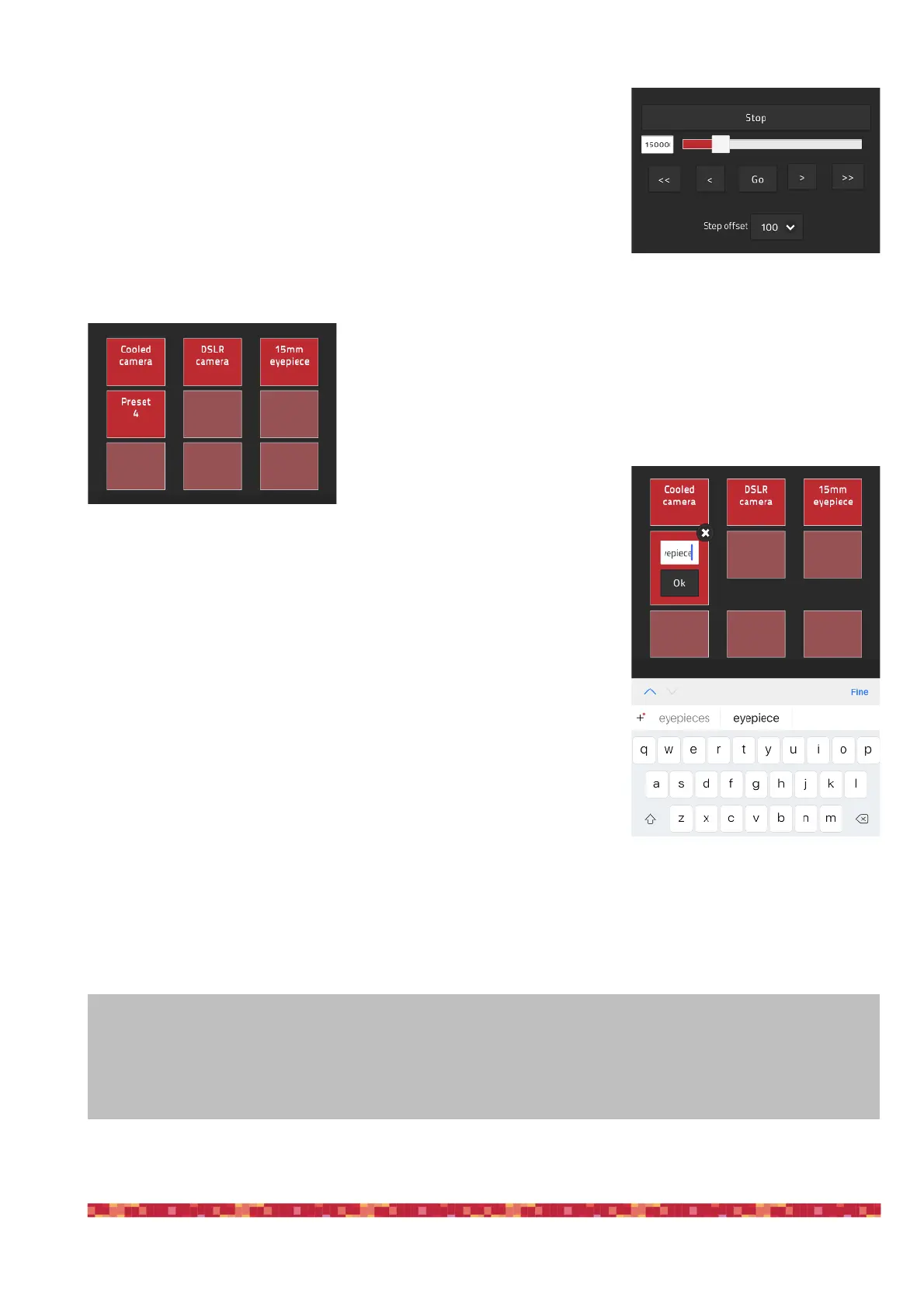
Moving the ESATTO focuser with the ESATTO Virtual HandPad is very
easy. You can do this in different ways:
1. move the slider until you reach the desired position and tap on the GO
button
2. make a double tap on the left field (where you can read the number in
step of your focuser), write the number you prefer with the virtual key-
board of your device and then press the GO button
3. select a value in the “Step offset” selector (from 100 to 2000 steps) and
tap the < or > buttons to move the focuser by the number you selected.
Tap the << or >> buttons to move the focuser by 10 times the number you selected.
In any moment, if you need to immediately stop the movement, press the
STOP button in the upper part.
In order to save a new position in the ESATTO Virtual HandPad, first of all
you have to move the ESATTO focuser to a position where your telescope is
in perfect focus (you will need an optical accessory or a camera in order to
do this) and then follow this procedure:
Tap and keep your finger on one of the empty buttons: the position will be
automatically saved with a “Preset” name.
Tap on the name of the button and you will be able to change it by using the
virtual keyboard of your device. Press ENTER button to confirm the new
name.


 To Next Page