10
LAYOUT
Set up procedure for plasma cutting machine
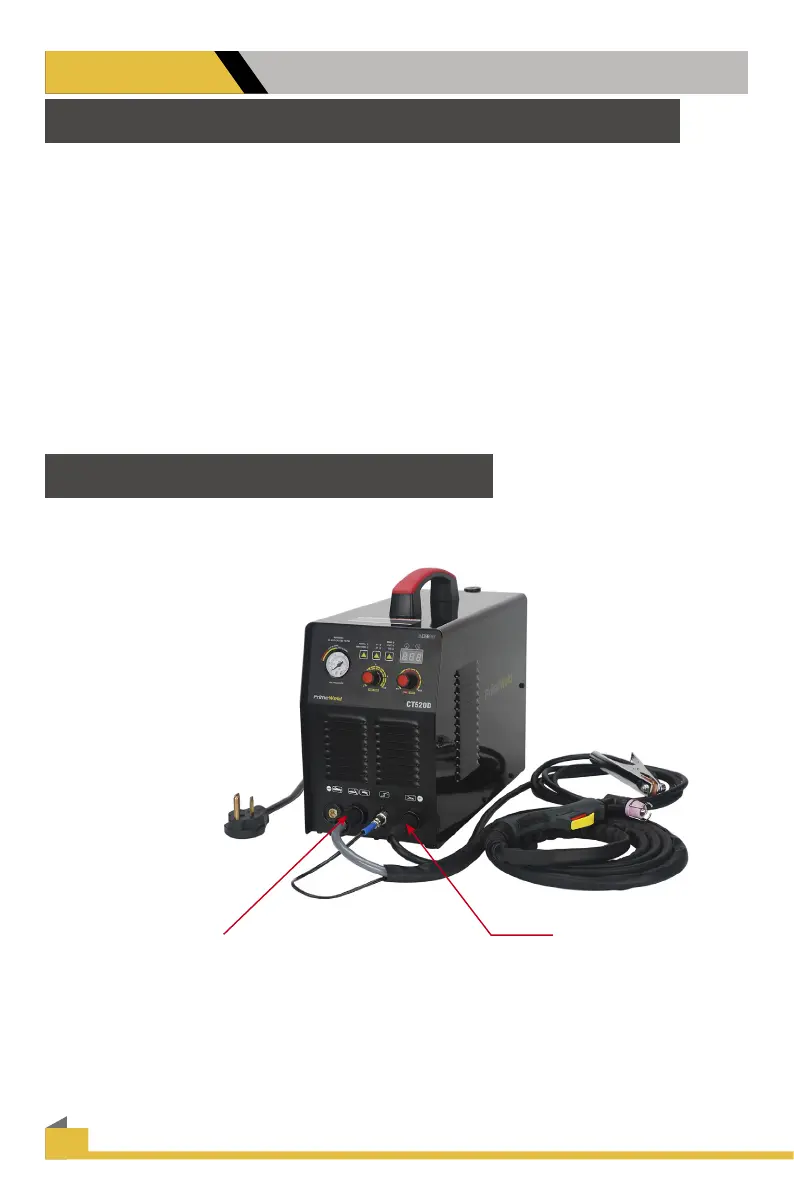
1. Connect the AG60/AG60P Plasma Torch to the machine. Insert the torch connection into the
torch.Connection receptacle at the front of the machine and screw up hand tight. Caution: Be
careful not to bend the pins located inside the torch connector.
2. Connect the earth lead to the output terminal of the machine and tighten.
3. Connect the air supply to the air connection located at the rear of the machine. Turn on the air
supply.
4. Connect the machine to the correct power supply and switch on the machine using the on/o
switch located at the rear of the machine.
5. Select 2T / 4T operation
Operating procedure using the 2T / 4T Function with AG60/AG60P torch. Set torch operation
2T / 4T.
• When 2T operation is selected press trigger Arc starts, release trigger Arc stops.
• When 4T operation is selected press and release trigger Arc starts, press and release trigger
Arc stops.
6. Set amperage dial.
How to begin use this machine
Before use this machine, you need to read the blow information carefully, Put the
accessories ready before operate this unit.
Connect the earth
lead to the output
terminal Of the
machine and tight
Connect the Plasma cutting torch to the
machine set the torch connection into
the torch connection
Receptacle at the front of the machine
and Screw up hand tight.


 To Next Page