25
LAYOUTOPERATION
HIGH FREQUENCY START TIG OPERATION
<1/8
<1/8”
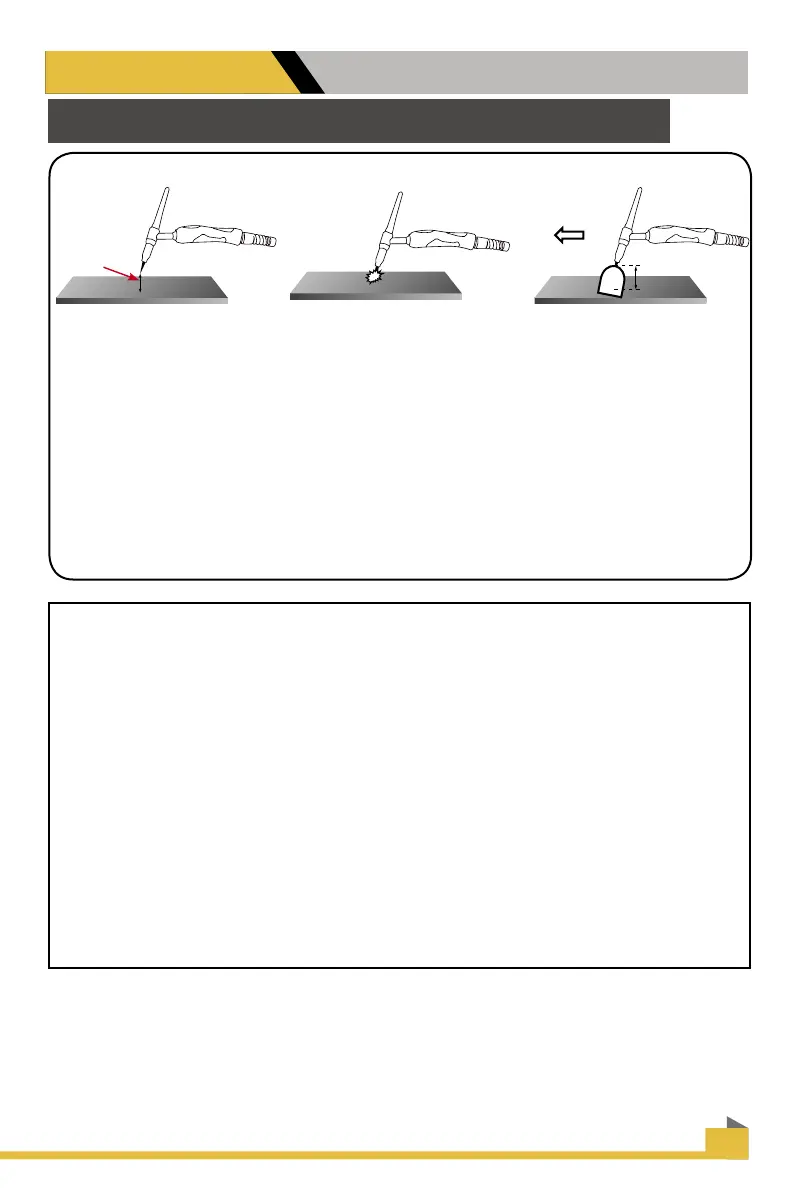
1. Position the point of the sharpened tungsten about 1/8” or less above the metal.
2. Press the torch trigger or press the foot pedal to initiate the arc. The HF arc will be initiated.
It may appear briey as a blue spark.
3. An arc should form almost immediately. If arc does not start, and the HF is creating a
spark, then check the work clamp connectivity to the work piece. Grind a clean spot to attach
the clamp if necessary. Connect the work clamp directly to the object being welded Move the
tungsten closer to the work. Also check polarity if arc does not start or tungsten balls, or burns
quickly. Repeat steps 1 and 2.
4. Leave 1/8” or less gap between the tungsten tip and the metal and proceed with welding,
leaving the torch inclined at a maximum 15° angle.
General TIG Arc Starting Steps
1. Turn the unit on, allow time for power up cycle to complete its start up process.
2. Select TIG mode with TIG /CUT/Stick selector button.
3. Plug in the TIG Torch with either the torch switch or foot pedal connected. Then select
panel mode or pedal mode with the selector button depending upon whether the foot pedal
(pedal mode) or torch switch (panel mode) was chosen for use.
4. Adjust to the desired Post Flow time by rotating the knob to increase/decrease. ( Usually
.5 to 1 second per 10 amps)
5. Select maximum amps with amp control knob.
6. Start arc as depicted above by either pressing and holding the torch switch or by
stepping down slightly on the pedal.
7. If you are using the panel mode, continue to hold the torch switch until you are ready to
stop welding. Release the switch. The welding arc will then cease. If you are using the foot
pedal raise your foot completely o the pedal and arc will stop automatically.


 To Next Page