15
in the coverage area (to avoid being seen by animals or potential
thieves. The camera is now “sleeping” and waiting for the PIR sensor
to trigger the an image capture.
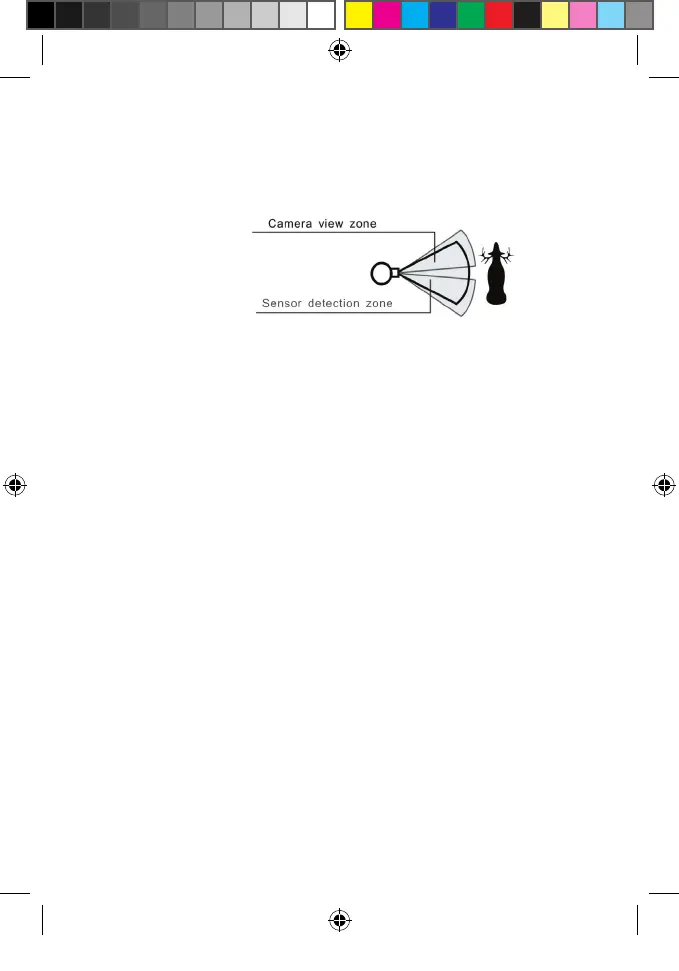
• Maximum PIR sensor range is approx. 13 meters (42 ft).
4. Secure the Camera
A standard padlock may be used in the camera’s lock hole to secure it and
prevent theft.
VIEWING THE PHOTOS/VIDEOS
After your camera has been operating for awhile, you will of course
want to review the images it has been capturing. This can be done by
either of two methods, according to your preference or the availability of
accessory equipment:
Using an SD Card Reader
1. Push the SD card in slightly to release it, then pull it out of the
camera gently.
2. Put the SD card into a USB connected SD card reader (either a
dedicated SD card reader or “multi-card reader” that features slots
for dierent types of memory cards, including SD) or the SD card
slot on your computer if it has one.
3. The SD card or card reader should appear on your desktop or list of
connected “drives”. Double click it to view or download the photo
les (.jpg) and/or video les (.avi) on the SD card.
Note: while it may be possible to view the image les on many digital
cameras, it is not recommended. If you do insert the SD card in a digital
camera, we recommend you perform a full format of the card using a
computer before re-inserting the card into the Game Camera.
Angle of PIR Coverage=42 degrees
Lens Angle of View=40 degrees
Primos63162WM_12MPBulletProofCam_WalmartSMU_1LIM.indd 15 3/9/17 1:40 PM


 To Next Page