5
Taking a Look
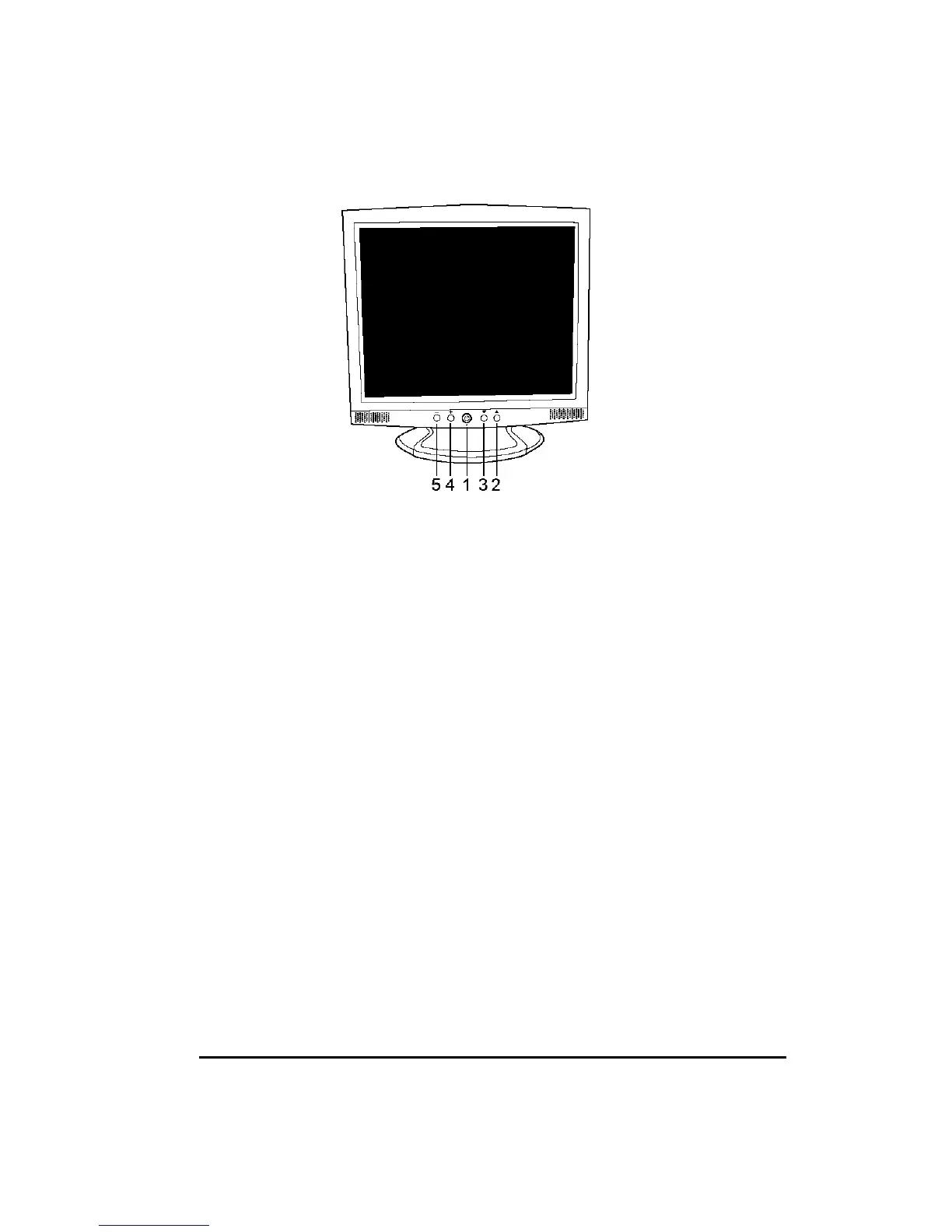
1. Power Switch Pressing this button turns the display system power on or off.
2. Menu/Select ▲ Pressing this button pops up the OSD menus on the screen, and used to
select (“Up” direction) the OSD control options on the screen.
3. Select ▼ This button is used to select (“Down” direction) the OSD control options on
the screen.
4. + This button is used to increase the value of the selected OSD control option.
5. 0 This button is used to decrease the value of the selected OSD control option.
Quick Adjustment Function
When the OSD Menu is not active, the following functions are available for the quick
adjustment.
y Pressing ▲ button once pops up the OSD Function Main Menu .
y Pressing ▼ button once pops up the small Brightness icon. Use +or 0button to adjust
the Brightness level.
y Pressing + button once pops up the small Volume icon. Use +or 0button to adjust the
Volume level.
y Press 0 button to switch to the digital interface


 To Next Page