7
OSD Control Options
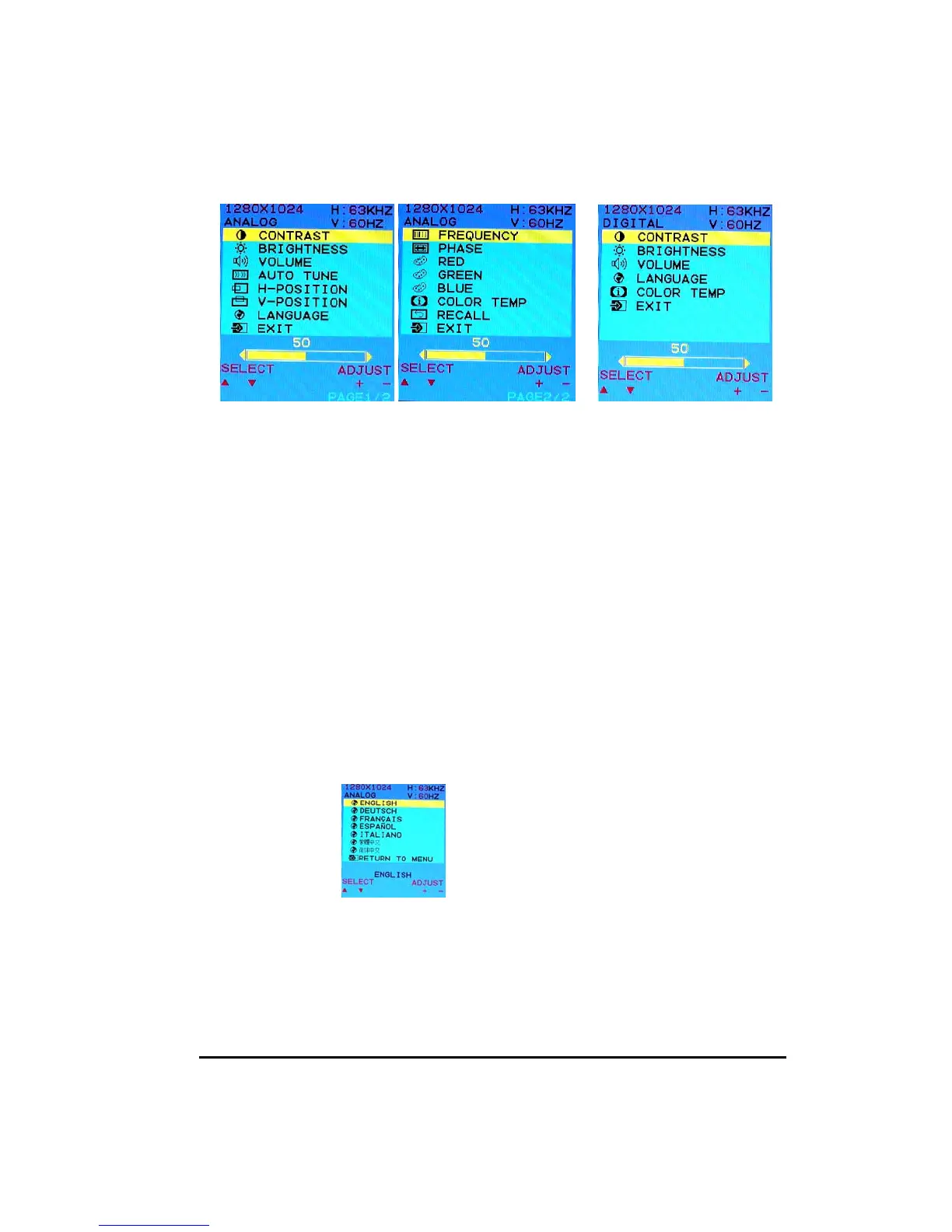
OSD Menu - Analog Interface OSD Menu - Digital
z CONTRAST
Adjust the contrast using + and
− buttons.
z BRIGHTNESS
Adjust the brightness using + and
− buttons.
z VOLUME
Adjust the speaker volume using + and – buttons.
z AUTO TUNE
Press + or
− buttons to make LCD monitor adjust the related parameters automatically
for optimal display status.
z H - POSITION
Pressing + moves the display image to the right; Pressing - moves the display image
to the left.
z V - POSITION
Pressing +moves the display image upward; Pressing -
moves the display image
downward.
z LANGUAGE
This item is used to select OSD languages.
z FREQUENCY
This item is used to decrease the vertical interference.
1. Select one display pattern from your computer.
2. Use + and − buttons on the LCD monitor to decrease the vertical interference to
get the optimal display.


 To Next Page