www.probuilttools.com
9
2) Aer your sonde is acvated, it is me to use your locator. This page specifically shows how to
use your PB550SL Digital Locator Wand in conjuncon with your PB Series sewer camera.
a) Turn on your locator by depressing the yellow buon in the handle grip.
i) NOTE: The locator will only remain on while this buon is depressed.
ii) Leng go of the handle will automacally power off the locator.
b) You may change the acve frequency by pressing the “F” buon on the face of the locator.
i) NOTE: Each press will toggle the acve frequency to the next on the list.
ii) 512Hz is the acve frequency for your PB Series sewer camera system.
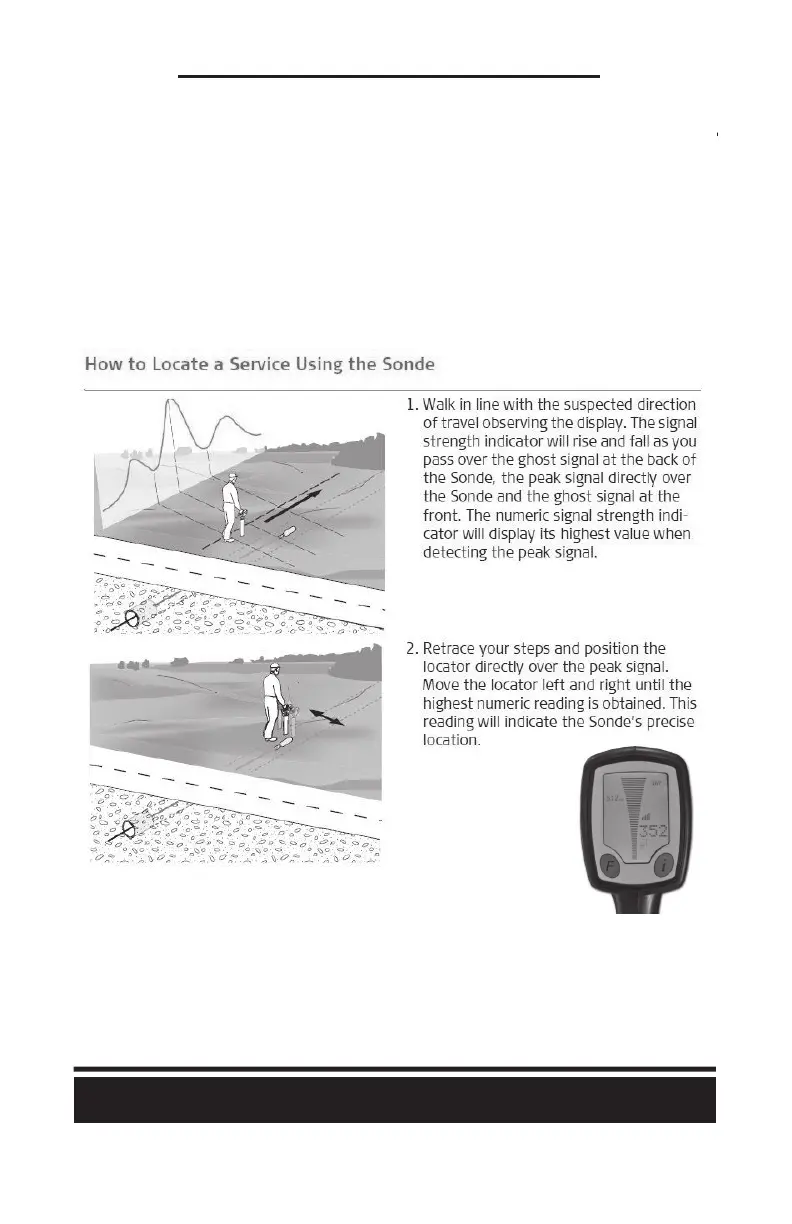
c) Facing the SAME DIRECTION as the pipe, begin to walk towards your camera as shown:
d) The most important number to look at on the locator is the “peak” number on the lower-
right of the screen. Once that number is at its highest possible point AT THAT JOB, then you
are directly above the sonde and in-line with it.
e) When directly above the sonde, press and HOLD DOWN the red “i” buon on the face of the
locator. Aer approximately 2 seconds, it will beep and show you your depth measurement.
LOCATING YOUR CAMERA
Models: PB2000, PB-Mycro, PB2400ES, PB3600ES



 To Next Page