EasyManua.ls Logo

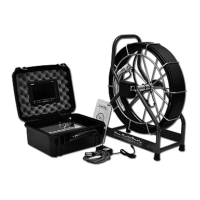
Pro-Built Tools PB2400ES - User Manual

Default Icon
24 pages
Print Icon
To Next Page IconTo Next Page
Loading...
PB Mycro
PB2000
PB2400ES
PB3600ES
100’
130’
150’
200’
250’
Pro-Built Tools
Users Guide
275’
300’
400’
500’
___
Question and Answer IconNeed help?

Do you have a question about the Pro-Built Tools PB2400ES and is the answer not in the manual?

Summary

Equipment Specifications and Safety

Safety Instructions

Guidelines for maintaining equipment and ensuring safe operation, including inspections.

Initial Setup and Startup

Locating Your Camera: Sonde Activation

Activating the Sonde

How to turn on the sonde and what to expect on the video display.

Locating Your Camera: Using the Locator

Locator Wand Operation

Instructions for using the locator wand to find the sonde's position and depth.

SD Card Recorder Setup

SD Recorder Installation Guide

Connection and Power Setup

Step-by-step guide for connecting the SD recorder to the control box and power.

Troubleshooting: Blue Screen

Diagnosing Blue Screen Errors

Steps to resolve a blue screen error on the LCD display by checking connections and signals.

Troubleshooting: Black Screen

Diagnosing Black Screen Errors

Steps to resolve a black screen error, checking power, LEDs, and connections.

Troubleshooting: Video and Lights

Head Removal Guide

Tools and Initial Removal Steps

Required tools and initial steps for safely removing the camera head assembly.

Head Disassembly Guide

Head Installation Guide

Pro-Built Tools PB2400ES Specifications

General IconGeneral
BrandPro-Built Tools
ModelPB2400ES
CategoryDigital Camera
LanguageEnglish

Related product manuals