11
12. Make sure that all parts of the elliptical exerciser are properly tightened. Note: Some hardware may be
left over after assembly is completed. To protect the floor or carpet from damage, place a mat under the
elliptical exerciser.
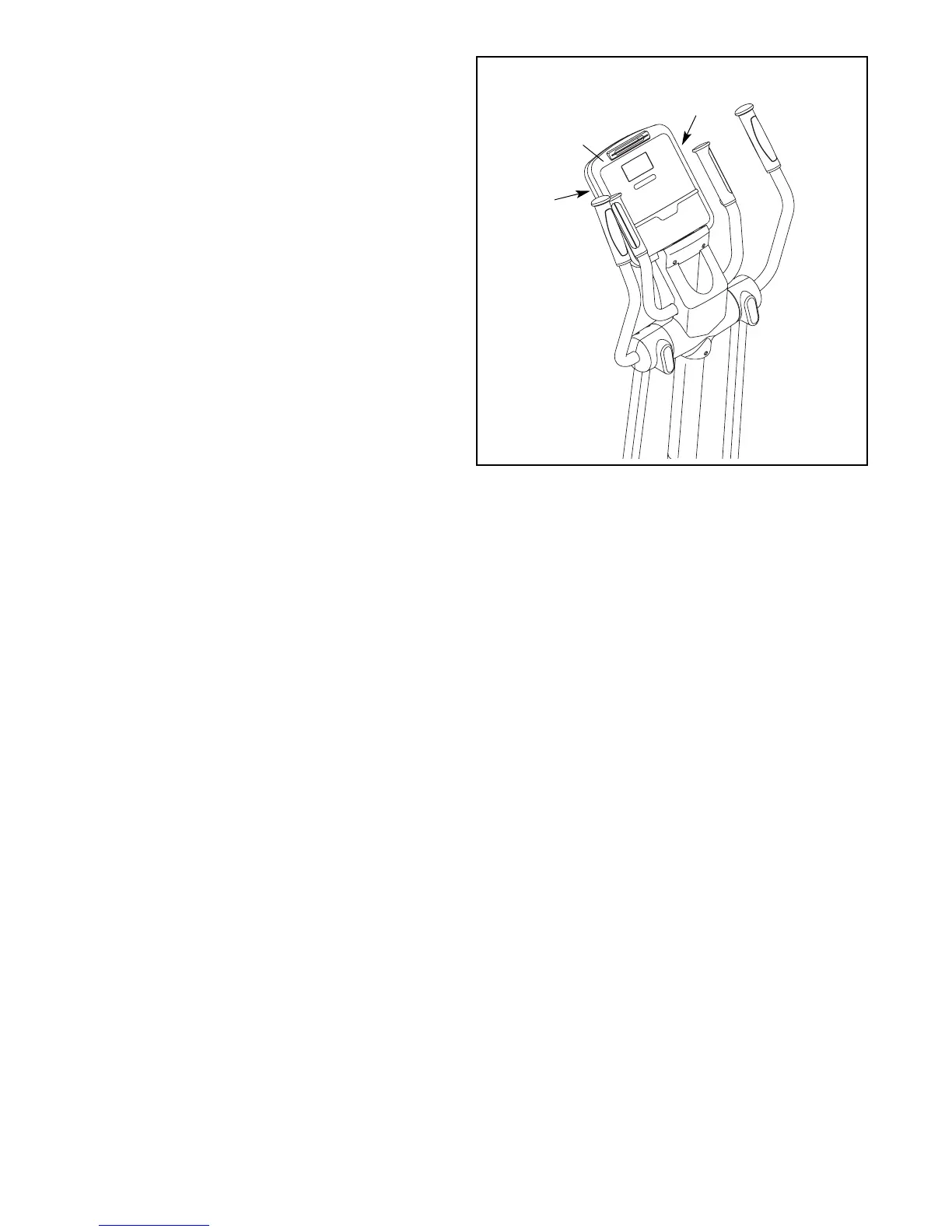
11. The Console (11) can be operated with four
1.5V “D” batteries (not included); alkaline batter-
ies are recommended. Locate the two battery
covers on the back of the Console. Press the
tabs on the battery covers, and remove the bat-
tery covers. Next, insert two batteries into each
battery compartment; make sure that the bat-
teries are oriented as shown by the symbols
inside the battery compartments. Then, reat-
tach the battery covers.
The Console (11) can also be operated with a
regulated 6-volt DC 2-amp power supply (not
included). To purchase a power supply, call
the telephone number on the front cover of
this manual. To avoid damaging the console,
use only a manufacturer-supplied power
supply. Plug one end of the power supply into
the jack on the elliptical exerciser; plug the
other end into an outlet installed in accordance
with all local codes and ordinances.
11
11
Battery
Cover
Battery
Cover



 To Next Page