EasyManua.ls Logo

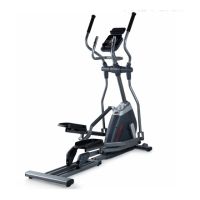
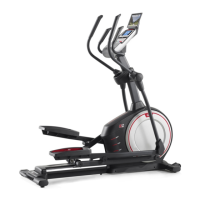
Pro-Form Endurance 520 E - User Manual

Pro-Form Endurance 520 E
36 pages
Print Icon
To Next Page IconTo Next Page
Loading...
USER’S MANUAL
Serial
Number
Decal
CAUTION
Read all precautions and
instructions in this manual before
using this equipment. Keep this
manual for future reference.
Model No. PFEVEL69716.0
Serial No.
Write the serial number in the space
above for reference.
www.iconeurope.com
CUSTOMER SERVICE
UNITED KINGDOM
Call: 0330 123 1045
From Ireland: 053 92 36102
Website: www.iconsupport.eu
E-mail: csuk@iconeurope.com
Write:
ICON Health & Fitness, Ltd.
Unit 1D, The Gateway
Fryers Way, Silkwood Park
OSSETT
WF5 9TJ
UNITED KINGDOM
AUSTRALIA
Call: 1800 993 770
E-mail: australiacc@iconfitness.com
Write:
ICON Health & Fitness
PO Box 635
WINSTON HILLS NSW 2153
AUSTRALIA
Question and Answer IconNeed help?

Do you have a question about the Pro-Form Endurance 520 E and is the answer not in the manual?

Summary

Customer Service Contact Information

Understanding Warning Decal Placement

Essential Safety Precautions

Getting Started: Before You Begin

Parts Identification and Diagram

Product Assembly Guide

Using Your ProForm Elliptical

Power Adapter Connection

Connects the elliptical to a power source for operation.

Moving the Elliptical

Instructions for safely moving the elliptical, requiring two people.

Leveling the Elliptical

Adjusts leveling feet to ensure the elliptical remains stable on the floor.

Using the Tablet Holder

Guides on inserting and securing a tablet in the holder.

Adjusting Ramp Incline

Adjusts the ramp incline to vary pedal motion and workout intensity.

Proper Elliptical Exercise Technique

Details on mounting, pedaling, and dismounting the elliptical safely.

Console Layout Overview

Console Features and Functions

Manual Mode Operation

Measuring Heart Rate in Manual Mode

Explains how to use the console's heart rate monitor for feedback.

Onboard Workout Guide

Connecting Audio Devices

Using the Device Charging Port

Optional Chest Heart Rate Monitor

Smart Device Connectivity (iFit)

Heart Rate Monitor Connectivity

Customizing Console Settings

Maintenance and Troubleshooting

Routine Maintenance Procedures

Regular inspection, cleaning, and part replacement for optimal performance.

Console Error Troubleshooting

Guidance for resolving issues with heart rate display and console feedback.

Adjusting the Reed Switch

Procedure for adjusting the reed switch for accurate console feedback.

Adjusting the Drive Belt

Steps to adjust the drive belt if pedals slip during operation.

Exercise Guidelines and Recommendations

Optimizing Exercise Intensity

Guidance on using heart rate zones for fat burning and aerobic exercise.

Structured Workout Phases

Recommendations for warming up, training, and cooling down during workouts.

Recommended Exercise Frequency

Advice on how often to exercise for maintaining or improving fitness.

Post-Exercise Stretching Guide

Ordering Replacement Parts

Product Recycling and Disposal

Summary

Customer Service Contact Information

Understanding Warning Decal Placement

Essential Safety Precautions

Getting Started: Before You Begin

Parts Identification and Diagram

Product Assembly Guide

Using Your ProForm Elliptical

Power Adapter Connection

Connects the elliptical to a power source for operation.

Moving the Elliptical

Instructions for safely moving the elliptical, requiring two people.

Leveling the Elliptical

Adjusts leveling feet to ensure the elliptical remains stable on the floor.

Using the Tablet Holder

Guides on inserting and securing a tablet in the holder.

Adjusting Ramp Incline

Adjusts the ramp incline to vary pedal motion and workout intensity.

Proper Elliptical Exercise Technique

Details on mounting, pedaling, and dismounting the elliptical safely.

Console Layout Overview

Console Features and Functions

Manual Mode Operation

Measuring Heart Rate in Manual Mode

Explains how to use the console's heart rate monitor for feedback.

Onboard Workout Guide

Connecting Audio Devices

Using the Device Charging Port

Optional Chest Heart Rate Monitor

Smart Device Connectivity (iFit)

Heart Rate Monitor Connectivity

Customizing Console Settings

Maintenance and Troubleshooting

Routine Maintenance Procedures

Regular inspection, cleaning, and part replacement for optimal performance.

Console Error Troubleshooting

Guidance for resolving issues with heart rate display and console feedback.

Adjusting the Reed Switch

Procedure for adjusting the reed switch for accurate console feedback.

Adjusting the Drive Belt

Steps to adjust the drive belt if pedals slip during operation.

Exercise Guidelines and Recommendations

Optimizing Exercise Intensity

Guidance on using heart rate zones for fat burning and aerobic exercise.

Structured Workout Phases

Recommendations for warming up, training, and cooling down during workouts.

Recommended Exercise Frequency

Advice on how often to exercise for maintaining or improving fitness.

Post-Exercise Stretching Guide

Ordering Replacement Parts

Product Recycling and Disposal

Pro-Form Endurance 520 E Specifications

General IconGeneral
TypeElliptical Trainer
Stride Length18 inches
Resistance Levels18
Maximum User Weight300 lbs
Dimensions64.5 x 24 x 68 inches
Flywheel Weight14 lbs
Display TypeLCD
Programs24
Heart Rate MonitoringYes
Warranty90 days parts
ModelPro-Form Endurance 520 E

Related product manuals