15
71
51
51
39
Weight
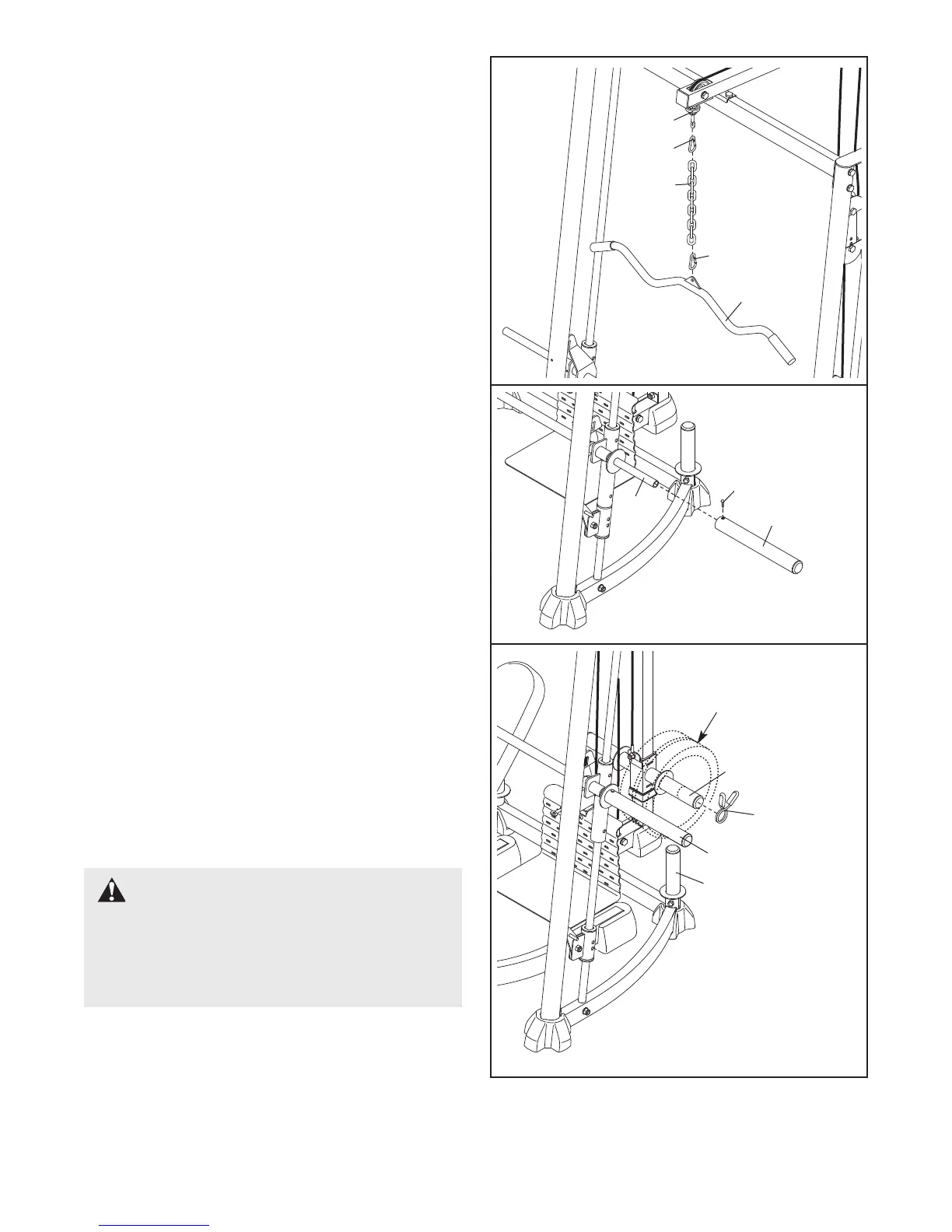
ATTACHING ACCESSORIES
The Lat Bar (55) can be attached to a Cable (61) with
a Cable Clip (71). For some exercises the Chain (24)
should be attached between the Cable and the Lat
Bar with two Cable Clips.
T
he other accessories can be attached to the Cables
(61) in the same manner.
6
1
71
24
55
ADDING WEIGHT
Slide the desired amount of weight (not included)
onto the Weight Carriage (42). Secure the weight with
the Spring Clips (72).
Add weight to the Barbell (51) or Leg Lever (not
shown) in the same manner.
Weights can be stored on the Center Rack Base (39)
when they are not being used.
WARNING: Always place an equal
amount of weight on each side of the Weight
Carriage (42) or Barbell (51). Do not place more
than 150 pounds on the Weight Carriage or Leg
Lever (not shown). Do not place more than 310
pounds on the Barbell.
54
42
72
62
ATTACHING THE BARBELL ADAPTER
Slide the Barbell Adapter (54) onto the Barbell (51)
and secure it in place with an M8 x 10mm Set Screw
(62). Repeat this process on the other side of the
Barbell.



 To Next Page