7
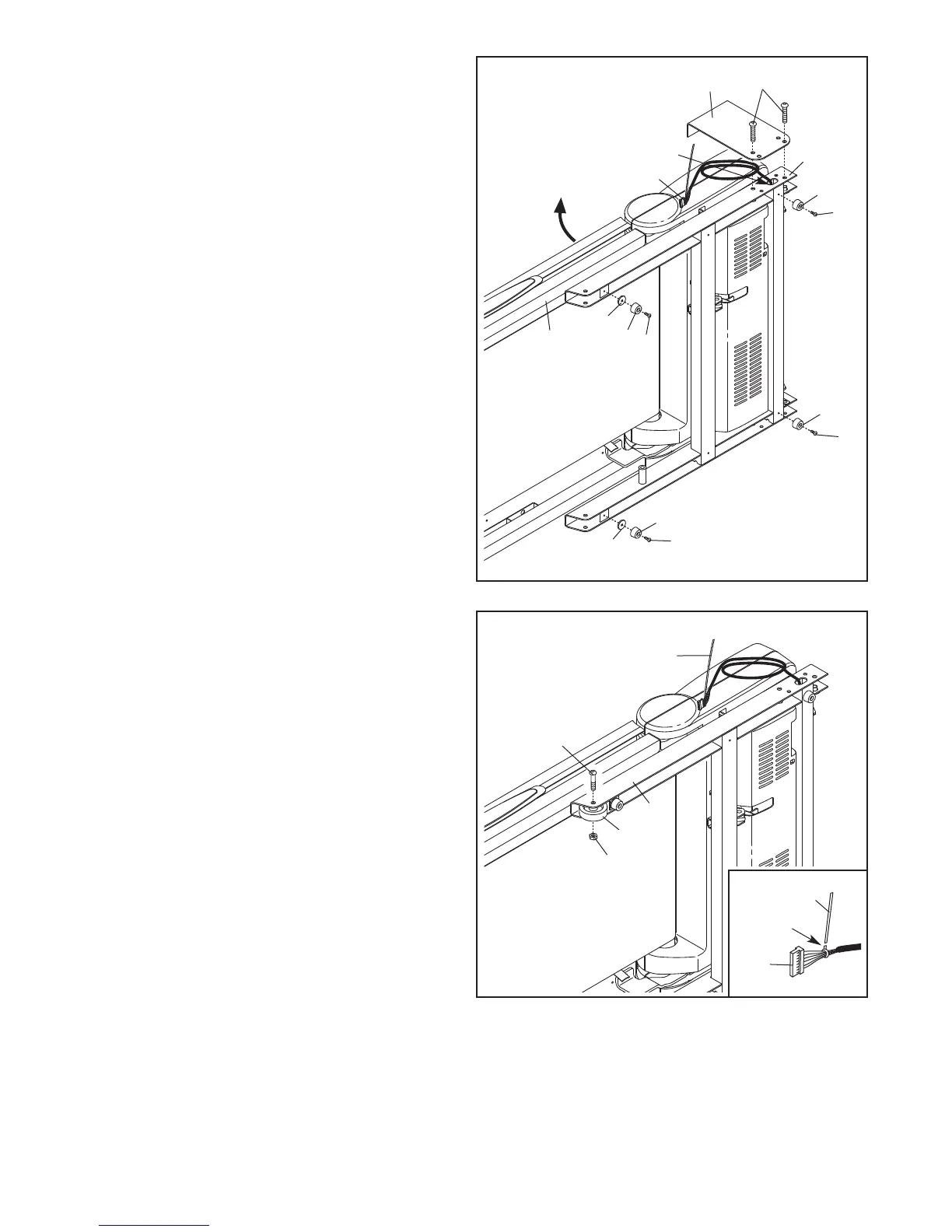
2. See the inset drawing. Cut the plastic tie near
the Upright Wire (79).
Attach a Wheel (88) to the Base (87) with a 3/8"
x 2" Bolt (7) and a 3/8" Nut (11). Do not over-
tighten the Nut; the Wheel must turn freely.
87
7
11
2
88
1
. Make sure that the power cord is unplugged.
W
ith the help of a second person, carefully tip
the treadmill onto its left side. Partially fold the
Frame (51) so that the treadmill is more stable;
do not fully fold the Frame yet.
Remove and discard the indicated bolts (A) and
the shipping bracket (B).
Cut the shipping tie securing the Upright Wire
(79) to the Base (87). Locate the plastic tie in
the indicated hole in the Base, and use the tie to
pull the Upright Wire out of the hole.
Attach two Base Feet (84) to the Base (87) in the
locations shown with two Base Foot Spacers
(89) and two #8 x 1" Tek Screws (4).
Then, attach the other two Base Feet (84) with
two #8 x 1" Tek Screws (4).
1
87
4
51
84
84
4
4
4
84
89
84
79
Hole
89
Plastic Tie
Cut
79
A
B
Plastic Tie





 To Next Page