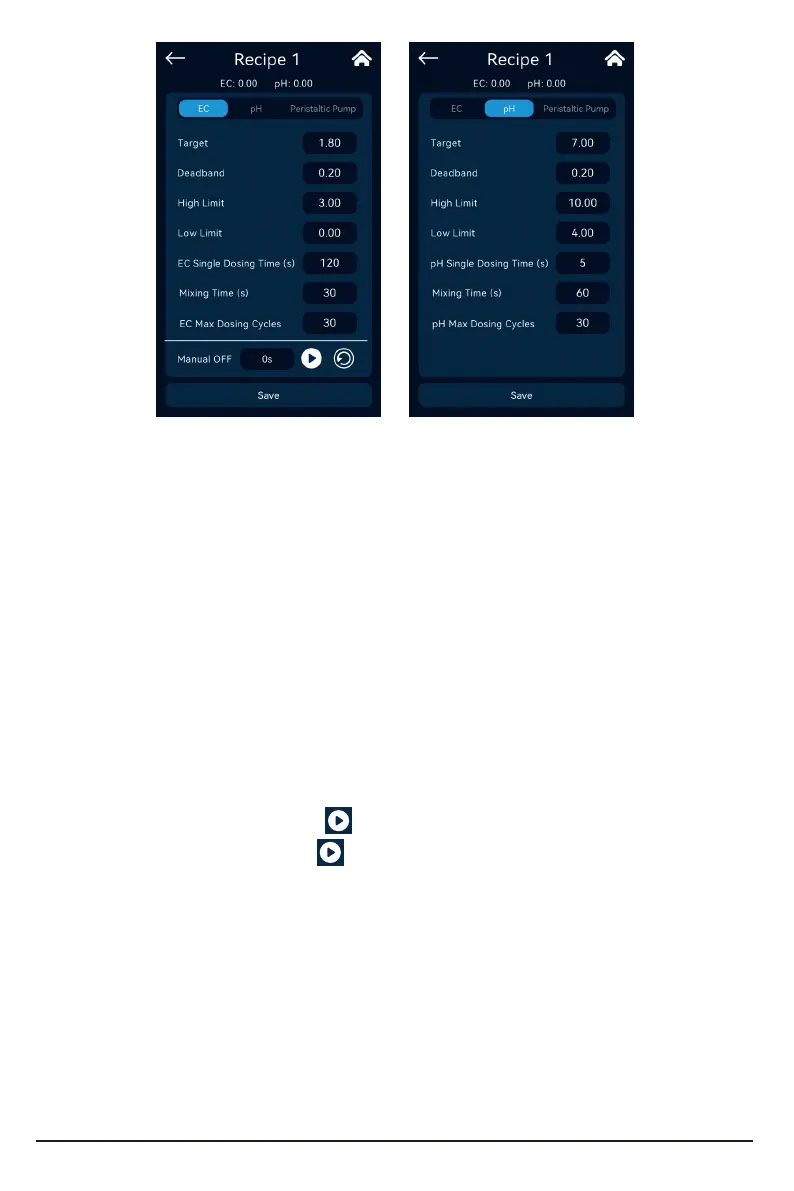
EC Target value setting: set the target parameters for the user to maintain the EC value of the
nutrient solution.
EC Deadband: Set the oset of automatic liquid addition after the EC reaches or exceeds the
target value, and stas feilizer distribution when the EC value is less than or equal to the target
value - Dead band value, and reaches or exceeds the target value stop.
EC alarm value setting: set the low limit value and high limit value of the alarm signal. When
the EC exceeds the high limit value, the system will stop the feilizer distribution.
Single Dosing time/Mix time: set the parameters of the dosing time and inteal time (the
waiting time for nutrient solution mixing) in an automatic dosing cycle of the equipment.
Max Dosing cycles: Set the maximum number of continuous dosing cycles for equipment
dosing before the nutrient solution EC reaches or exceeds the target value. After exceeding the set
maximum value, a corresponding alarm signal will be sent and the machine will stop. Automatic
dosing output, this function is to prevent out of control of dosing caused by component failure or
lack of mother liquor. After manual inspection and pressing the alarm prompt symbol on the screen,
the system will resta the automatic feilizer distribution action, and at the same time, the number
of EC cycles will be cleared.
After the parameters are set, click in the EC setting inteace to add the prepared stock
solution into the nutrient pool, click repeatedly to add the solution and manually mix the
nutrient solution evenly until the EC reaches the target value or slightly exceeds the target value.
Record the cumulative working time of a single peristaltic pump for the rst feilizer distribution,
divide the cumulative working time of the peristaltic pump by the single dosing time to get the max
dosing cycles, after considering a ceain margin Fill in the value;
pH target value setting: set the target parameters for you to maintain the pH value of the
nutrient solution.
pH deadband: set the oset for restaing the automatic liquid addition after the pH reaches
the target value.
pH+ mode: When the pH concentration of the system is less than or equal to the target value,
the system stas the peristaltic pump to add alkali balance liquid, and stops when it reaches or
exceeds the target value.
13



 To Next Page