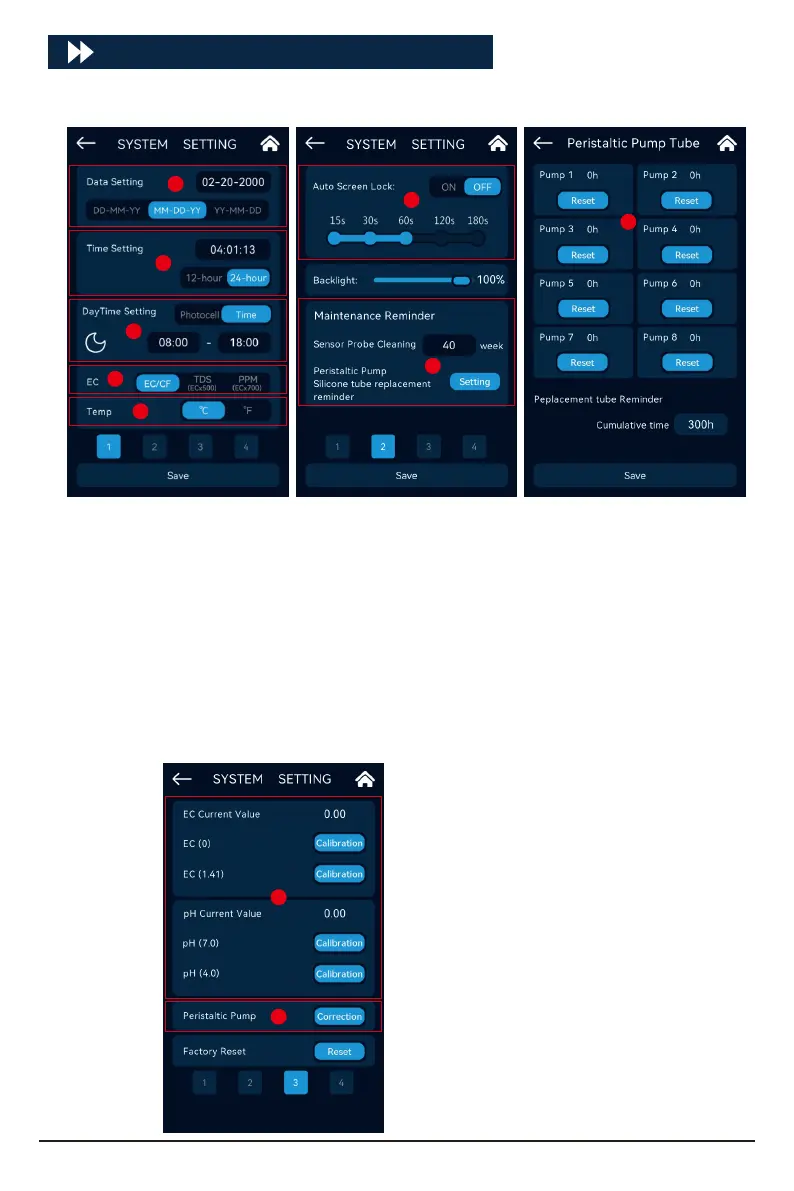
Click [SYSTEM] to enter the system settings:
SYSTEM
Data setting
Time setting
Daytime setting
EC unit switching
Temperature unit
Auto Screen Lock
Maintenance reminder setting (includ-
ing EC/pH sensor regular cleaning
reminder and peristaltic pump silicone
tube replacement reminder).
A.
B.
C.
D.
E.
F.
G.
Alarm when the silicone tube of the
peristaltic pump needs to be replaced.
Click the "Setting" button in the "Main-
tenance Reminder" menu to access the
silicone tube reminder inteace of
peristaltic pump.
Automatically record the cumulative
working time of each peristaltic pump,
and if the time reaches the time set by
the user, the system will alarm.
H.
EC\pH Current value and calibration.
Peristaltic pump channel feilizer
absorption error manual correction
function (due to various reasons such
as the length of the external silicone
tube of the peristaltic pump, the
feilizer absorption amount of each
channel is inconsistent, etc.)
I.
J.
A
B
D
E
I
J
F
G
H
C
24



 To Next Page