After the pH sensor has been used for a period of time, it needs to be decontaminated and
calibrated regularly.
The way of maintenance: take out the sensor, d the impurities on the suace with a soft cloth,
and make the suace smooth again. According to the dierent water quality and production
environment in dierent regions, it should be maintained eve 15 days or 30 days; if there is a big
dierence between the reading and the expected value, the user can individually correct the coe-
cient of the pH sensor.
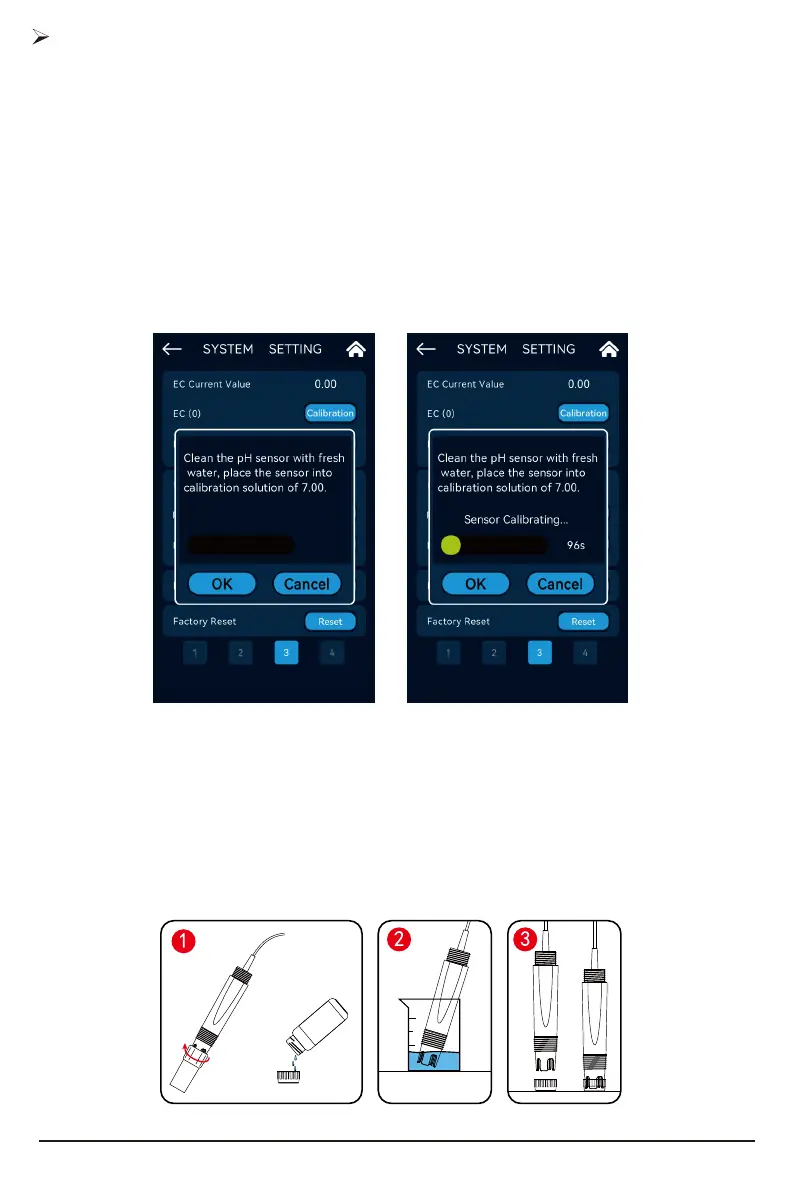
Take out the package of the sensor, pour the standard solution (4.00, 7.00) into the calibration
cup , clean the sensor with a soft cloth and put it into the standard solution respectively.
Note: The pH sensor needs to be placed in two standard liquids during calibration, it will take a long
time for the reading to stabilize. To ensure the accuracy of the calibration, please be patient.
pH Sensor Calibration
Press and hold the button "Calibration" of "pH (7.00)" or the button "Calibration" of "pH (4.00)"
to enter the corresponding calibration sensor calibration state.
At this time, put the cleaned pH sensor in the standard solution of pH 7.00, wait for the calibra-
tion action of the equipment to end, and wait for the reading time to count down for 100 seconds.
Complete the corrective action. When the calibration is complete, the current value should display 7.00.
After cleaning the probe in clean water, wipe o the water on the suace of the probe with a
soft cloth. At this time, put the cleaned pH sensor in the standard solution of pH 4.00, and wait for
the calibration of the equipment to end for 100 seconds.
26



 To Next Page