2
6
ENGLISH
Display Settings
[CLOCK]
[CLOCK DISPLAY]
[ON]: The clock time is shown on the display even when the unit is turned
off. ; [OFF]: Cancels.
Preset color:
[INITIAL COLOR]
/
[VARIABLE SCAN]
/
[CUSTOM R/G/B]
/
[RED1]
/
[RED2]
/
[RED3]
/
[PURPLE1]
/
[PURPLE2]
/
[PURPLE3]
/
[PURPLE4]
/
[BLUE1]
/
[BLUE2]
/
[BLUE3]
/
[SKYBLUE1]
/
[SKYBLUE2]
/
[LIGHTBLUE]
/
[AQUA1]
/
[AQUA2]
/
[GREEN1]
/
[GREEN2]
/
[GREEN3]
/
[YELLOWGREEN1]
/
[YELLOWGREEN2]
/
[YELLOW]
/
[ORANGE1]
/
[ORANGE2]
/
[ORANGERED]
Installation/Connection
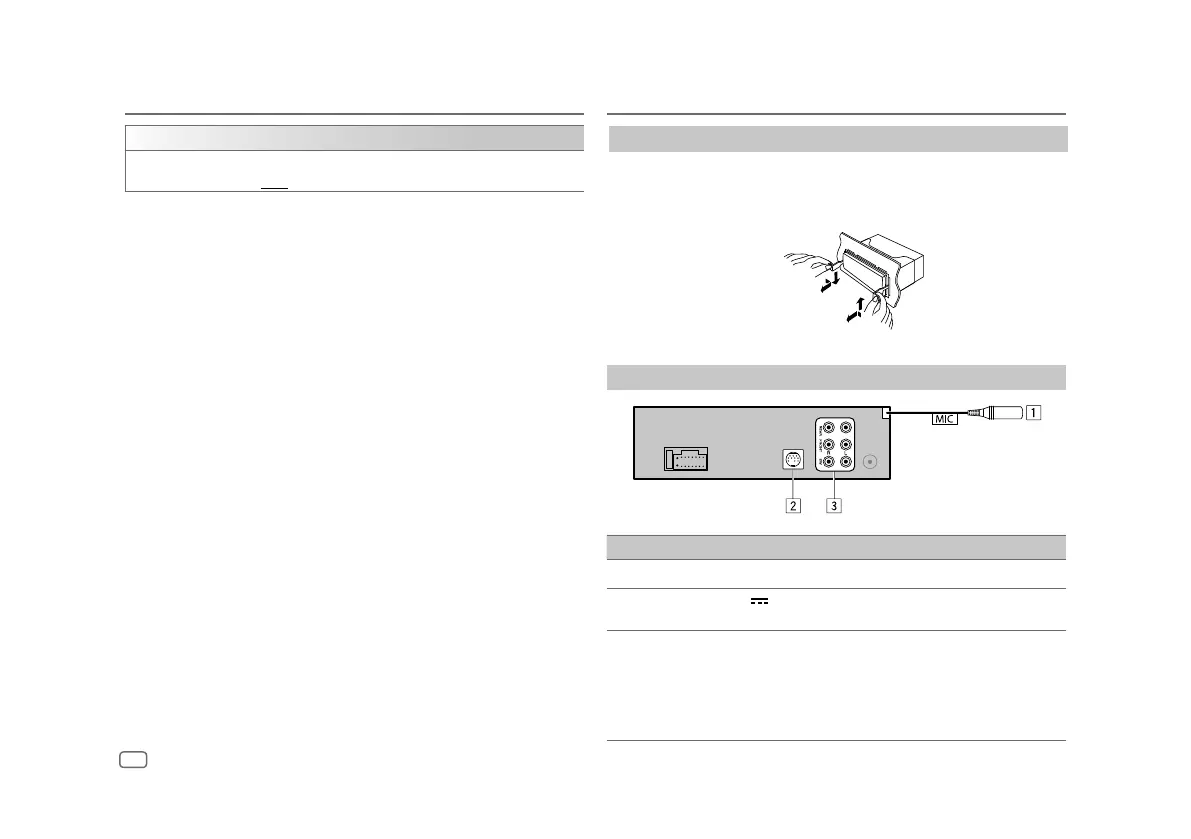
Removing the unit
Insert the extraction keys deeply into the slots on each side, then
follow the arrows as shown on the illustration.
Connect external components
No Part
1
MIC (Microphone input terminal) (Page
16
)
2
Expansion port (12 V 500 mA): To the optional SiriusXM Vehicle Tuner (commercially
available) (Page 12)
3
Output terminals
REAR : Rear output
FRONT : Front output
SW : Subwoofer output
•
When connecting an external amplifier to the output terminals of this unit, securely
connect the amplifier ground wire to the car chassis to prevent damage to the unit.


 To Next Page