
 Need help?
Do you have a question about the PROCASTER DTV-007 and is the answer not in the manual?
Guidelines for storing the device safely, including temperature and environmental conditions.
Instructions for cleaning and maintaining the device, emphasizing safe cleaning practices.
Crucial safety warnings, particularly regarding device use while operating a vehicle.
Important advisory about not attempting self-repair and seeking professional servicing.
Steps for connecting the device to a power source, including vehicle use.
Procedure for connecting the TV to a terrestrial or cable antenna.
Instructions for connecting and positioning the portable magnetic antenna.
Guide to connecting external audio-visual devices via the AV adapter.
Details on the automatic channel search function that runs upon first startup.
Option to perform a manual channel scan instead of the automatic process.
Emphasizes setting the correct country for accurate channel detection.
Information on how to abort the automatic channel scanning process.
Configure antenna, country, OSD, audio, and subtitle languages.
Settings for aspect ratio, picture mode, OSD transparency, banner time, and video enhancement.
Manage menu lock, channel lock, censorship, and password changes.
Procedure for updating the device firmware from USB or memory card.
How to reset all settings to factory defaults using the Set Default option.
Edit channel order, names, and favorites, and save changes.
Access the Electronic Program Guide for current and upcoming program information.
Details on supported memory capacity, file formats (JPEG, MP3, WMA, VCD, AVI).
Instructions on connecting media and navigating to open pictures, music, or video files.
How to open, browse, and select channels using the OK and arrow keys.
Accessing and navigating the program guide for current and upcoming shows.
Methods for choosing subtitle tracks or disabling subtitles.
Process for selecting different audio tracks for programs.
How to open teletext and enter page numbers using the remote.
Troubleshooting tips for poor image quality, likely due to weak signal.
Advice for resolving incorrect images when using video output, suggesting PAL setting.
Steps to resolve subtitle display issues, noting potential delays.
Guidance on ensuring USB devices are recognized, checking FAT32 format.
Technical details for Digital Video Broadcasting, including frequency range, modulation, and audio.
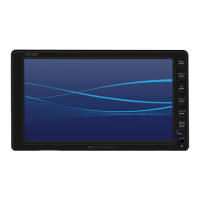
Device specifications like screen size, resolution, speakers, power, and connectivity.
Details on the device's physical dimensions, weight, and operating temperatures.
Guidance on the proper disposal and recycling of the product.











 To Next Page
 General