7
First startup
1. Connect the power cable as instruct-
ed on the previous page.
2. Connect the TV to an antenna. If using
the travel antenna, place it in an open
area or near a window to improve
reception.
3. Push the main power switch to the ON
position.
4. Start up the TV by pressing the power
button on the remote control.
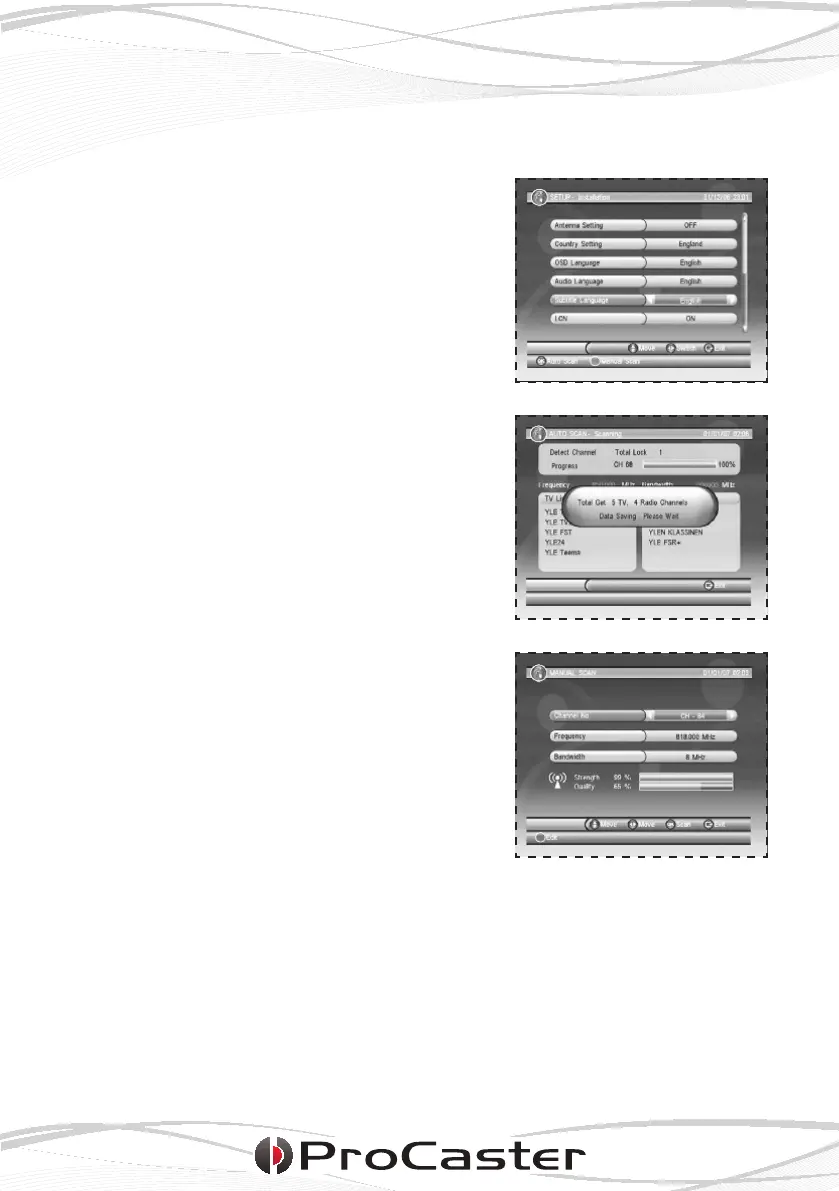
The TV has no preinstalled channels when
starting up the rst time so the automatic
channel search function will start auto-
matically.
Begin by setting the desired language and
country settings using the arrow keys on
the remote control. Press OK when ready
and the automatic chanel search will
begin.
If you wish to search each channel manu-
ally, chose Manual Scan by pressing the
green function button.
Please note:
• The TV searches the frequencies
depending on the country settings.
Set the country setting to match the
country you’re in, otherwise the TV will
not nd any channels.
• The automatic channels scan can be
canceled by pressing EXIT.











 To Next Page