English - 49 -
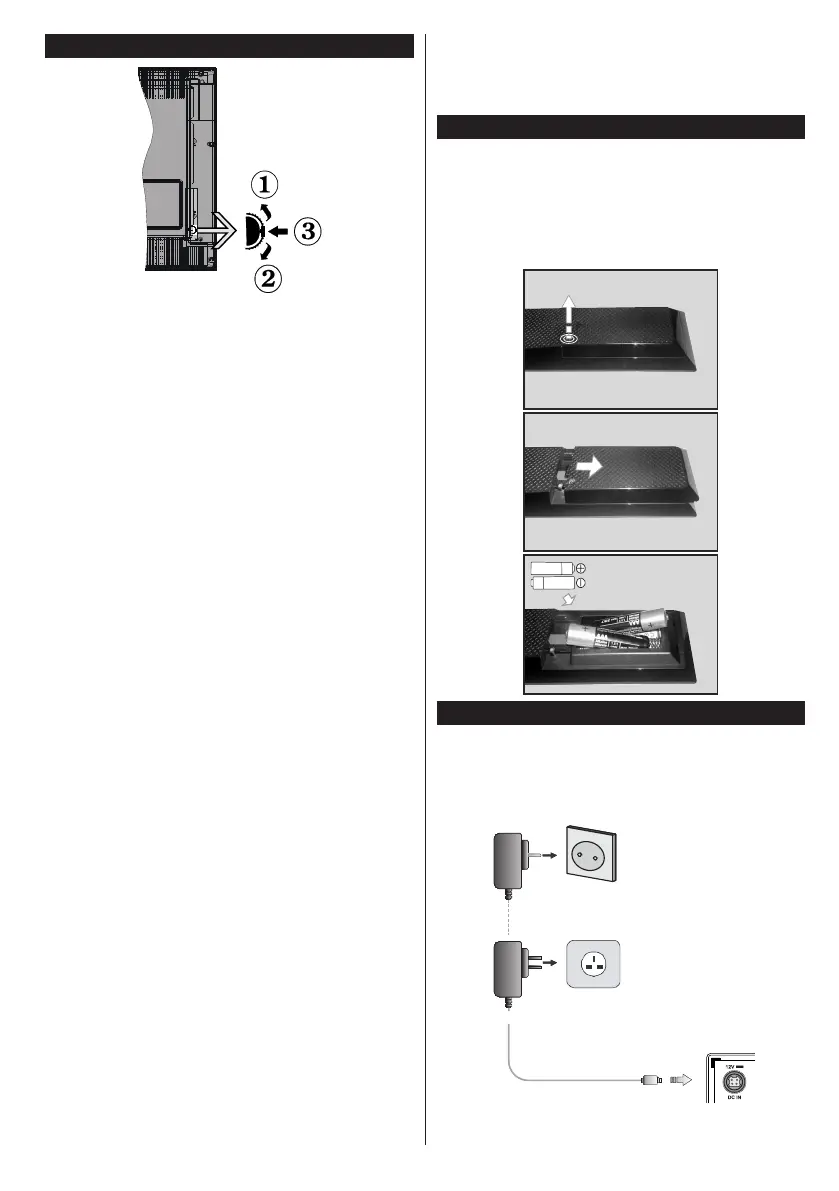
TV Control Switch & Operation
1. Up direction
2. Down direction
3. Volume / Info / Sources List selection and
Standby-On switch
The Control button allows you to control the Volume
/ Programme / Source and Standby-On functions of
the TV.
To change volume: Increase the volume by pushing
the button up. Decrease the volume by pushing the
button down.
To change channel: Press the middle of the button,
the information banner will appear on the screen.
Scroll through the stored channels by pushing the
button up or down.
To change source: Press the middle of the button
twice(for the second time in total), the source list will
appear on the screen. Scroll through the available
sources by pushing the button up or down.
To turn the TV off: Press the middle of the button
down and hold it down for a few seconds, the TV will
turn into standby mode.
Notes:
• If you turn the TV off, this circle starts again
beginning with the volume setting.
• Main menu OSD cannot be displayed via control
button.
Operation with the Remote Control
Press the Menu button on your remote control to
display main menu screen. Use the directional buttons
to select a menu tab and press OK to enter. Use the
directional buttons again to select or set an item. Press
Return/Back or Menu button to quit a menu screen.
Input Selection
Once you have connected external systems to your
TV, you can switch to different input sources. Press the
Source button on your remote control consecutively
to select the different sources.
Changing Channels and Volume
You can change the channel and adjust the volume
by using the Volume +/- and Programme +/- buttons
on the remote.
Inserting the Batteries into the Remote
Remove the screw that secure the battery compartment
cover on the back side of the remote control rst.
Press and slide the cover to open. Insert two AAA
batteries. Make sure the (+) and (-) signs match
(observe correct polarity). Place the cover back on.
Then screw the cover back on again.
Connect Power
IMPORTANT: The TV set is designed to operate on
12 V DC. For this, an adaptor is used which gives
12 V voltage. Connect this adaptor to a system that
supplies 110-240V AC, 50/60Hz.
To POWER INPUT
DC 12 V terminal
AC adaptor










 To Next Page