18
CS
12
3
12
3
S
C
RL
12
3
12
3
L
R
RL
12
3
12
3
L
R
17
8
9
1110
32
54
6
L
R
RL
RL
CS
12
12
3
12
3
center/sub output
surround output
front output
digital inputs
digital inputs
digital
out
remote output
pav pass-through
slavemaster
comm.
rem
on/off
rear
surround
center/sub main
control
120VAC
60Hz
~
12
3
12
3
12
2
1
aux. output
(optional)
21
3
9
1 2 3 4 5
7
8
10
11
6
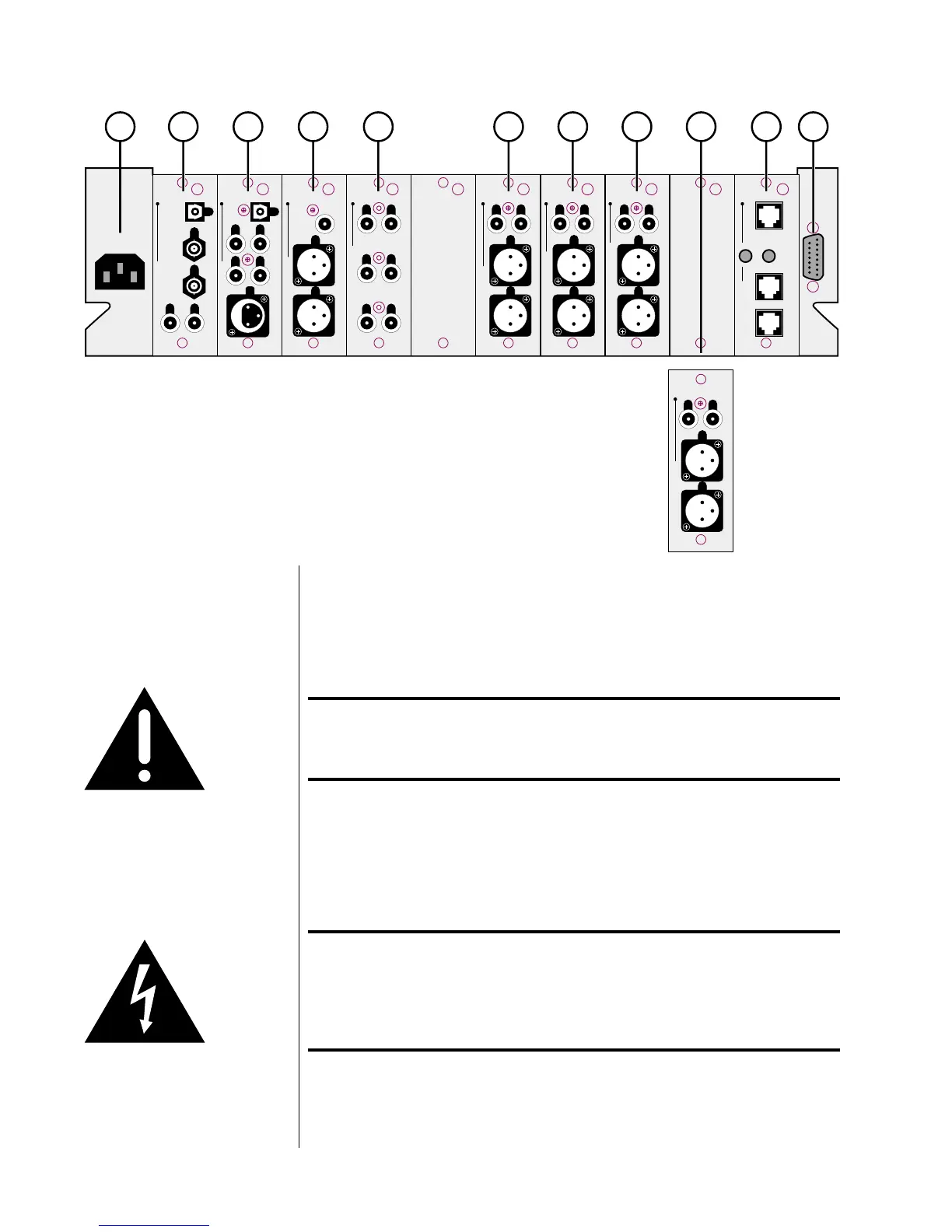
Rear Panel
Caution! Disconnect all associated equipment from the AC mains
BEFORE making any signal connections and applying power
to the Digital Surround Decoder.
1 AC MAINS INPUT
This input accepts AC power from the AC mains (via the supplied AC
cable).
Warning! The Digital Surround Decoder is set internally for 100, 120, 220,
230, or 240VAC mains operation at either 50 or 60Hz. Make
sure that the label on the rear of the unit indicates the correct
AC operating voltage and frequency for your location before
connecting it to AC mains.
Connect the female end of this cable to the Digital Surround Decoder. Con-
nect the male end of this cable to wall outlet.



 To Next Page