www.usaprocom.com
200000-01B20
OPERATION
MANUAL LIGHTING PROCEDURE
(ALL MODELS)
1. Remove lower front panel.
2. Follow steps 1 through 5 under Lighting
Instructions, page 18 or 19.
3. With control knob pressed in, strike match.
Hold match to pilot until pilot lights.
4. Keep control knob pressed in for 30 sec-
onds after lighting pilot. After 30 seconds,
release control knob. Follow step 8 under
Lighting Instructions, page 18 or 19.
5. Replace lower front panel.
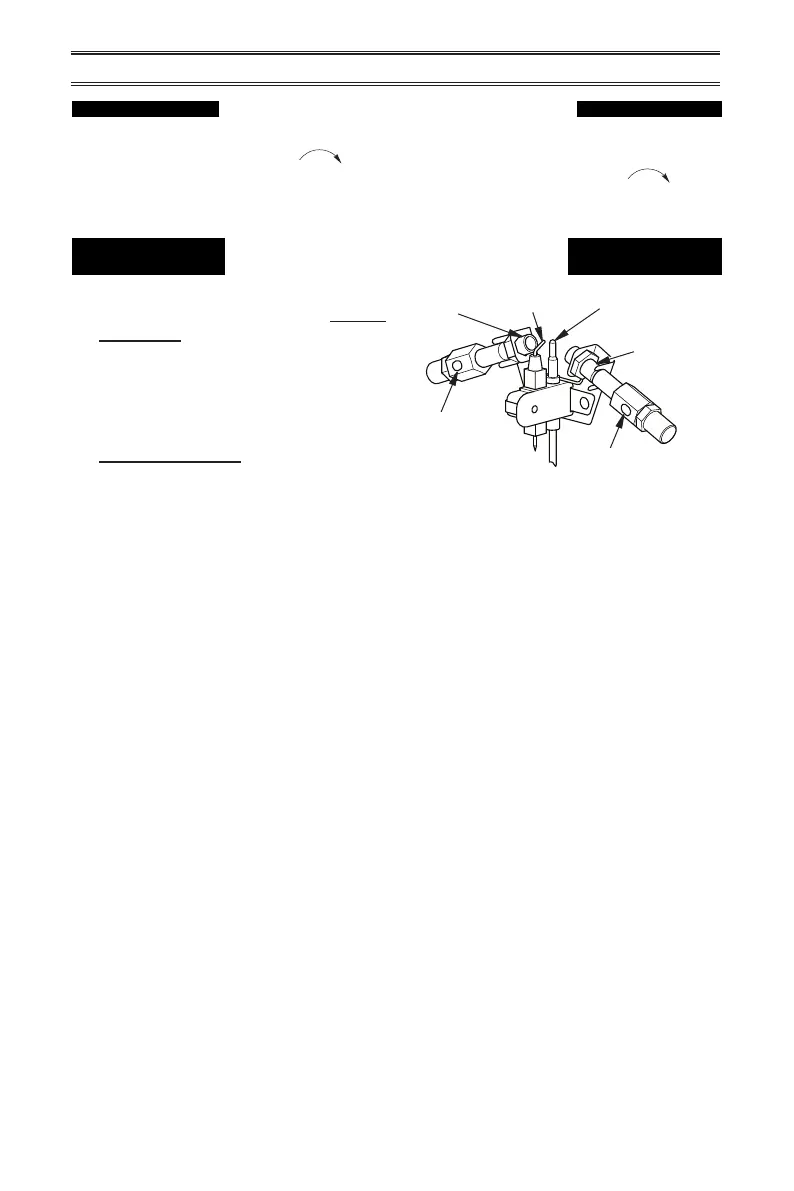
Figure 21 - Pilot Assembly
Pilot Air
Inlet Hole
Natural
Gas
Burner
Propane/LP
Gas Burner
Ignitor
Electrode
Thermocouple
Pilot Air Inlet Hole
TO TURN OFF GAS TO APPLIANCE
Shutting Off Heater
1. Turn control knob clockwise to the
OFF position.
2. Turn off all electric power to the appliance
if service is to be performed.
Shutting off burner only
(pilot stays lit)
Turn control knob clockwise to the
PILOT/IGN position.



 To Next Page