5.4. Configuration
Note:
The MelCOMMS MINI unit must be restarted if any changes are made to the following configuration settings.
The configuration is done using the 12x DIP switches, 4x digital inputs and 4x configurable inputs (which are fixed as
digital inputs).
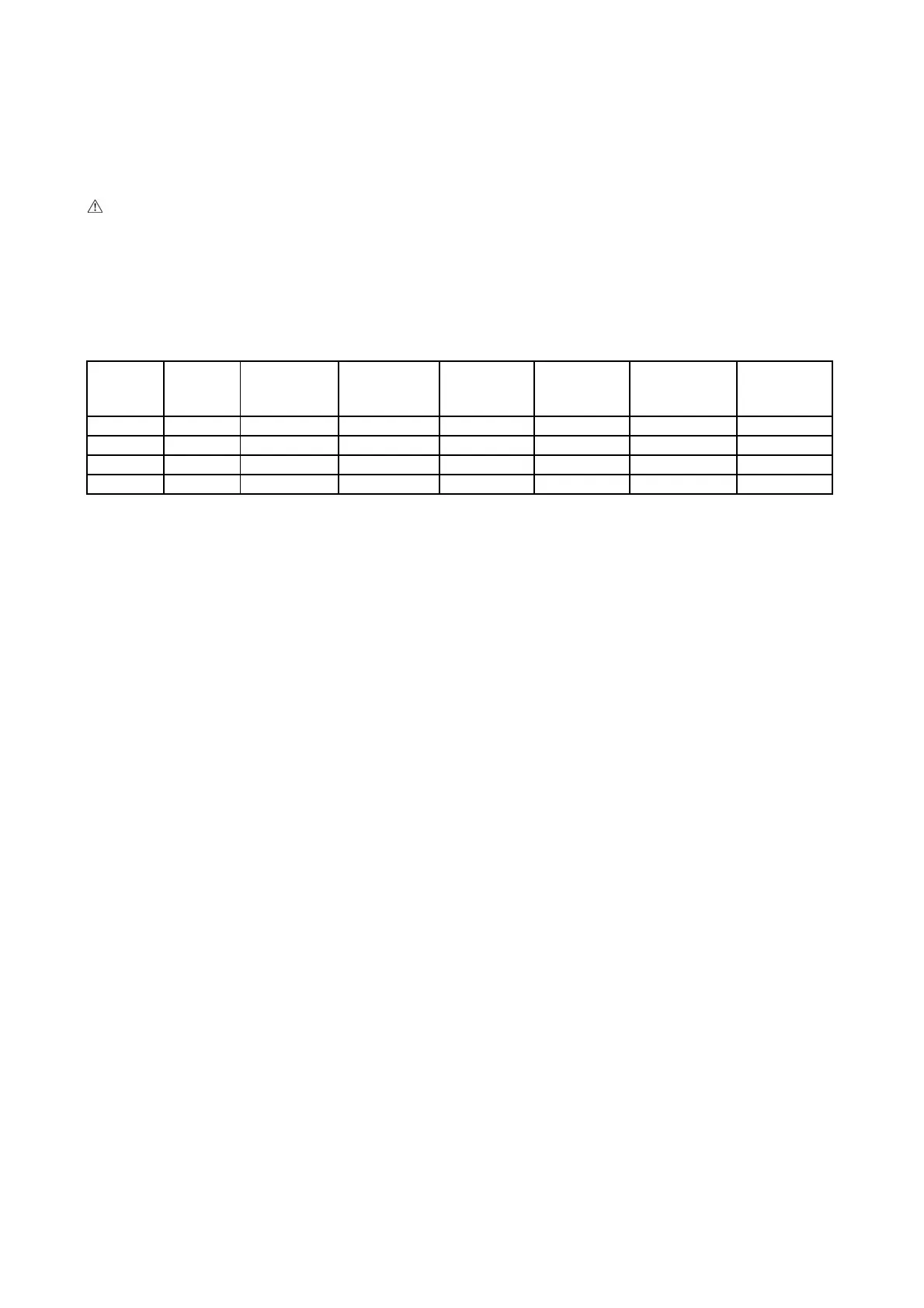
To help installers who are already familiar with the PANEL_RS product the 4x digital inputs on the MelCOMMS MINI
will be used as follows:
Digital
Input 03
Digital
Input 04
Settings
name
Units
connected
Units
running
Days
between
rotation
High
temperature
alarm (ºC)
Setpoint
(ºC) /
Mode
No link No link RS1 2 1 7 26 20 COOL
Link No link RS2 3 2 7 26 20 COOL
No link Link RS3 4 3 7 26 20 COOL
Link Link Custom - - - - -
If links are fitted to both digital input IN03 and IN04 then custom settings will be applied. These custom settings are
determined by the 12x DIP switches and 4x configurable inputs.
The following shows the custom configuration options (Note: Value 0 = DIP switch OFF, Value 1 = DIP switch ON):



 To Next Page