Prodys S.L. Tel: +34 91 6896880 Θ Fax: +34 91 6943777 Θ Email: sales@prodys.net Θ Web: www.prodys.com
Page 24
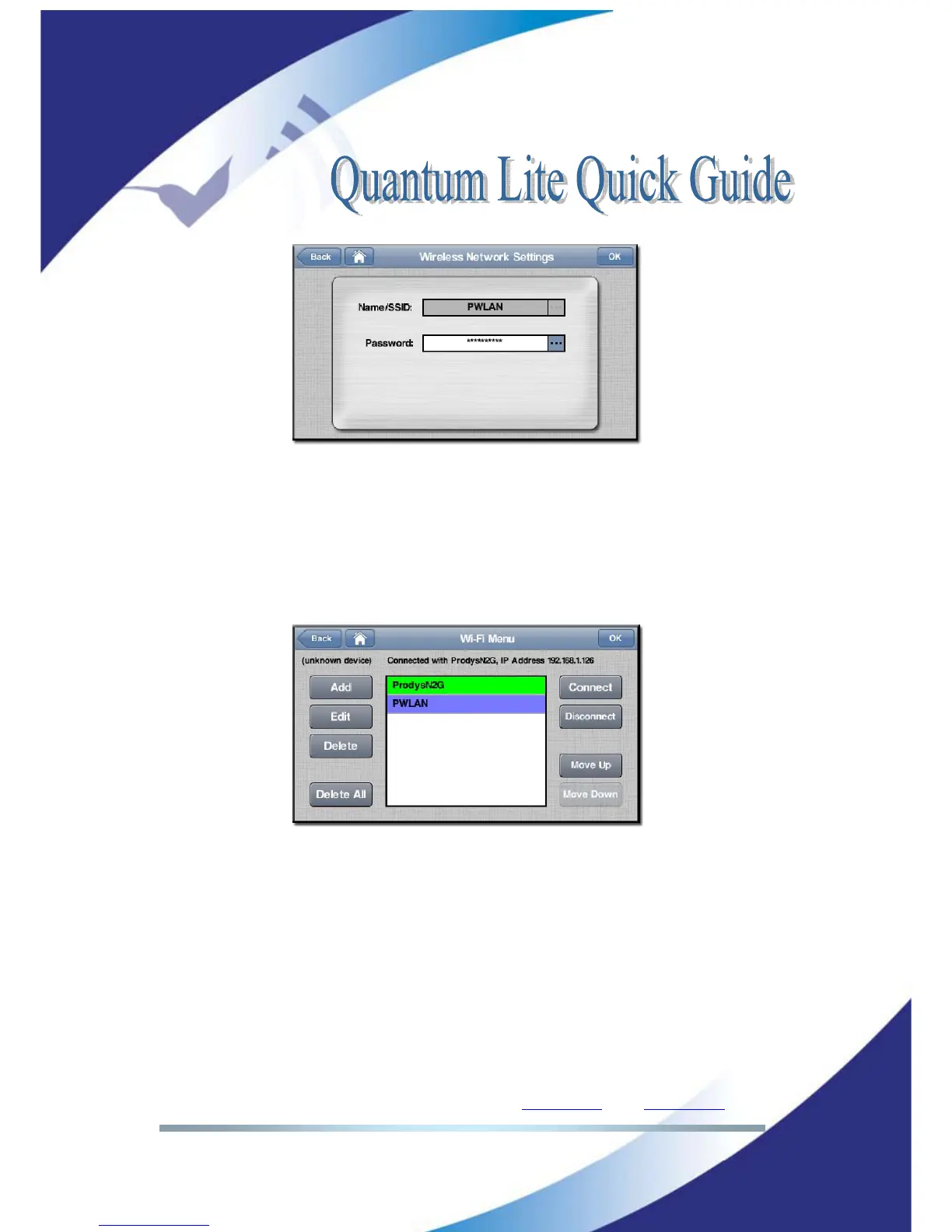
Picture 26: Wi-Fi settings
Once all networks in the list have been configured with their corresponding
security settings, the user has to click on the desired network and press the
Connect button. The current Wi-Fi network in use will be shown on a green
background colour, whilst the currently selected Wi-Fi network will be shown on
a purple background colour.
Picture 27: Wi-Fi main menu
In the picture above, ProdysN2G is the current Wi-Fi network in use, whilst the
PWLAN network is currently selected by the user. By clicking on the Disconnect
button the user can disconnect the unit from the current Wi-Fi network.
To delete a network, just select one network and press the Delete button. The
system will ask for a confirmation.
To end with, it is also possible to define the priority of the Wi-Fi networks. The
unit will try to connect first to the Wi-Fi network at the top of the list. The user



 To Next Page