Prodys S.L. Tel: +34 91 6896880 Fax: +34 91 6943777 Email: sales@prodys.net Web: www.prodys.com
Page 17
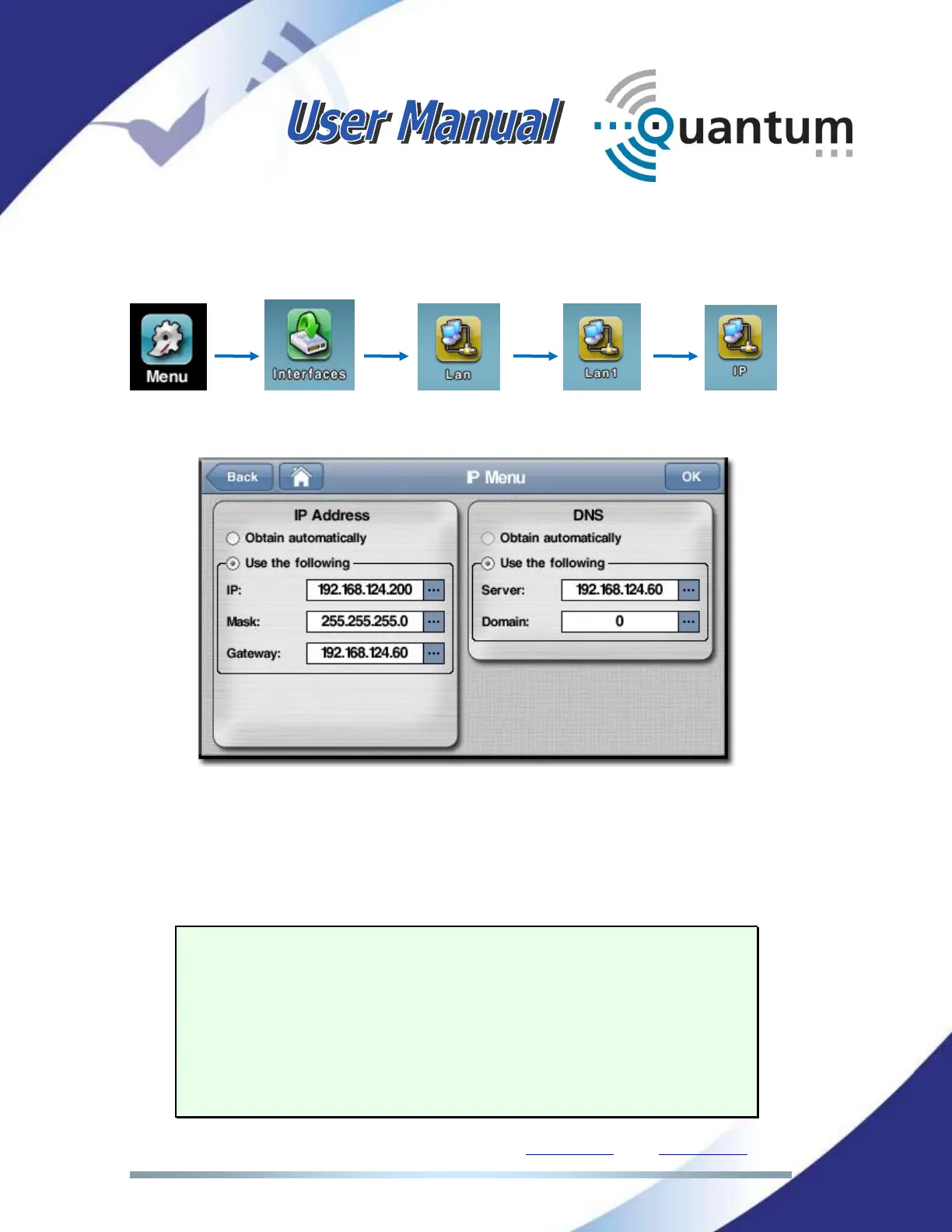
To configure the IP parameters, click on the following icons of the front panel
menu or the web page:
The following configuration window will appear:
There are two different options: Either to get the IP address automatically from a
DHCP server when available, or to set up these IP parameters manually. In the
example above, we are configuring them manually. Optionally, the DNS protocol
can be configured. It allows using domain names instead of IP addresses when
establishing calls.
NOTE: When the unit is configured to get the IP address
automatically from a DHCP server, if no DHCP server is
available in the network, the unit will try for a while to get
it, indicating the message ‘Negotiating DHCP’ on the
Program and TalkBack connection bars on the main menu
page and, after that, the default IP address and netmask
will be assigned automatically: 192.168.100.100 /
255.255.255.0.



 To Next Page