Tri Stem
7
INSTALLATION INSTRUCTIONS
Externally routed headset
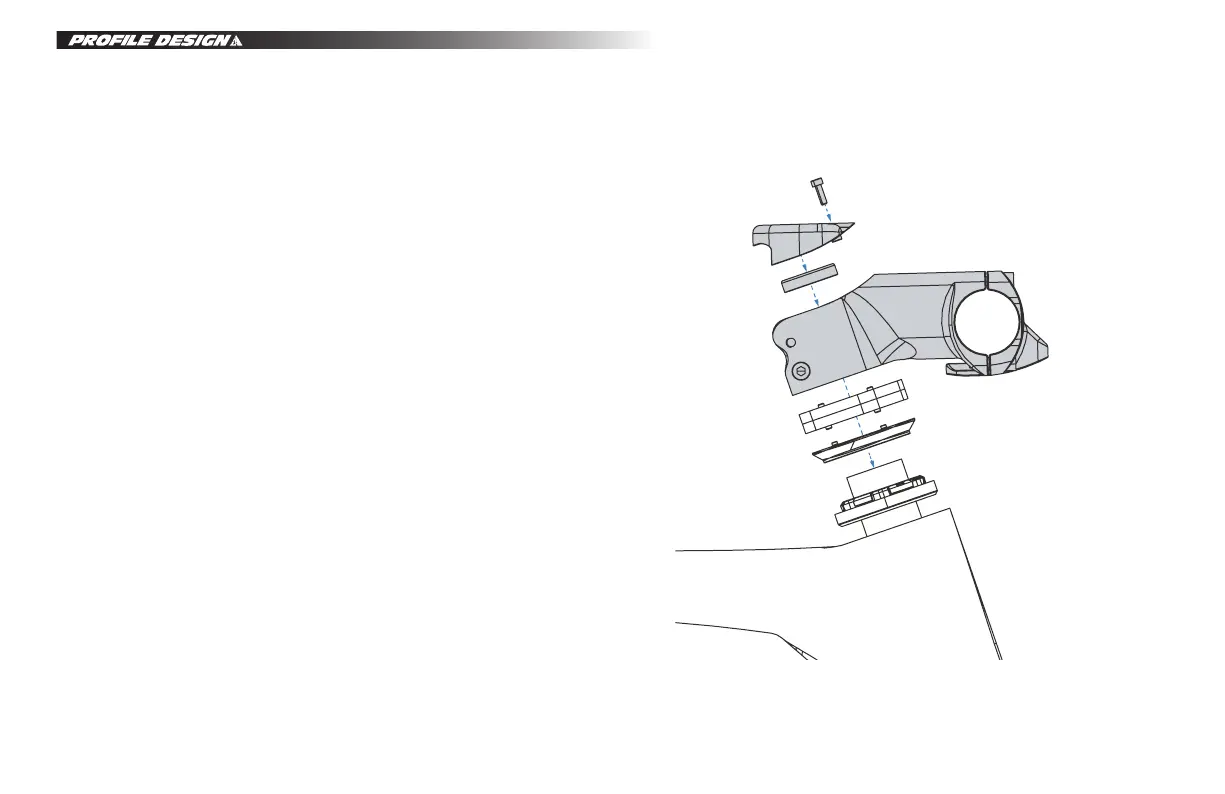
1. Install the stem on the fork steerer.
• Ensure the top of the steerer tube is level with or up to 2mm above the top of the stem clamp.
• Fit the included compression cap.
• Tighten the steerer clamp bolts enough that the stem won’t shift during the assembly process.
Note that this is not the final tightening of these bolts.
2. Apply assembly paste to the bar clamp of the stem.
3. This step depends on the style of basebar you are using.
• If the brake cables exit the basebar outside the stem attach the basebar to the stem and tighten
the faceplate bolts so they are snug.
• If the brake cables exit the basebar inside the stem, first route the cables through the bar, then
route them through the stem before attaching the faceplate and tightening the bolts to be snug.
• The front brake cable can be routed outside the stem or into the stem and out through the hole
in the base of the stem body.
4. If using electronic gears, the only way to route the cables into the stem is through the basebar (only
available on Wing Carbon bars and Aeria Ultimate), do this prior to fitting the basebar to the stem.
5. Complete the rest of the aerobar installation then brake and shifter cable setup according to the
manufacturer instructions.
6. Remove the bike from the workstand for final adjustments.
• Tighten the headset according to the headset manufacturers instructions.
• Tighten the steerer clamp bolts on the stem to a maximum of 5Nm.
• Adjust the angle of the basebar.
• Tighten the faceplate bolts to a maximum of 6Nm.
7. Once headset and cable installation is complete, fit the plastic cover over the steerer and torque
the bolts to a maximum of 2Nm.


 To Next Page