12
HOW TO CONNECT THE TREADMILL TO YOUR
CD PLAYER, VCR, OR COMPUTER
To use iFit.com CDÕs, the treadmill must be con-
nected to your portable CD player, portable stereo,
home stereo, or computer with CD player. See pages
12 and 13 for connecting instructions. To use iFit.com
videocassettes, the treadmill must be connected to
your VCR. See page 14 for connecting instructions. To
use iFit.com programs directly from our internet
site, the treadmill must be connected to your home
computer. See page 13 for connecting instructions.
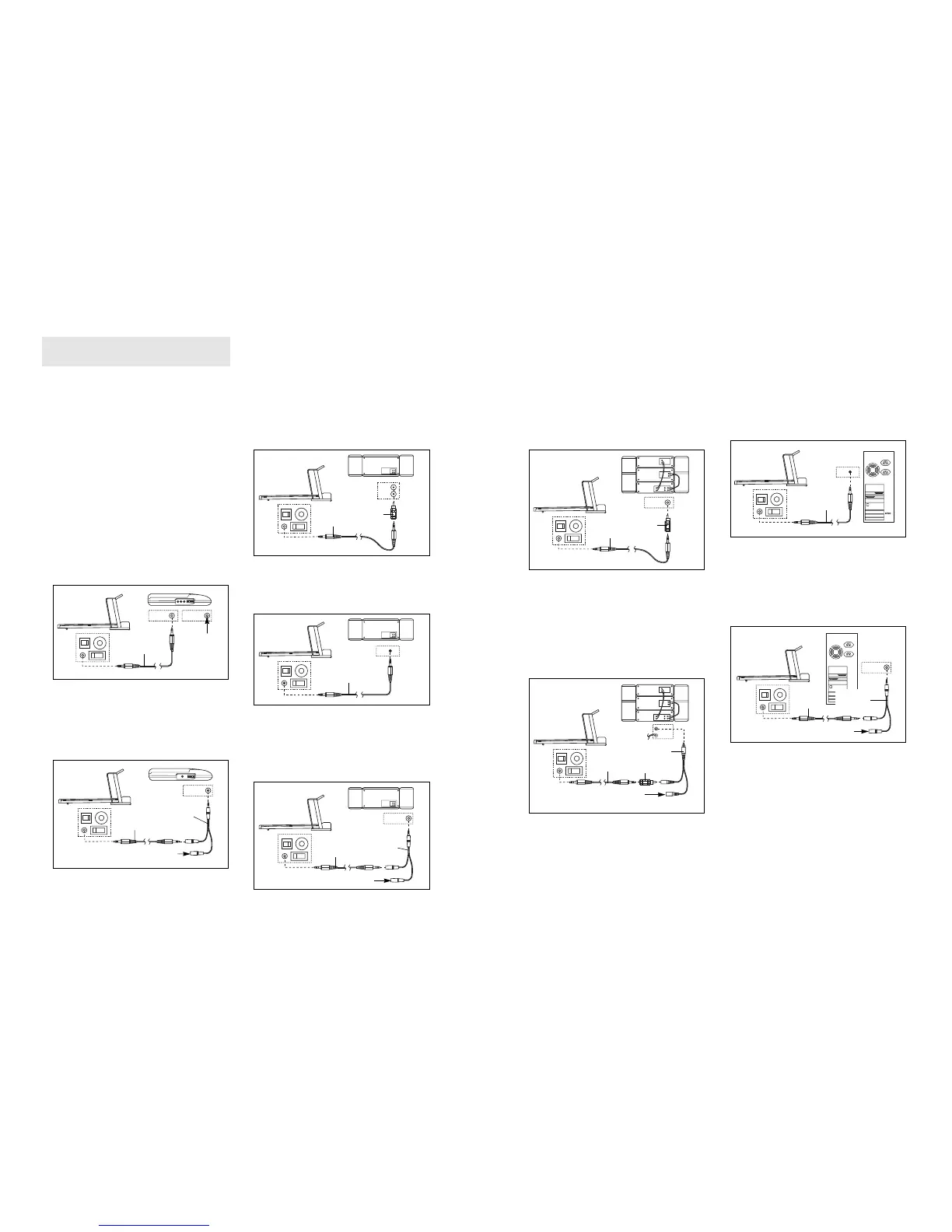
HOW TO CONNECT YOUR PORTABLE CD PLAYER
Note: If your CD player has separate LINE OUT and
PHONES jacks, see instruction A below. If your CD
player has only one jack, see instruction B.
A. Plug one end of the audio cable into the jack on the
front of the treadmill near the power cord. Plug the
other end of the cable into the LINE OUT jack on
your CD player. Plug your headphones into the
PHONES jack.
B. Plug one end of the audio cable into the jack on the
front of the treadmill near the power cord. Plug the
other end of the cable into a 3.5mm Y-Adaptor
(available at electronics stores). Plug the Y-Adaptor
into the PHONES jack on your CD player. Plug your
headphones into the other side of the Y-Adaptor.
HOW TO CONNECT YOUR PORTABLE STEREO
Note: If your stereo has an RCA-type AUDIO OUT
jack, see instruction A below. If your stereo has a
3.5mm LINE OUT jack, see instruction B. If your
stereo has only a PHONES jack, see instruction C.
A. Plug one end of the audio cable into the jack on the
front of the treadmill near the power cord. Plug the
other end of the cable into the included Adaptor. Plug
the Adaptor into an AUDIO OUT jack on your stereo.
B. Plug one end of the audio cable into the jack on the
front of the treadmill near the power cord. Plug the
other end of the cable into the LINE OUT jack on
your stereo.
C. Plug one end of the audio cable into the jack on the
front of the treadmill near the power cord. Plug the
other end of the cable into a 3.5mm Y-Adaptor
(available at electronics stores). Plug the Y-Adaptor
into the PHONES jack on your stereo. Plug your
headphones into the other side of the Y-Adaptor.
Audio
Cable
3.5mm
Y-Adaptor
Headphones
B
3.5mm
Y-Adaptor
Headphones
13
HOW TO CONNECT YOUR HOME STEREO
Note: If your stereo has an unused LINE OUT jack,
see instruction A below. If the LINE OUT jack is
being used, see instruction B.
A. Plug one end of the audio cable into the jack on the
front of the treadmill near the power cord. Plug the
other end of the cable into the included Adaptor.
Plug the Adaptor into the LINE OUT jack on your
stereo.
B. Plug one end of the audio cable into the jack on the
front of the treadmill near the power cord. Plug the
other end of the cable into the included Adaptor.
Plug the Adaptor into an RCA Adaptor (available at
electronics stores). Next, remove the wire that is
currently plugged into the LINE OUT jack on your
stereo and plug the wire into the unused side of the
RCA Adaptor. Plug the RCA Adaptor into the LINE
OUT jack on your stereo.
HOW TO CONNECT YOUR COMPUTER
Note: If your computer has a 3.5mm LINE OUT jack,
see instruction A. If your computer has only a
PHONES jack, see instruction B.
A. Plug one end of the audio cable into the jack on the
front of the treadmill near the power cord. Plug the
other end of the cable into the LINE OUT jack on
your computer.
B. Plug one end of the audio cable into the jack on the
front of the treadmill near the power cord. Plug the
other end of the cable into a 3.5mm Y-Adaptor
(available at electronics stores). Plug the Y-Adaptor
into the PHONES jack on your computer. Plug your
headphones or speakers into the other side of the
Y-Adaptor.






 To Next Page