EasyManua.ls Logo

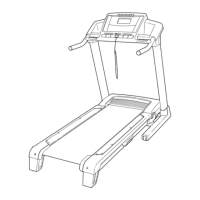
ProForm 680 LT - User Manual

ProForm 680 LT
32 pages
Print Icon
To Next Page IconTo Next Page
Loading...
Serial Number
Decal
M
odel No. PFTL96008.0
Serial No.
CAUTION
Read all precautions and instruc-
tions in this manual before using
this equipment. Save this manual
for future reference.
QUESTIONS?
If you have questions, or if parts
are missing, DO NOT CONTACT
THE STORE; please contact
Customer Care.
IMPORTANT: You must note the
product model number and
serial number (see the drawing
above) before contacting us:
CALL TOLL-FREE:
1-888-533-1333
Mon.–Fri. 6 a.m.–6 p.m. MT
Sat. 8 a.m.–4 p.m. MT
ON THE WEB:
www.proformservice.com
Write the serial number in the
space above for reference.
USER'S MANUAL
w
ww.proform.com

Questions and Answers

  • B
    Brianna ScottJul 30, 2025
    How to recalibrate incline on ProForm 680 LT?
    • G
      gcollinsJul 30, 2025
      To recalibrate the incline system on your ProForm Treadmill, insert the key into the console and press one of the incline buttons. While the incline is changing, remove the key. After a few seconds, re-insert the key. The treadmill will automatically rise to the maximum incline level and then return to the minimum level.
  • J
    jessicaandrewsAug 3, 2025
    What to do if my ProForm 680 LT Treadmill power turns off during use?
    • B
      bcunninghamAug 3, 2025
      If your ProForm Treadmill's power turns off during use, try the following: 1. Check the reset/off circuit breaker. If tripped, wait five minutes, then press the switch back in. 2. Ensure the power cord is securely plugged in. If it is, unplug it, wait five minutes, and plug it back in. 3. Remove and reinsert the key from the console. If the treadmill still won't run, further assistance information can be found on the front cover of the manual.
  • M
    Mark RasmussenAug 7, 2025
    How to fix ProForm Treadmill that does not turn on?
    • T
      Tara OlsonAug 7, 2025
      To troubleshoot why your ProForm Treadmill won't turn on: 1. Ensure the power cord is plugged into a surge suppressor and the surge suppressor is plugged into a properly grounded outlet. Use only a single-outlet surge suppressor that meets the specifications described on page 13. Note that the treadmill is not compatible with GFCI-equipped outlets. 2. After plugging in the power cord, make sure the key is inserted into the console. 3. Check the reset/off circuit breaker located on the treadmill frame near the power cord. If the switch protrudes, the circuit breaker has tripped. To reset it, wait five minutes and then press the switch back in.
  • A
    Ashley MooreAug 12, 2025
    What to do if the displays of the ProForm Treadmill console do not function properly?
    • J
      John ReyesAug 12, 2025
      To resolve console display issues on your ProForm Treadmill, remove the key and unplug the power cord. Carefully tip the uprights down. Check for three #8 x 2" screws in the bottom of the belly pan; if present, remove them. Locate the reed switch and the magnet on the left side of the pulley. Turn the pulley until the magnet aligns with the reed switch, ensuring a gap of about 1/8 inch (3 mm). If needed, loosen the 3/4" screw and adjust the reed's position. Reattach the hood with the #8 x 3/4" screws if necessary. Run the treadmill for a few minutes to check for a correct speed reading.
  • S
    sydneyjohnsonAug 20, 2025
    Why does the walking belt on my ProForm 680 LT Treadmill slow down when I walk on it?
    • E
      estokesAug 20, 2025
      If the walking belt slows down when you walk on your ProForm Treadmill: * Ensure you are using a single-outlet surge suppressor that meets the specifications described on page 13 of the manual. * If the walking belt is overtightened, it can decrease performance and damage the belt. To correct this, remove the key and unplug the power cord. Use the hex key to turn both idler roller bolts counterclockwise, 1/4 of a turn. When properly tightened, you should be able to lift each edge of the belt 2 to 3 inches off the platform. Keep the belt centered. Plug the power cord back in, insert the key, and run the treadmill for a few minutes. Repeat until the belt is properly tightened. If the belt continues to slow down, refer to the front cover of this manual.
  • E
    Eric MillerAug 25, 2025
    Why do the console displays remain lit on my ProForm Treadmill when I remove the key?
    • B
      beardalexandraAug 26, 2025
      The console on your ProForm Treadmill might be in display demo mode, which is designed for store displays. To turn off the demo mode, hold down the Stop button for a few seconds. If the displays are still lit, refer to THE INFORMATION MODE on page 19 to turn off the demo mode.
  • M
    Mark WilliamsNov 15, 2025
    Why is the walking belt on my ProForm Treadmill off-center or slipping?
    • K
      Kathleen TerrellNov 15, 2025
      If your ProForm Treadmill's walking belt is off-center, first remove the key and unplug the power cord. If the belt has shifted to the left, use the hex key to turn the left idler roller bolt clockwise 1/2 of a turn. If it has shifted to the right, turn the bolt counterclockwise 1/2 of a turn. Avoid overtightening the belt. Then, plug the power cord back in, insert the key, and run the treadmill for a few minutes. Repeat this process until the walking belt is centered. If the walking belt slips when walked on, first remove the key and unplug the power cord. Using the hex key, turn both idler roller bolts clockwise, 1/4 of a turn. When the walking belt is correctly tightened, you should be able to lift each edge of the walking belt 2 to 3 inches off the walking platform. Keep the walking be...

Summary

WARNING DECAL PLACEMENT

IMPORTANT PRECAUTIONS

BEFORE YOU BEGIN

ASSEMBLY

OPERATION AND ADJUSTMENT

THE PRE-LUBRICATED WALKING BELT

Information about the treadmill's pre-lubricated walking belt and maintenance.

HOW TO PLUG IN THE POWER CORD

Instructions on properly connecting the power cord, including safety precautions.

CONSOLE DIAGRAM

FEATURES OF THE CONSOLE

Overview of console features like manual mode, preset workouts, and iFit system.

HOW TO TURN ON THE POWER

HOW TO USE THE MANUAL MODE

HOW TO USE A PRESET WORKOUT

HOW TO USE AN IFIT WORKOUT

THE INFORMATION MODE

HOW TO USE THE STEREO SOUND SYSTEM

HOW TO FOLD AND MOVE THE TREADMILL

HOW TO FOLD THE TREADMILL FOR STORAGE

Instructions on how to properly fold the treadmill for storage.

HOW TO MOVE THE TREADMILL

Steps for safely moving the folded treadmill.

HOW TO LOWER THE TREADMILL FOR USE

TROUBLESHOOTING

POWER AND CONSOLE ISSUES

Resolving problems with power not turning on, shutting off, or console display malfunctions.

TREADMILL ADJUSTMENT PROBLEMS

INCORRECT INCLINE ADJUSTMENT

Procedure to recalibrate the incline system for correct changes.

WALKING BELT SLOWS DOWN

Steps to address the walking belt slowing down during use, possibly due to overtightening.

WALKING BELT ALIGNMENT

BELT OFF-CENTER OR SLIPPING

Instructions for centering and tightening the walking belt to prevent slipping.

EXERCISE GUIDELINES

EXERCISE INTENSITY AND ZONES

Guidance on finding proper exercise intensity using heart rate zones for fat burning and aerobic fitness.

WORKOUT STRUCTURE

Recommendations for warming up, training duration, and cooling down during workouts.

EXERCISE FREQUENCY

Advice on how often to exercise for maintaining or improving fitness.

PART LIST

EXPLODED DRAWING A

EXPLODED DRAWING B

EXPLODED DRAWING C

EXPLODED DRAWING D

ORDERING REPLACEMENT PARTS

LIMITED WARRANTY

ProForm 680 LT Specifications

General IconGeneral
Speed Range0-10 MPH
Incline Range0-10%
FoldableYes
Weight Capacity300 lbs
DisplayLCD
Heart Rate MonitoringEKG Grip Pulse
Motor2.5 CHP Mach Z™ Motor

Related product manuals