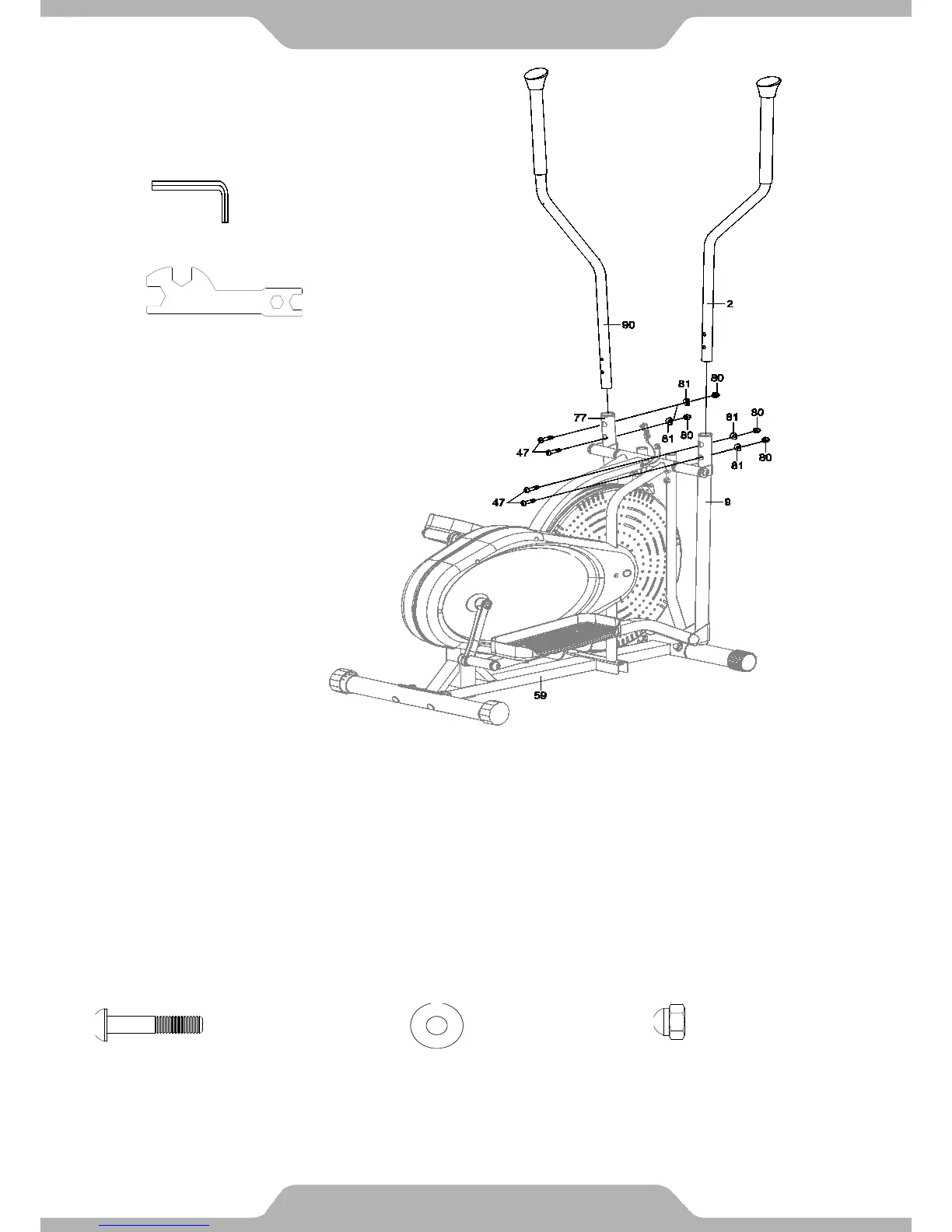
6. Right and Left Handrail Arms Installation:
Insert the Right Handrail Arm (2) with the handlebar grip bent outwards into the Right Lower
Handrail (9) and align the holes. Secure the Right Handrail Arm (2) using two Big Curve
Washers (81), two Bolts (47), and two Cap Nuts (80). Tighten the nuts and bolts using the 6mm
Allen Wrench and Open-Ended Flat Wrench simultaneously.
Insert the Left Handrail Arm (90) with the handlebar grip facing outwards into the Left Lower
Handrail (77) and align the holes. Secure the Left Handrail Arm (90) using two Big Curve
Washers (81), two Bolts (47), and two Cap Nuts (80). Tighten the nuts and bolts using the 6mm
Allen Wrench and Open-Ended Flat Wrench simultaneously.


 To Next Page