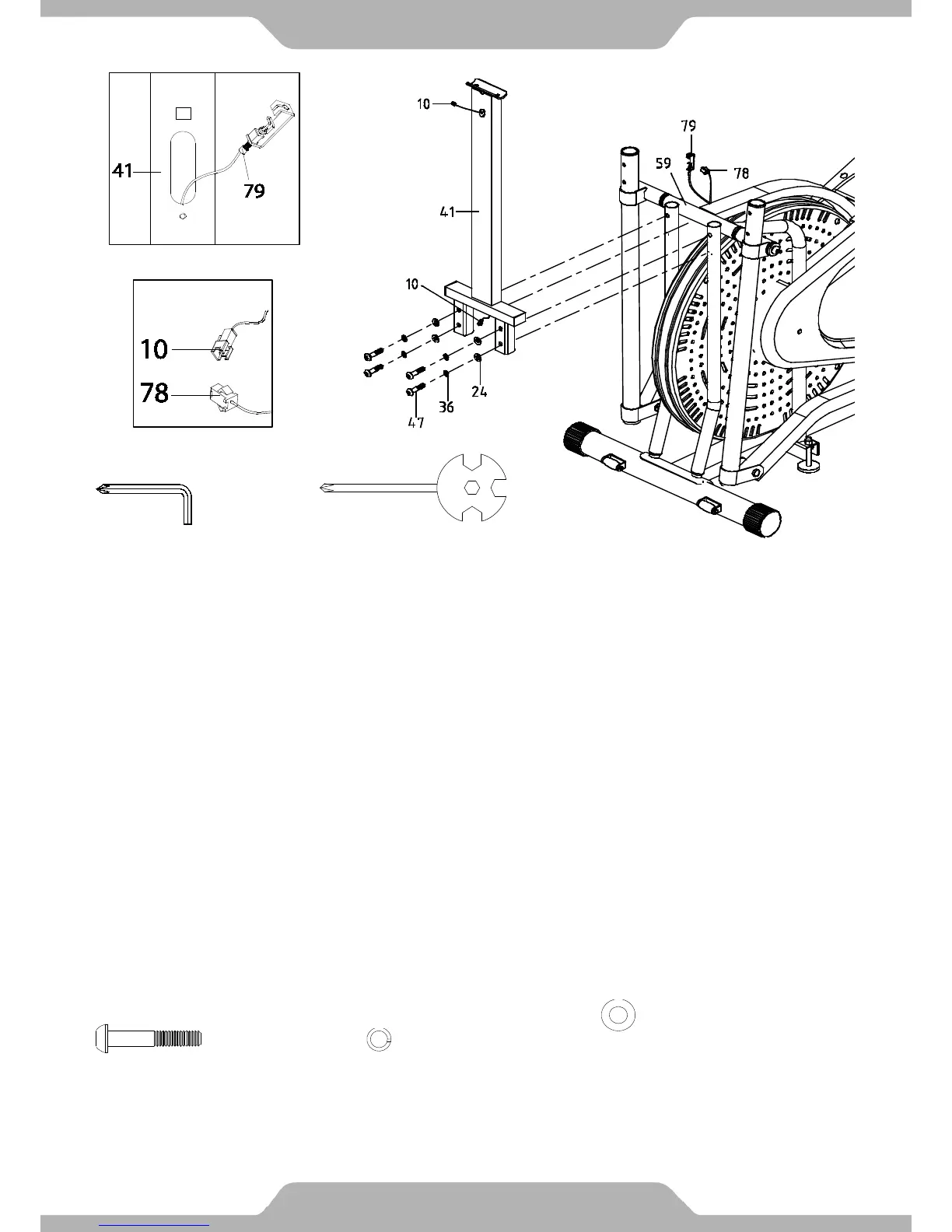
7. Support Frame Handlebar Installation:
As you begin to mount the Hand Pulse Handlebar Support Frame (41) to the Mainframe (59),
insert the Tension Cable (79) through the bottom opening in the shaft of the Hand Pulse
Handlebar Support Frame (41) and pull it out through the shaft opening located midway up the
support frame. See Figure G.
Fully mount the Hand Pulse Handlebar Support Frame (41) to the Mainframe (59). After being
mounted, secure the Hand Pulse Handlebar Support Frame (41) onto the Mainframe (59) with
four Bolts (47), four Spring Washers (36), and four Washers (24). Use the 6mm Allen Wrench
with Phillips Screwdriver to tighten the bolts until they are firm and secure.
Connect the Sensor Wire (78) attached to the Mainframe (59) to the Extension Sensor Wire (10)
coming from the bottom end of the Hand Pulse Handlebar Support Frame (41). Make sure the
connectors “click” when connected. See Figure A.
Multi Hex Tool with Phillips
Screwdriver
Tools:
6mm Allen Wrench with
Phillips Screwdriver


 To Next Page