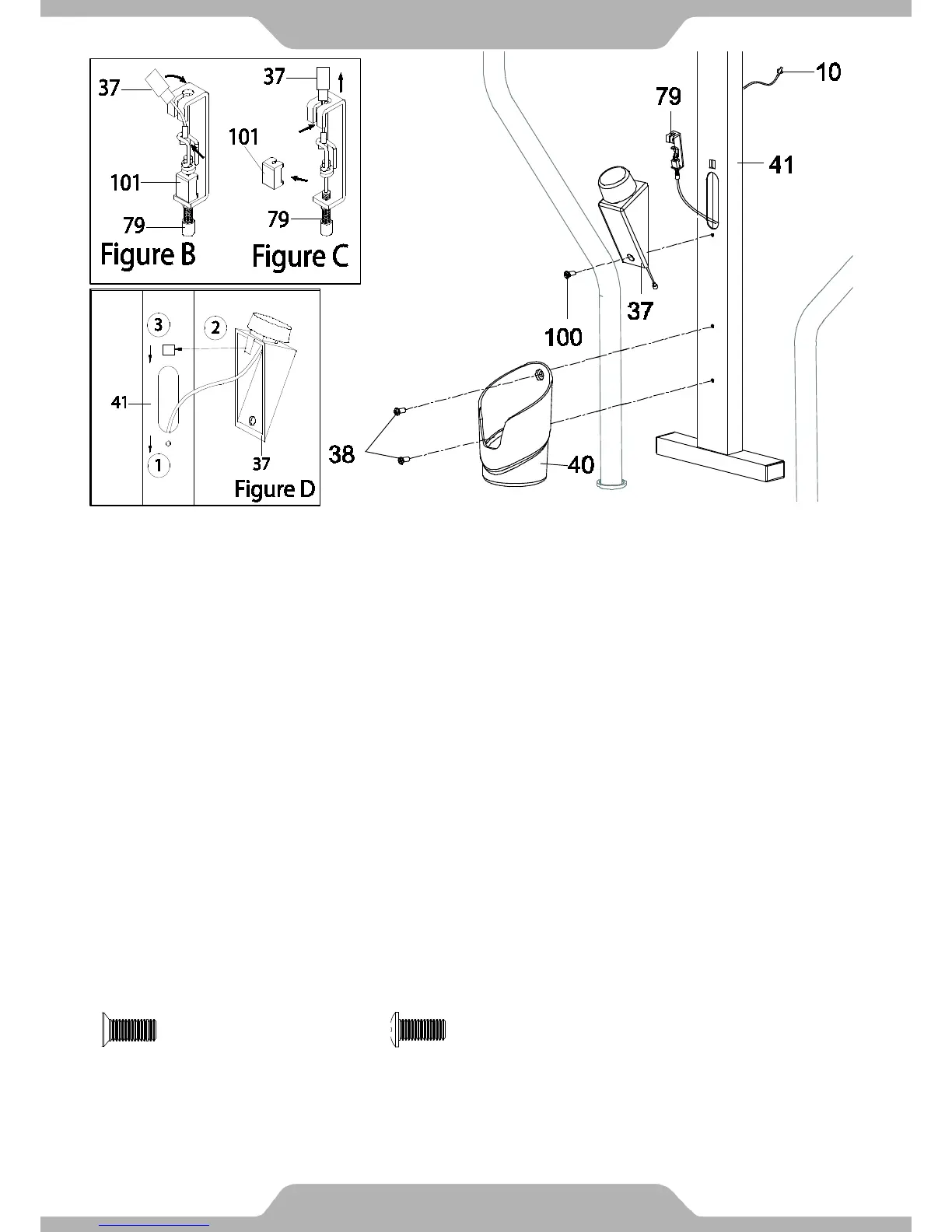
8. Bottle holder and Tension Control Knob Installation:
First turn the Tension Control Knob (37) to the lowest setting (counterclockwise). Hook the end of
the resistance cable connected to the Tension Control Knob (37) to the Tension Cable (79), See
Figure B. Insert the remaining cable at the end of the Tension Control Knob (37) in to the slot on
top of the Tension Cable (79), See Figure C. Turn the Tension Control Knob (37) to the highest
setting (clockwise), then remove the Clip (101) from the Tension Cable (79). Safely dispose of the
Clip (101).
Mount the Tension Control Knob (37) to the Hand Pulse Support Frame (41) as shown in Figure
D. Secure the Tension Control Knob (37) to the Hand Pulse Support Frame (41) with the Cross
Recessed Pan Head Screw (100). Tighten the screw with the Multi-Hex Tool with Phillips
Screwdriver until it is firm and secure.
Attach the Bottle Holder (40) onto the Hand Pulse Handlebar Support Frame (41) with two
Bolts (38). Tighten both Bolts (38) using the Multi Hex Tool with Phillips Screwdriver.
Caution: Do not force the Tension Control Knob (37) beyond its lowest or highest settings. Refer
to our Tension Adjustment page 26.
ASSEMBLY


 To Next Page