15
STEP 5 – SET CHARGE RATE
Thechargerateshouldbesetaccordingtothesizeofthebattery.Seetherecommended
chargeratesforvariousbatterysizesinthetablebelow.
(Notallouputsareavailableonallmodels)
a.PresstheCHARGERATEbutton.TheLCDscreenwillflashthepresentsetting.
b.PresstheCHARGERATEbuttonrepeatedlyuntildesiredsettingisdisplayed.
c.WaitfortheLCDscreentostopflashing.
Note: Failuretowaitforthescreentostopflashingwillcausethechargeratetodefault
toprevioussetting.
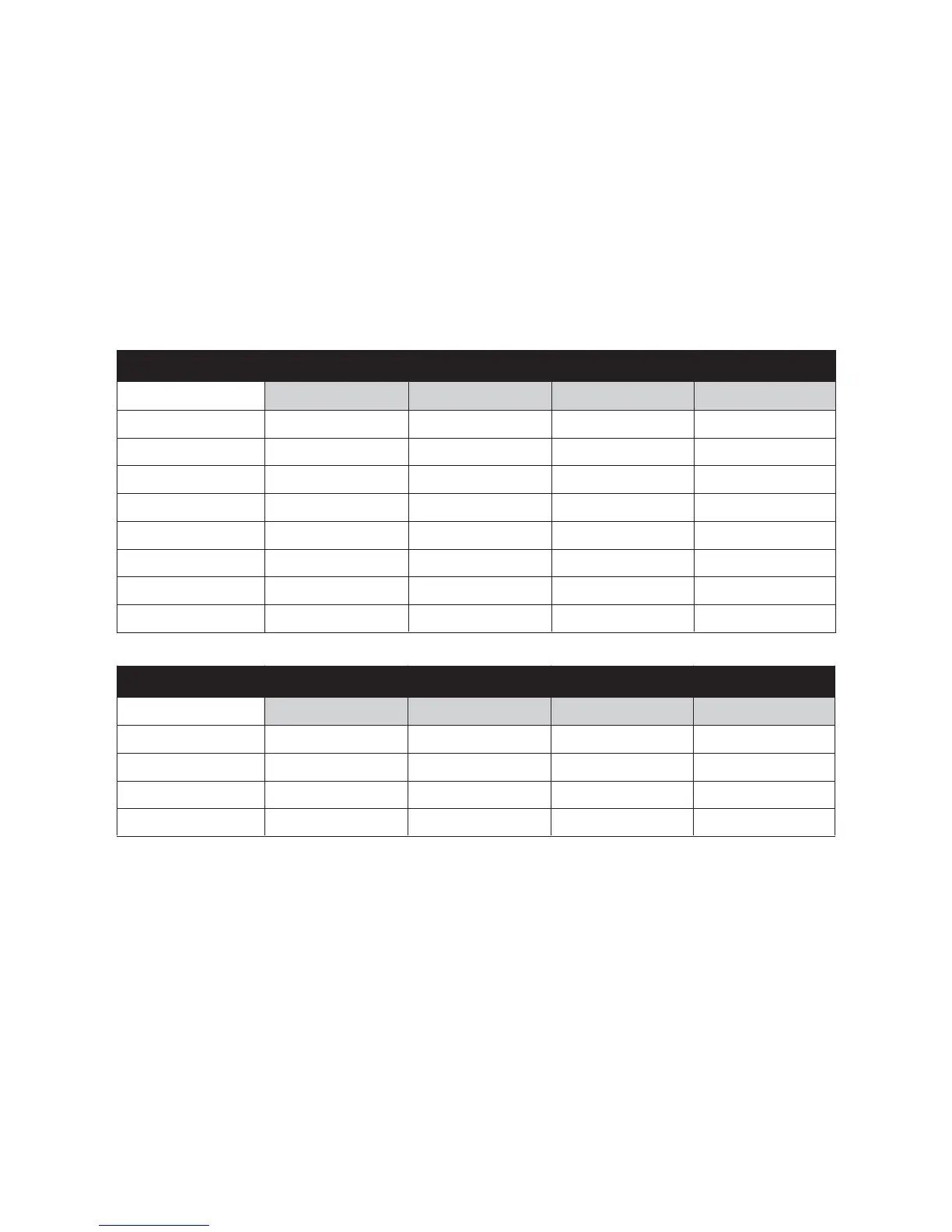
ADJUSTABLE CHARGE RATES: 12 VOLT BATTERIES
CHARGE RATE BATTERY SIZE (12V)
DeepCycle(AH) Automotive(CCA) Marine(MCA) Time(Hours)
2Amp 14–40 80–240 110–330 7–24
6Amp 40–120 240–720 330–1000 7–24
8Amp 60–160 360–1000 500–1300 7–24
12Amp 80–240 480–1440 660–2000 7–24
16Amp 110–320 660–1900 930–2700 7–24
25Amp 170–500 1000–3000 1400–4200 7–24
35Amp 240–700 1440–4200 2000–5800 7–24
50Amp 350–1000 2100–6000 2900–8300 7–24
ADJUSTABLE CHARGE RATES: 24 VOLT BATTERIES
CHARGE RATE BATTERY SIZE (24V)
DeepCycle(AH) Automotive(CCA) Marine(MCA) Time(Hours)
2Amp 14–40 80–240 110–330 7–24
4Amp 30–80 180–480 250–650 7–24
6Amp 40–120 240–720 330–1000 7–24
8Amp 60–160 360–1000 500–1300 7–24
STEP 6 – SET BATTERY CHEMISTRY TYPE
BatteryChemistryshouldbeselectedbythetypeofbatterybeingcharged(refertothe
batterymanufacturer’sspecificationsforbatterytype).Refertopages4and5fora
detailedexplanation.
Forexample,ifyouarecharginganAGMbattery,thenAGMmodewillneedtobe
selected.Thiscanbedonebythefollowingprocedure:
a.PresstheBATTERYTYPEbutton.TheLCDscreenwillflashthepresentsetting.
b.PresstheBATTERYTYPEbuttonrepeatedlyuntildesiredsettingisdisplayed.
c.WaitfortheLCDscreentostopflashing.
Note:Failuretowaitforthescreentostopflashingwillcausethechargeratetodefault
toprevioussetting.



 To Next Page