INSTRUCTION DISPLAY
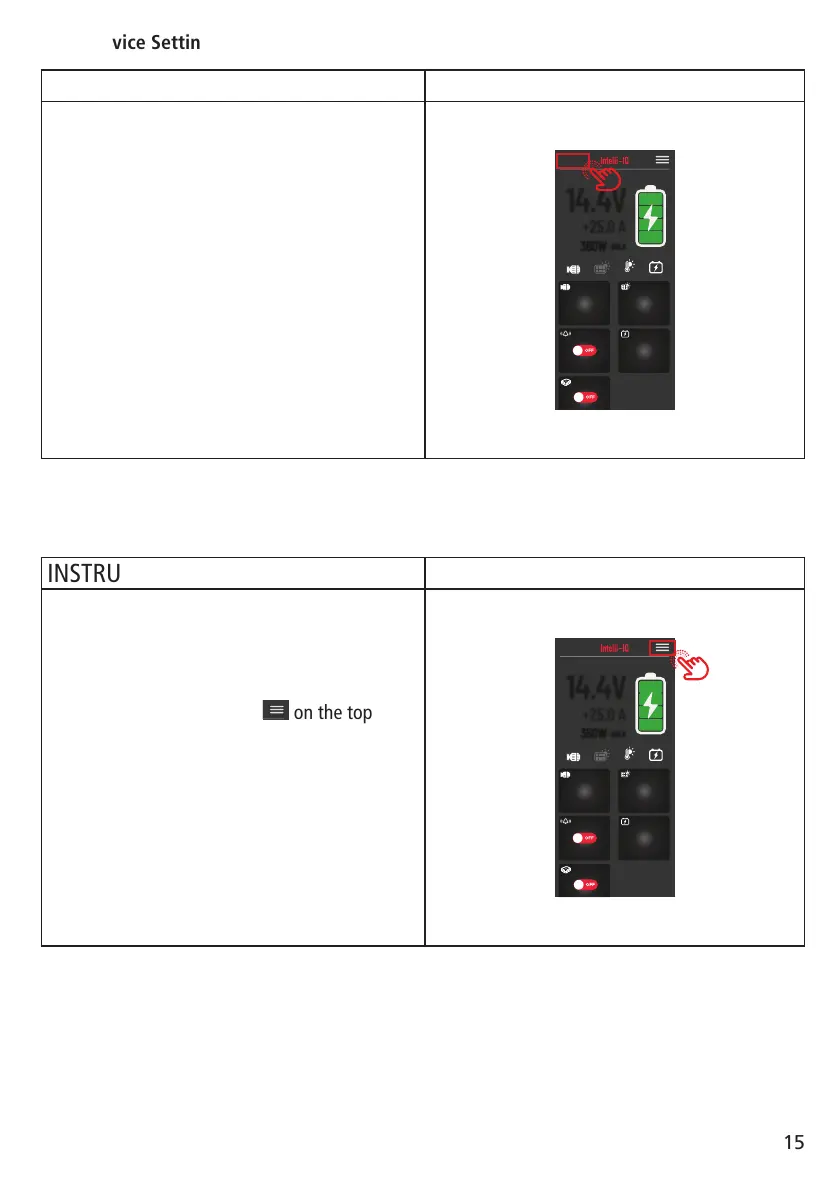
When a device is selected. The name of the
device will be shown on the top left, and a
dashboard will be presented to you.
To enter the general screen settings screen, tap
the top left “DEVICE NAME”.
19.1V
WET
SOLAR
12.5V
STARTER BATTERY
DEFAULT
MY 4X4
14.4V
+25.0 A
360W
- BULK
WAKE UP
OFF
OFF
INSTRUCTION DISPLAY
At any point after you have signed up, or logged
in, you can enter and explore the App Settings.
In the dashboard screen, even if you have not
connected to a device.
To explore App Settings, tap
19.1V
WET
SOLAR
12.5V
STARTER BATTERY
DEFAULT
MY 4X4
14.4V
+25.0 A
360W
- BULK
WAKE UP
OFF
OFF
POWER
on the top right
of the dashboard.
19.1V
WET
SOLAR
12.5V
STARTER BATTERY
DEFAULT
MY 4X4
14.4V
+25.0 A
360W
- BULK
WAKE UP
OFF
OFF
Open Device Settings:
Open App Settings:
15


 To Next Page