INSTRUCTION DISPLAY
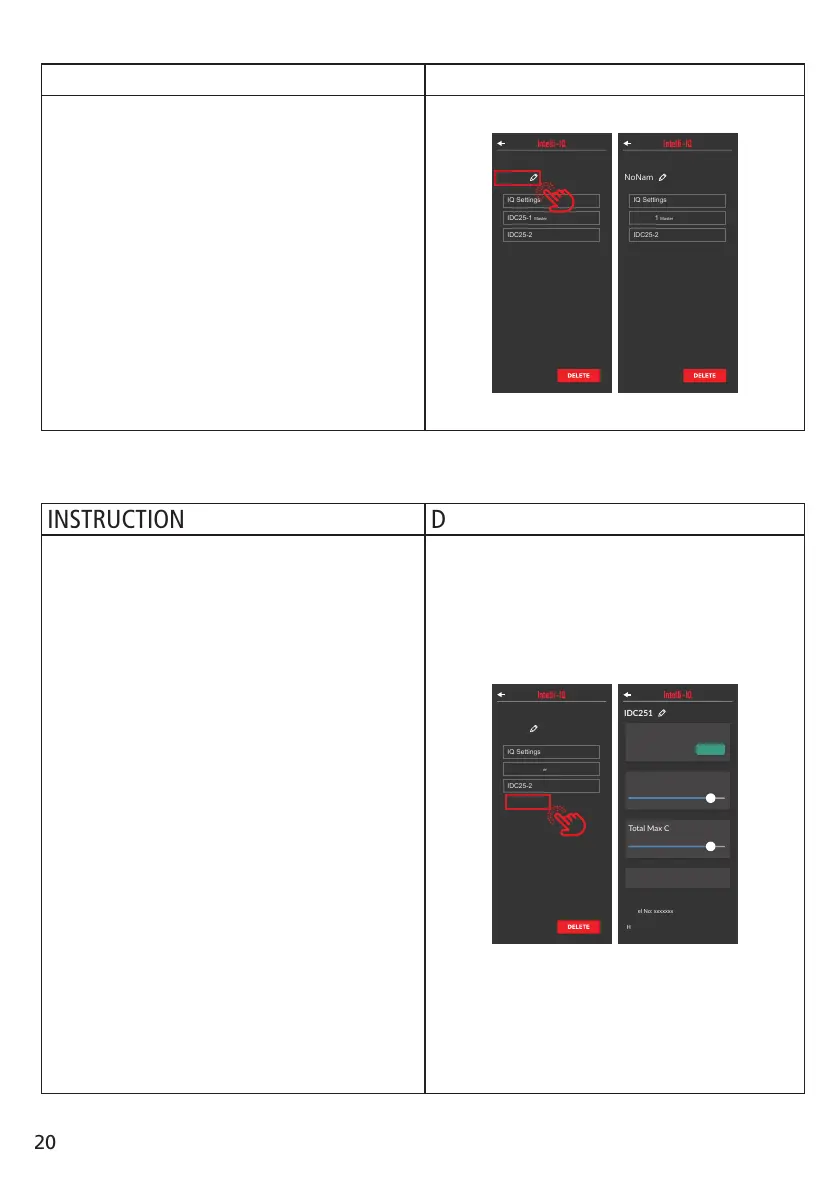
You can rename your Intelli-IQ in either the Main
device settings screen or the IQ Display settings
screen.
To change your device name, in either screen,
select the text of the existing device name.
After completing the name, the device name will
automatically change on the unit.
NOTE: The device name can only be a maximum
of 6 characters.
NOTE: If you enter no text, the name will revert
to “NONAME”.
MY 4x4
Sengs
DELETE
NoName
Sengs
DELETE
INSTRUCTION DISPLAY
In the Main Device Settings screen select the IDC
device you wish the edit.
If your device is indicated to the master device,
all controls will be available.
For slave devices, you can only update the device
rmware and check the product information.
NOTE: To change the battery charge settings,
you need to select device indicated as “Master”.
In this screen you can control the following
options :
Charge Prole: Select when you wish to
change the battery charge prole or create a
custom battery chemistry prole.
Low Voltage Warning: When the battery
voltage falls below this indicated value an alert
will be display indicating this.
Display on Time: The unit will stay on for the
selected period of time without any user input.
MY 4x4
Sengs
DELETE
IDC251
Total Max Current
50A
Maximum Output
95%
Low Voltage
Alarm
11V
Charge Profile
LiFePO4
CHANGE
Model No: xxxxxxx
Hardware Version: xx.xx
Soware Version: xx.xx.xx
Serial Number: xxxxxxxx
IDCX Variant: IDCX-xx
Rename Intelli-IQ:
Check IDC Settings:
20


 To Next Page