INSTRUCTION DISPLAY
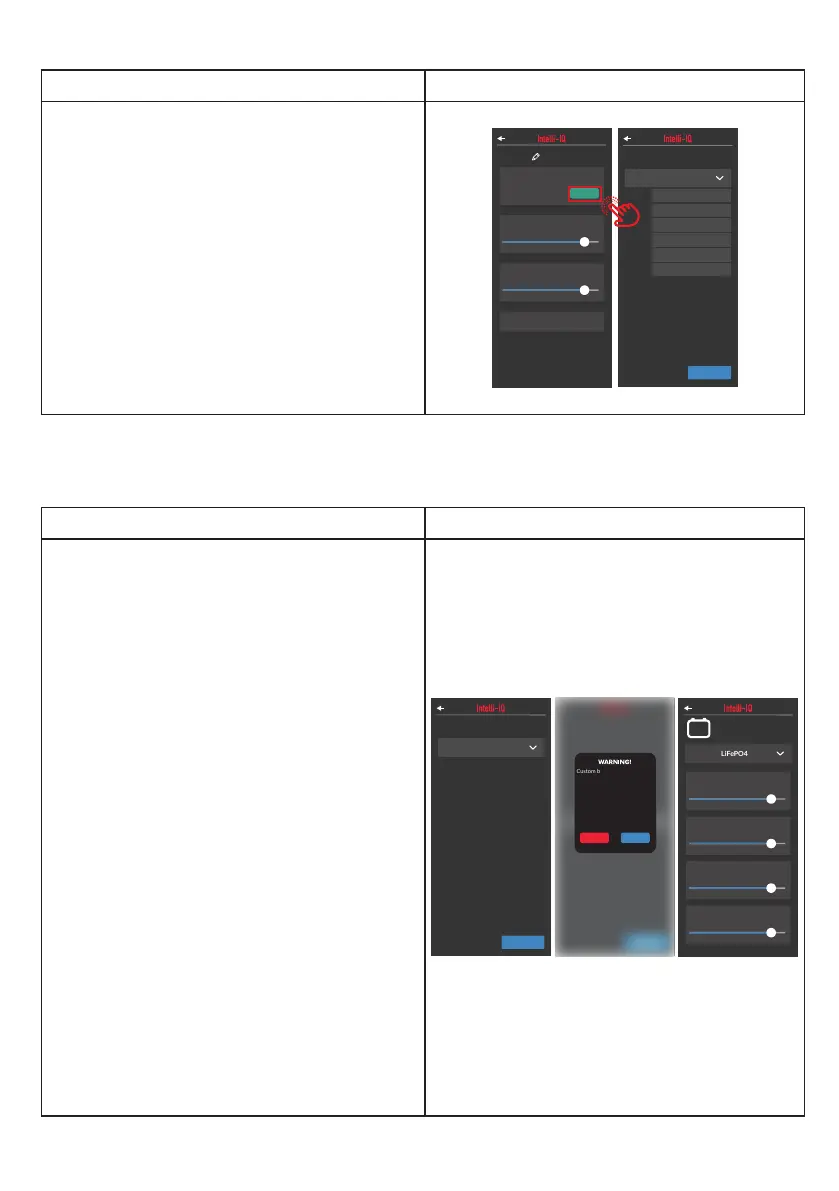
In the IDC settings screen you can select a
predened battery prole from a collection of
different prole settings.
So change the battery prole, select one from
the dropdown and tap “CONFIRM”.
WARNING: Custom battery settings
should strictly follow manufacturer
recommendations.
Failure to comply could result in re or
serious injury.
IDC251
Total Max Current
50A
Maximum Output
95%
Low Voltage
Alarm
11V
Charge Profile
LiFePO4
CHANGE
Model No: xxxxxxx
Hardware Version: xx.xx
Soware Version: xx.xx.xx
Serial Number: xxxxxxxx
IDCX Variant: IDCX-xx
WET
CONFIRM
GEL
AGM
WET
CAL
LiFePO4
USER
INSTRUCTION DISPLAY
When selecting the battery prole, one of the
options available is “USER”.
After selecting the “USER” prole, you will
able to set custom parameters for the charging
prole.
Each prole comes with both a preset collection
of values and custom parameters.
Select the starting settings for the chemistry your
charger will power.
In the IDC settings screen you can select a
predened battery prole from a collection of
different prole settings.
So change the battery prole, select one from
the dropdown and tap “CONFIRM”.
WARNING: Custom battery settings
should strictly follow manufacturer
recommendations.
Failure to comply could result in re or
serious injury.
CONFIRM
USER
WET
CONFIRM
WARNING
!
Custom baery sengs should
strictly follow manufacturers
recommendaons. Failure to
comply could result in fire or
serious injury.
Changing baery chemistry will
reset the Low Baery Voltage
Warning value.
CANCEL OK
So Start 1
8.0 A
So Start 2
8.0 A
Absorpon
Voltage
11.6V
Float Voltage
11.6V
LiFePO4
User Mode
Change IDC Battery Prole:
Congure IDC User Battery Prole:
21


 To Next Page