Prologix GPIB-USB Controller User Manual
4/19/2011 4
1. Introduction
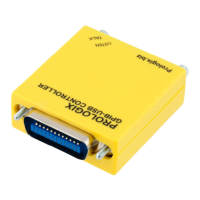
Prologix GPIB-USB controller converts any computer with a USB port into a GPIB
Controller or Device.
In Controller mode, Prologix GPIB-USB controller can remotely control GPIB enabled
instruments such as Oscilloscopes, Logic Analyzers, and Spectrum Analyzers.
In Device mode, Prologix GPIB-USB controller converts the computer into a GPIB
peripheral for downloading data and screen plots from the instrument front panel.
In both modes, Prologix GPIB-USB controller interprets high level commands received
from the host computer and performs the appropriate low-level GPIB protocol
handshaking.
2. Installation
Prologix GPIB-USB controller can be installed using these easy steps:
1. Download drivers for FT245R chip from FTDI website (www.ftdichip.com)
2. Connect Prologix GPIB-USB controller to a computer using USB A-B cable
3. Install drivers according to instructions in
www.ftdichip.com/Documents/InstallGuides.htm
4. Plug controller directly, or using a GPIB cable, to the GPIB connector on the
instrument
Two kinds of drivers are available: Virtual COM Port (VCP) driver and Direct (D2XX)
driver. The VCP driver emulates a standard serial port on the host computer such that
the Prologix GPIB-USB computer can be communicated with as a standard serial (RS-
232) device. D2XX driver allows direct access to the controller via a DLL interface.
3. Firmware Upgrade
Prologix GPIB-USB controller firmware is field upgradeable. Latest firmware and
upgrade installations are available at prologix.biz
4. Host Software
A wide variety of host software may be used to communicate with Prologix GPIB-USB
controller:
Terminal programs – any terminal emulation program such as HyperTerminal, Tera
Term Pro, or Minicom can be used to communicate with the controller and instruments
connected to it.


 To Next Page