EasyManua.ls Logo

Promaster 2500PK Super - Setting Shutter Speed and Aperture

Promaster 2500PK Super
24 pages
Print Icon
To Next Page IconTo Next Page
To Previous Page IconTo Previous Page
Loading...
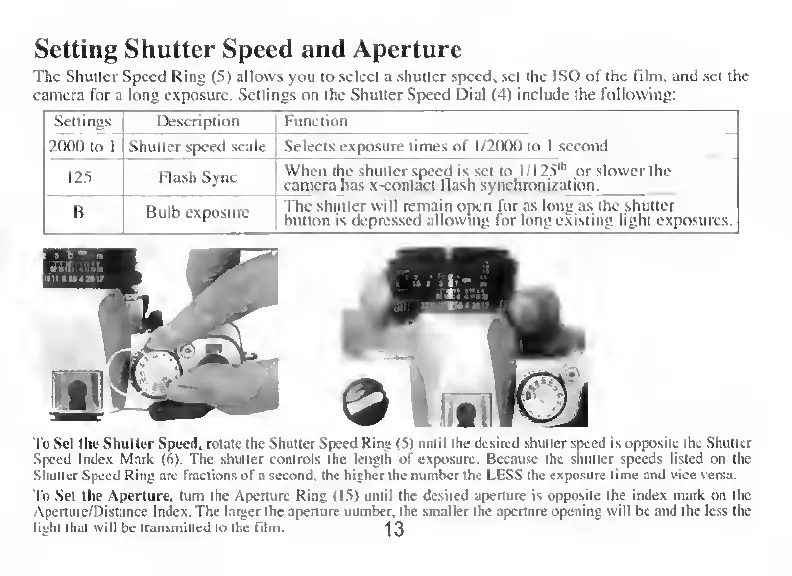
Setting
Shutter
Speed
and
Aperture
The
Shutter
Speed
Ring
(5)
allows
you
to
select
a
shutter
speed,
set
the
ISO
of
the
film.
and
set
the
camera
for
a
long
exposure.
Settings
on
the
Shutter
Speed
Dial
(4)
includc
the
following:
Settings
Description
Function
2000
to
1
Shutter
speed
scale
Selects
exposure
times
of
1/2000
to
1
second
125
Flash
Syne
When
the
shutter
speed
is
set
to
I
/125“'
or
slower
the
camera
has
x-contaet
flash
synchronization.
B
Bulb
exposure
The
shutter
will
remain
open
for
as
long
as
the
shutter
bulion
is
depressed
allowing
for
long
existing
light
exposures.
To
Set
the
Shutter
Speed,
rotatc
the
Shutter
Speed
Ring
(5)
until
the
desired
shutter
speed
is
opposite
the
Shutter
Speed
Index
Mark
(6).
The
shutter
Controls
the
length
of
exposure.
Bccausc
the
shutter
speeds
listed
on
the
Shutter
Speed
Ring
are
fractions
ofa
second.
the
higher
the
number
the
LESS
the
exposure
time
and
vice
versa.
To
Set
the
Aperture.
turn
the
Aperture
Ring
(15)
until
the
desired
aperture
is
opposite
the
index
mark
on
the
Apcrture/Distance
Index.
The
larger
the
aperture
number,
the
smaller
the
aperture
opening
will
be
and
the
less
the
lighi
that
will
be
transmitted
to
the
fdm.
"]3