EasyManua.ls Logo

Promaster 2500PK Super - Using the Camera Meter

Promaster 2500PK Super
24 pages
Print Icon
To Next Page IconTo Next Page
To Previous Page IconTo Previous Page
Loading...
Using
the
Meter
The
camera’s
meter
allows
you
to
select
a
combination
of
shutter
speed
and
apcrture
to
properly
expose
your
photographs.
Select
a
shutter
speed
or
aperture
according
to
your
requirements.
Press
the
Shutter
Release
Button
(3
)
about
one
third
of
the
vvay
to
activate
the
meter.
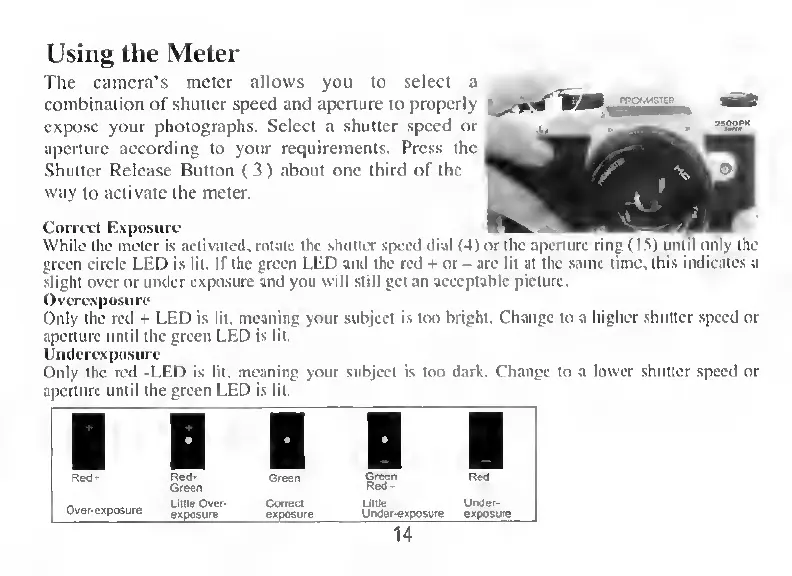
Correct
Exposure
While
the
meter
is
activated,
rotate
the
shutter
speed
dial
(4)
green
circle
LED
is
lit.
If
the
green
LED
and
the
red
+
or
-
are
lit
at
the
same
lime.
this
indicates
a
slight
over
or
under
exposure
and
you
will
still
get
an
acceptable
picture.
Overexposure
Only
the
red
+
LED
is
lit.
meaning
your
subject
is
too
bright.
Change
to
a
higher
shutter
speed
or
aperture
until
the
green
LED
is
lit.
Undcrexposure
Only
the
red
-LED
is
lit.
meaning
your
subject
is
too
dark.
Change
to
a
lower
shutter
speed
or
aperture
until
the
green
LED
is
lit.
or
the
aperture
ring
(15)
until
only
the