EasyManua.ls Logo

Promaster 2500PK Super - Loading the Film

Promaster 2500PK Super
24 pages
Print Icon
To Next Page IconTo Next Page
To Previous Page IconTo Previous Page
Loading...
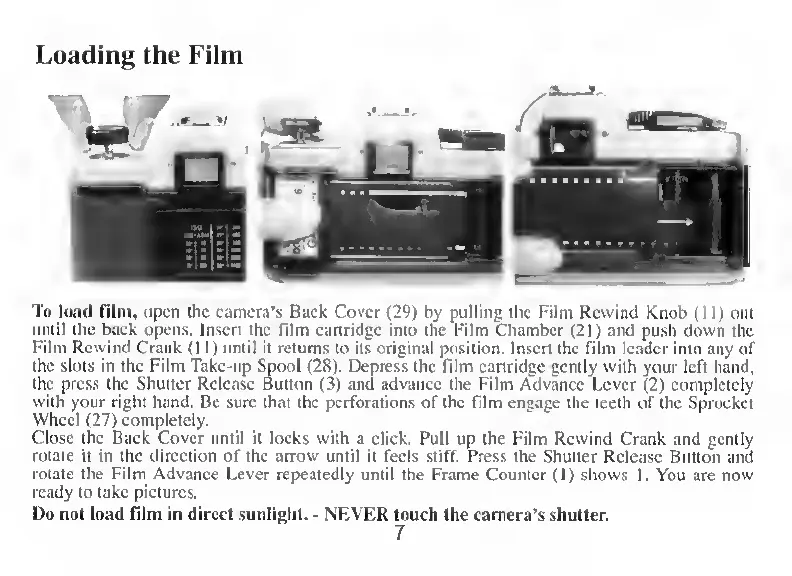
To
load
film,
open
the
camera’s
Back
Cover
(29)
by
pulling
the
Film
Rewind
Knob
(11)
out
umil
the
back
opens.
Insert
the
film
cartridge
into
the
Film
Chamber
(21)
and
push
down
the
Film
Revvind
Crank
(11)
until
it
retums
to
its
original
position.
Insert
the
film
leader
into
any
of
the
slots
in
the
Film
Take-up
Spool
(28).
Depress
the
film
cartridge
gently
with
your
left
hånd,
the
press
the
Shutter
Release
Button
(3)
and
advance
the
Film
Advance
Lever
(2)
completely
with
your
right
hånd.
Be
sure
that
the
perforations
of
the
film
engage
the
teeth
of
the
Sprocket
Wheel
(27)
completely.
Close
the
Back
Cover
until
it
locks
with
a
click.
Pull
up
the
Film
Rewind
Crank
and
gently
rotate
it
in
the
direction
of
the
arrow
until
it
feels
stiff.
Press
the
Shutter
Release
Button
and
rotate
the
Film
Advance
Lever
repeatedly
until
the
Frame
Counter
(1)
shows
L
You
are
now
ready
to
take
pictures.
I)o
not
load
film
in
direct
sunlight.
-
NEVER
touch
the
camera’s
shutter.
7