Using the remote control
0
o
@
4 ¸
---e
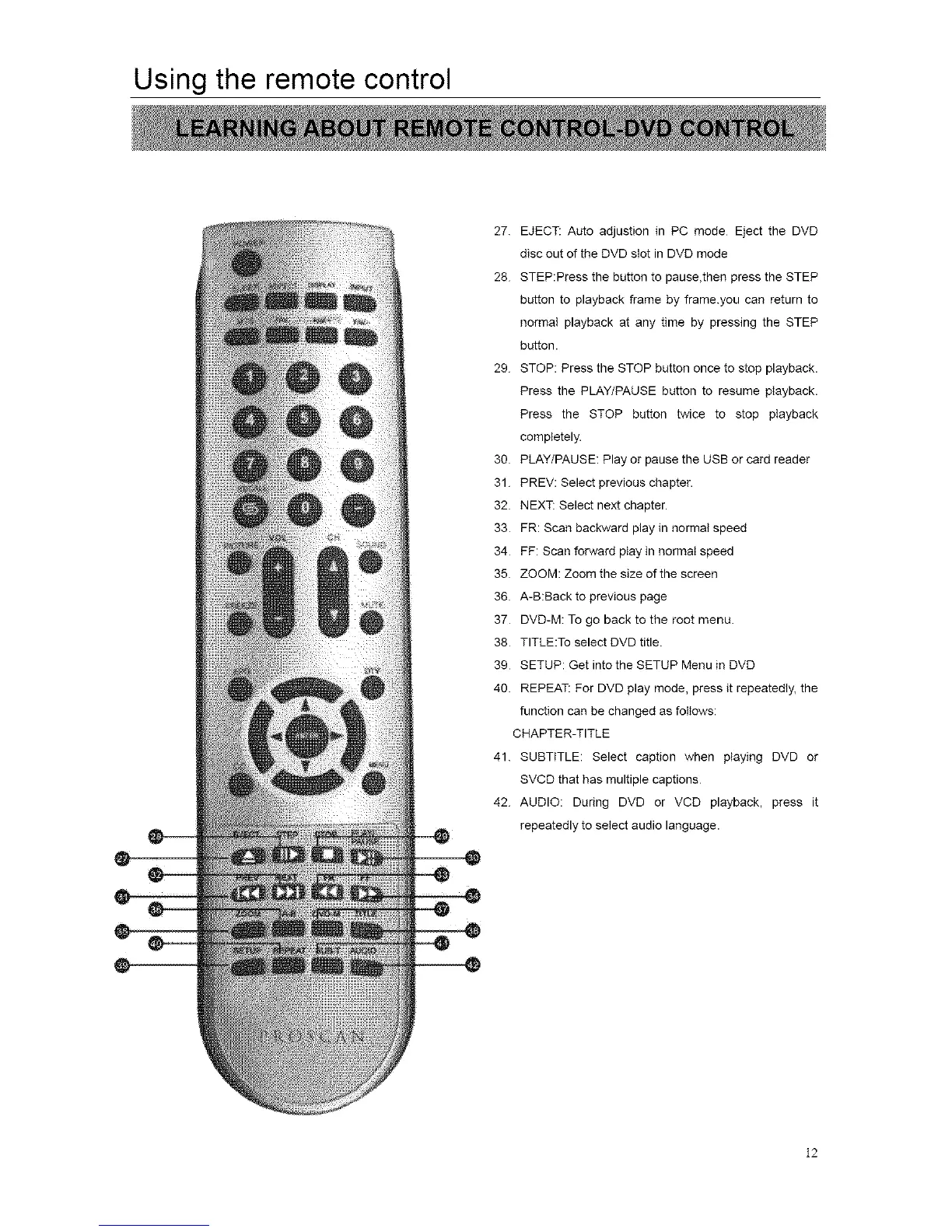
27 EJECT: Auto adjustion in PC mode Eject the DVD
disc out of the DVD slot in DVD mode
28 STEP:Press the button to pause,then press the STEP
button to playback frame by frame.you can return to
normal playback at any time by pressing the STEP
button.
29 STOP: Press the STOP button once to stop playback.
Press the PLAY/PAUSE button to resume playback.
Press the STOP button twice to stop playback
completely.
30 PLAY/PAUSE: Play or pause the USB or card reader
31 PREV: Select previous chapter.
32 NEXT: Select next chapter.
33 FR: Scan backward play in normal speed
34 FF: Scan forward play in normal speed
35 ZOOM: Zoom the size of the screen
36 A-B:Back to previous page
37 DVD-M: To go back to the root menu.
38 TITLE:To select DVD title.
39 SETUP: Get into the SETUP Menu in DVD
40. REPEAT. For DVD play mode, press it repeatedly, the
function can be changed as follows:
CHAPTER-TITLE
41. SUBTITLE: Select caption when playing DVD or
SVCD that has multiple captions
42. AUDIO: During DVD or VCD playback, press it
repeatedly to select audio language.
12














 To Next Page