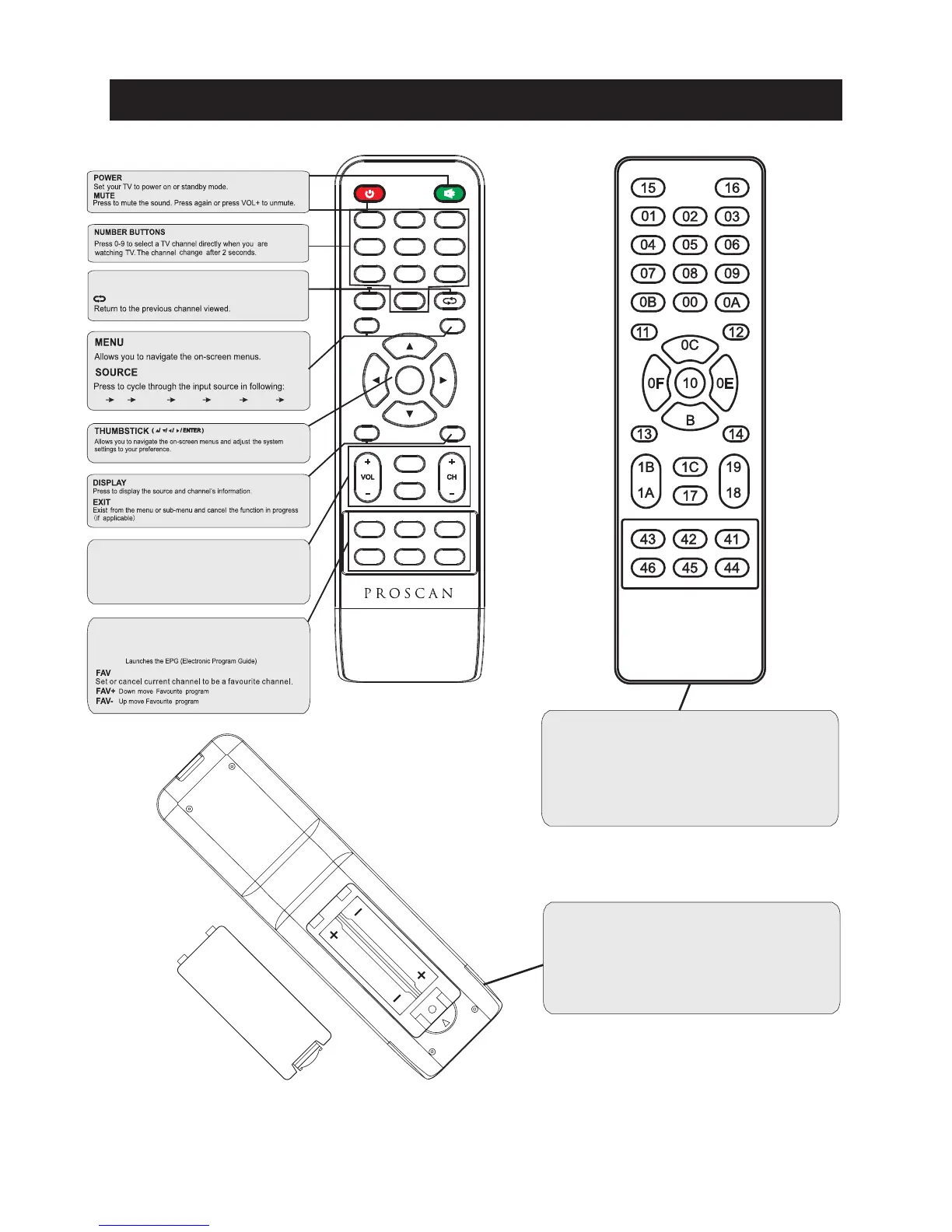
S.MODE: Press to cycle through the different sound settings
P.MODE: Press to cycle through the different picture settings
CH +/- : Pr ess to scan throu gh or to sel ect a cha nnel .
V +/-: Pr ess to inc rea se / de crea se the soun d level.
Pres s "-" to ent er a pr ogram numb er fo r mul tiple pr ogram
chan nel, such as 2- 1 etc.
SLEEP: Select amount of time before TV turn
off
automatically.
MTS:
Pres s to se lec t the audi o mode ,you can select st er eo,
Mon o,or SAP( se cond audio pr ogram) .
GUIDE:
1
5
9
2
6
0
3
7
4
8
ENTER
MENU
SOURCE
EXIT DISPLAY
P.
MODE
S.
MODE
SLEEP MTS GUIDE
FAV FAV- FAV+
Universal remote code
This is the code for remote control of
PLED2435A-E,if you want to change to a
universal remote control,you can edit
this code into your universal remote control.
(1)Open the battery compartment cover
on the back side
(2)Insert two 1.5V batteries of AAA type
with correct polarity
(3)Close the battery compartment cover
on the back side
Universal Remote Control code:007F
(Universal Remote control is not included)
Remote Controller
8
TV AV Y Pb Pr HDMI1 HDMI2 HDMI3 PC



 To Next Page