Using Your TV and Remote
With a Laserdisc Player: Programming and Basic
Refer to your Laserdisc Player owner's manual to hook up your Laserdisc Player.
The remote may need to be programmed for your laserdisc player. This
remote may not operate all models of brands listed below. Use the codes below
or on the sheet packed in with your remote.
Program the remote for
your Laserdisc Player
Basic Operation
REW PLAY FF
REC STOP PAUSE
r-i-1 1
DISPLAY cHAN SKIP
MUTE CHJ_ PREV CH
_0 _0 _0
_0 _0 _0
_0 _0 _0
INPUT ANTENNA
0 o0 0
CLEAR _ • RESET
PiP _ SWAP
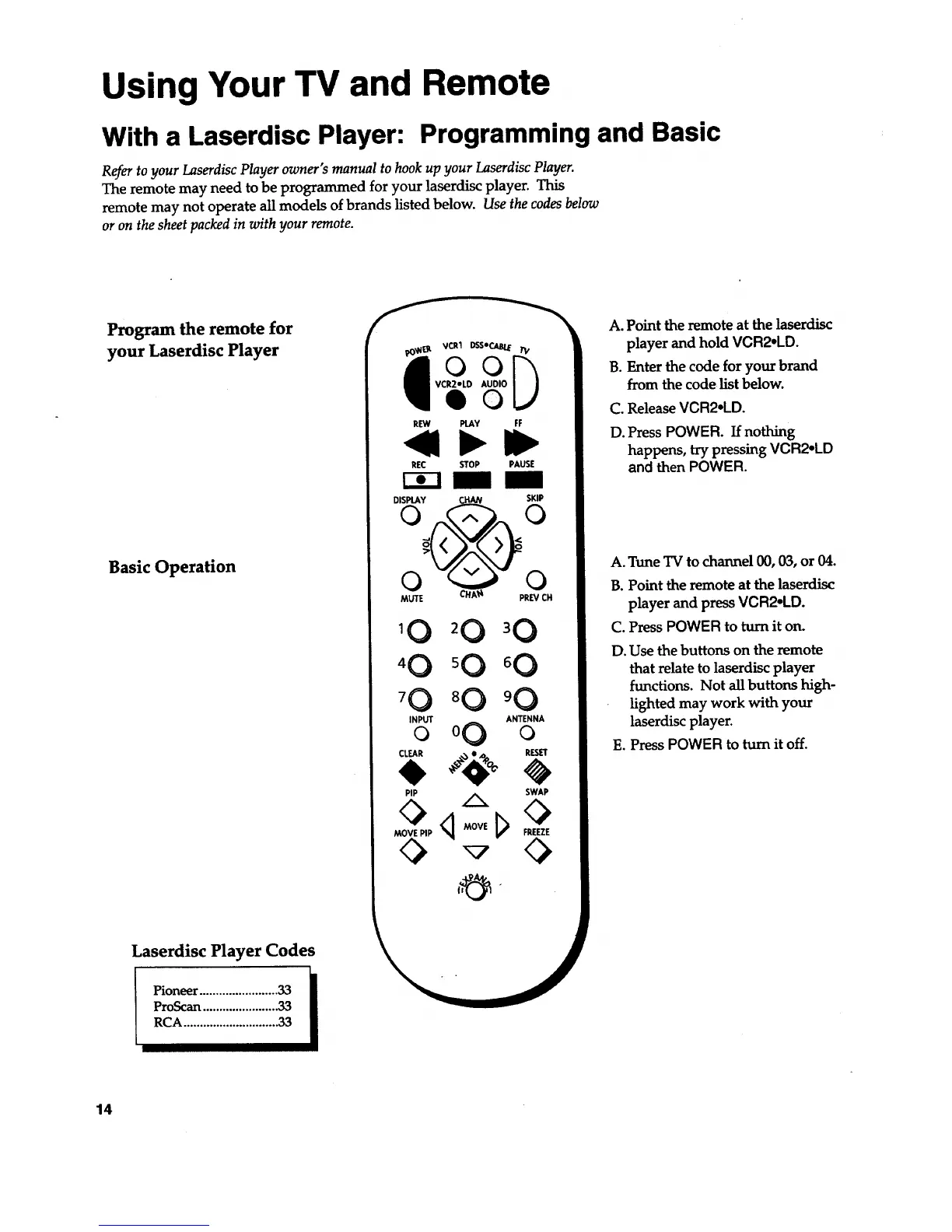
A. Point the remote at the laserdisc
player and hold VCR2oLD.
B. Enter the code for your brand
from the code list below.
C. ReleaseVCR2.LD.
D. Press POWER. If nothing
happens, try pressing VCR2oLD
and then POWER.
A. Tune TV to channel 00, 03, or 04.
B. Point the remote at the laserdisc
player and press VCR2°LD.
C. Press POWER to turn it on.
D. Use the buttons on the remote
that relate to laserdisc player
functions. Not all buttons high-
lighted may work with your
laserdisc player.
E. Press POWER to turn it off.
Laserdisc Player Codes
Pioneer ........................33 •
I
ProScan.......................33
RCA.............................33
14


 To Next Page