Quick Guide to Your TV
4
Basic Tour of the Remote
Basic information about your remote is shown below. This will give you a
general idea of how your remote works. For more details, see pages 6-15.
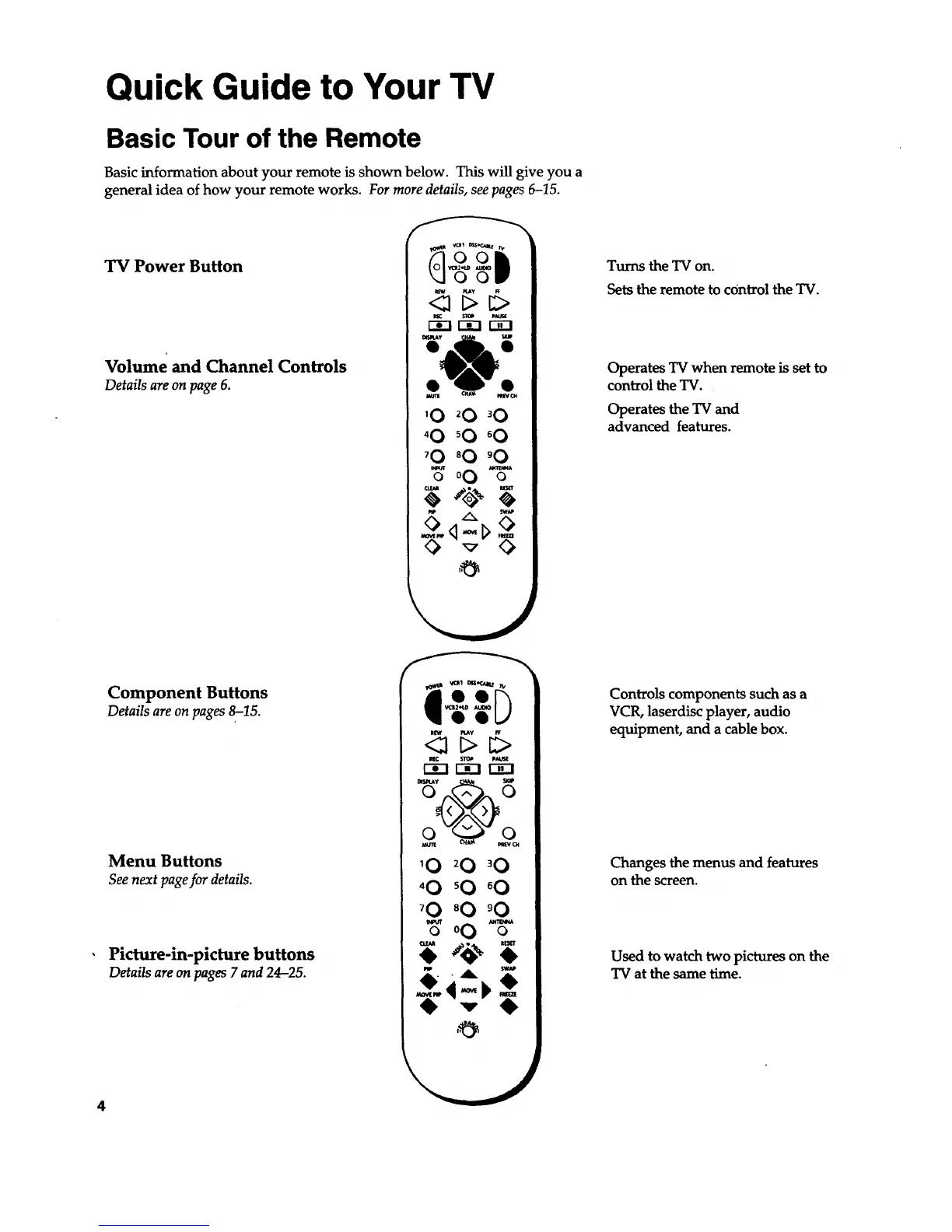
TV Power Button
Volume and Channel Controls
Details areon page6.
[_ $IoP PAu_
ma-I r-_
tam= O_A_ _
'0 _0 '0
'0 _0 °0
'0 _0 '0
Component Buttons
Details are on pages 8-15.
Menu Buttons
See next page for details.
Picture-in-picture buttons
Details areon pages7 and24-25.
pl_ PLAy
_!>
r-_-i r-i-I i-_1
'0 20 30
'0 sO °O
70 80 '0
o 0
,&
Turns the TV on.
Sets the remote to control the TV.
Operates TV when remote is set to
control the TV.
Operates the TV and
advanced features.
Controls components such as a
VCR, laserdisc player, audio
equipment, and a cable box.
Changes the menus and features
on the screen.
Used to watch two pictures on the
TV at the same time.


 To Next Page