INDUSTRY CANADA USER NOTICE:
Operation is subject to the following two conditions: (1) this device may not cause interference, and (2)
this device must accept any interference, including interference that may cause undesired operation of
the device.
To reduce potential radio interference to other users, the antenna type and its gain should be so chosen
that the equivalent isotropically radiated power (EIRP) is not more than that required for successful
communication.
NOTE: The manufacturer is not responsible for any radio or TV interference caused by unauthorized
modifications to this equipment. Such modifications could void the user's authority to operate the
equipment
D1124 2015-08-07 - VM - Canada
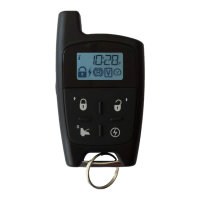
TWO-WAY 6-BUTTON LCD REMOTE STARTER
FOR AUTOMATIC OR MANUAL TRANSMISSION
34-0794 | CT-4311TW
User Guide
WARNING
It is the responsibility of the vehicle operator to ensure their vehicle is parked
in a safe and responsible manner.
1. a) Manual transmission: When leaving the vehicle, it is the user’s responsibility
to ensure that the gearshift lever is in the NEUTRAL position and the parking
brake is engaged in order to avoid accidents upon remote starting.
b) Automatic transmission: When leaving the vehicle, it is the user’s
responsibility to ensure that the gearshift lever is in “Park” in order to avoid
accidents upon remote starting.
(Note: Make sure that the automatic vehicle cannot start in "Drive".)
2. It is the user's responsibility to ensure that the remote starter is disabled or put
into valet mode before servicing.
AVIS D’INDUSTRIE CANADA :
L’utilisation de cet appareil est sujette aux deux conditions suivantes : 1) cet appareil ne doit causer aucune
interférence nuisible; 2) cet appareil doit accepter toute interférence qui pourrait nuire à son fonctionnement.
Pour réduire le brouillage radioélectrique qui risque d’affecter d'autres utilisateurs, il est important de choisir le
type et le gain de l'antenne de façon que la puissance isotrope rayonnée équivalente (PIRE) ne dépasse pas
ce qui est nécessaire pour assurer une communication efficace.
REMARQUE : Le fabricant ne peut être tenu responsable du brouillage radioélectrique causé par des
modifications non autorisées apportées à l’appareil. De telles modifications pourraient annuler le droit de
jouissance de l’utilisateur de cet appareil.
D1124 2015-08-07 - VM - Canada
TÉLÉDÉMARREUR BIDIRECTIONNEL AVEC TÉLÉCOMMANDE À 6
TOUCHES À AFFICHAGE À CRISTAUX LIQUIDES POUR TRANSMISSION
AUTOMATIQUE OU MANUELLE
34-0794 | CT-4311TW
Guide de l’utilisateur
ATTENTION
Il est de la responsabilité du conducteur du véhicule de s’assurer que celui-ci
est stationné de façon convenable et sécuritaire.
1. a) Transmission manuelle : L’utilisateur doit s’assurer que le levier de vitesse
est à la position NEUTRE et que le frein de stationnement est appliqué de façon
adéquate avant de quitter le véhicule afin d’éviter tout dommage au moment du
démarrage à distance.
b) Transmission automatique : L’utilisateur doit s’assurer que le levier de
transmission est en position « Park » avant de quitter le véhicule afin d’éviter tout
dommage au moment du démarrage à distance.
(Note : Assurez-vous que le véhicule à transmission automatique ne peut pas
démarrer lorsque le levier de transmission est en position « Drive ».)
2. L’utilisateur doit s’assurer de désactiver le démarreur à distance ou de le mettre
en mode valet avant de confier véhicule à un mécanicien ou un technicien affecté
à l’entretien.


 To Next Page

 General