5
ENGLISH
Selecting Direction of Ratchet Rotation (Fig.A)
1. To select clockwise rotation, rotate the for ward/re verse
dial
2
to the left side.
2. To select counterclockwise rotation, rotate the for ward/
re verse dial
2
to the right side.
Setting Required Torque (Fig.C, D)
This wrench has multi unit capability: N‑m, in‑lb, and
ft‑lb. Identify the unit scale displayed on the LCD
6
when
setting the torque.
1. Pull and hold down on the torque adjustment collar
5 .
2. Twist the anti‑slip handle
4 until the desired torque
value is displayed on the LCD
6 .
NOTE: If you see a LO or HI instead of a value, you have
reached the minimum or maximum torque setting.
3. Release the torque adjustment collar
5 to lock in the
desired torque value.
4. Use the LCD
6 to confirm the torque value is set correctly.
Blinking Torque Value
The torque value will blink if the current torque value is off
by at least two percent of the set torque value.
Power On (Fig.C)
1. To turn the wrench on, press set button7.
2. The LCD
6 will display the current value.
Auto Power Off
1. The wrench will power off automatically after
thirtyseconds of not beingused.
Manual Power Off
1. Turn the wrench on if it is not powered on.
2. Press and hold the button
7 until the LCD6 displays"OFF".
Battery Level Gauge
Battery gauge indicates four levels of remaining charge.
1.
indicates ~ 75% to 100% remaining
2.
indicates ~ 50% to 75% remaining
3.
indicates ~ 25% to 50% remaining
4.
indicates 25% or less remaining
5. When there is not enough energy remaining in the
battery to operate reliably, the battery frame will blink
and the wrench will turn off.
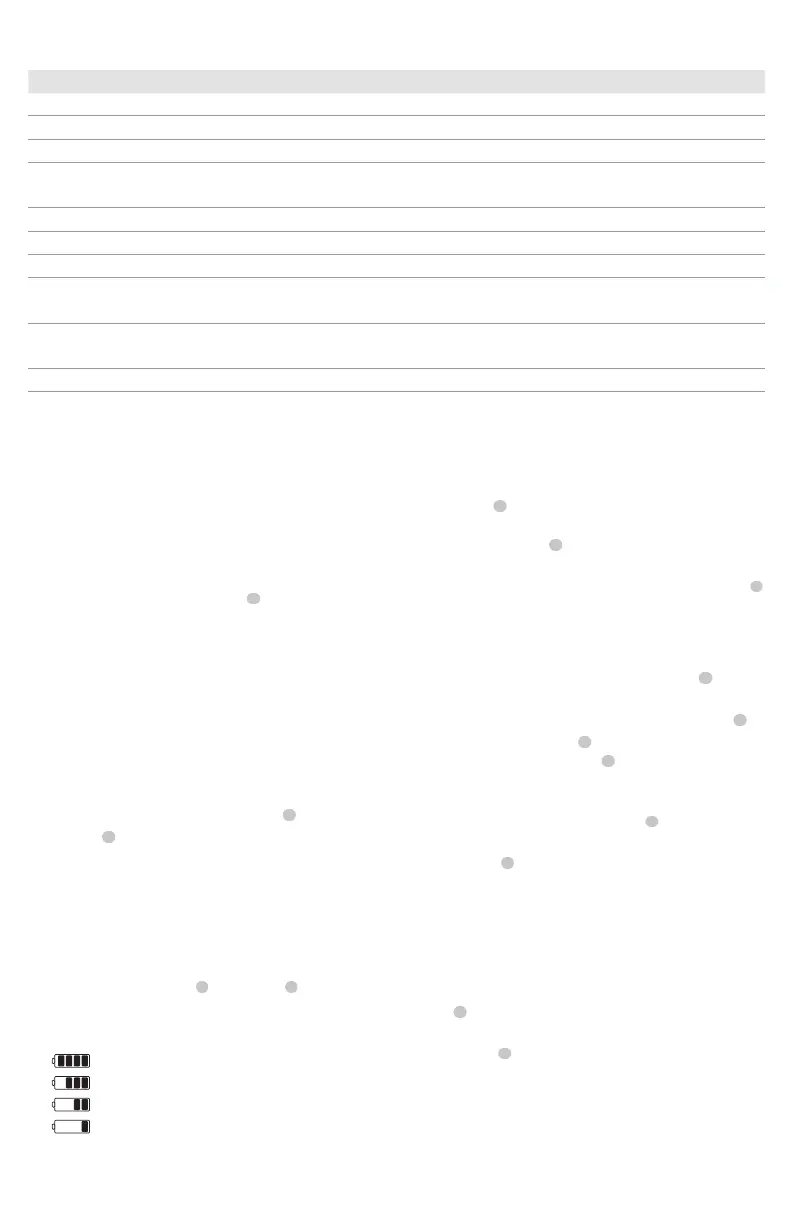
WRENCH SPECIFICATIONS
J6004D J6006D J60016D J6014D
Battery type (x2) AAA (x2) AAA (x2) AAA (x2) AAA
Power output 3.0V 3.0V 3.0V 3.0V
Drive size 3/8'' 3/8'' 1/2'' 1/2''
Torque range 11‑54 Nm
8‑40 ft‑lb
20‑102 Nm
15‑75 ft‑lb
40‑203 Nm
30‑150 ft‑lb
68‑339 Nm
50‑250 ft‑lb
Torque Accuracy*
CW ±2% CW ±2% CW ±2% CW ±2%
Units Ft‑lb, in‑lb, N‑m Ft‑lb, in‑lb, N‑m Ft‑lb, in‑lb, N‑m Ft‑lb, in‑lb, N‑m
Gear Teeth 48 48 48 48
Operating temperature range ‑20 °C / +50 °C
‑4 °F / +122 °F
‑20 °C / +50 °C
‑4 °F / +122 °F
‑20 °C / +50 °C
‑4 °F / +122 °F
‑20 °C / +50 °C
‑4 °F / +122 °F
Storage temperature range ‑20 °C / +70 °C
‑4 °F / +158 °F
‑20 °C / +70 °C
‑4 °F / +158 °F
‑20 °C / +70 °C
‑4 °F / +158 °F
‑20 °C / +70 °C
‑4 °F / +158 °F
Weight 2.4 lbs. (1.08 kg) 2.6 lbs. (1.175 kg) 3.4 lbs. (1.53 kg) 4 lbs. (1.78 kg)
*The accuracy of the readout is guaranteed from 20% to 100% of maximum range +/-1increment.Calibration point is at the middle line of the five grip lines on the rubberhandle.For maintaining
accuracy, calibrate the wrench at regular intervals (1 yearrecommended).
OPERATION
WARNING: To reduce the risk of serious
personal injury, turn unit off before making any
adjustments or removing/installing attachments
or accessories. An accidental start‑up can causeinjury.
Low Voltage Indicator
If the battery strength is low, the LCD
6
will display a battery
symbol and powerdown.
1. Replacebatteries.
‑ Transporting batteries can possibly cause fires if the
battery terminals inadvertently come in contact
with conductive materials such as keys, coins, hand
tools and the like. So when transporting individual
batteries, make sure that the battery terminals are
protected and wellinsulated from materials that
could contact them and cause a shortcircuit.
Unit Selection
1. Turn the wrench off.
2. To cycle through the available units, press and hold the
set button
7 until the torque value starts blinking.
3. Once the screen displays a blinking torque value you may
press the set button
7 until the desired unit it selected.
4. Choose from N‑m, in‑lb and ft‑lb.
5. To choose the selected unit, press and hold the set button
7
for three seconds. The torque value will stopblinking.
Proper Hand Position (Fig.C, D)
WARNING: To reduce the risk of serious personal injury,
ALWAYS use proper hand position asshown.
WARNING: To reduce the risk of serious personal
injury, ALWAYS hold securely in anticipation of a
suddenreaction.



 To Next Page