19
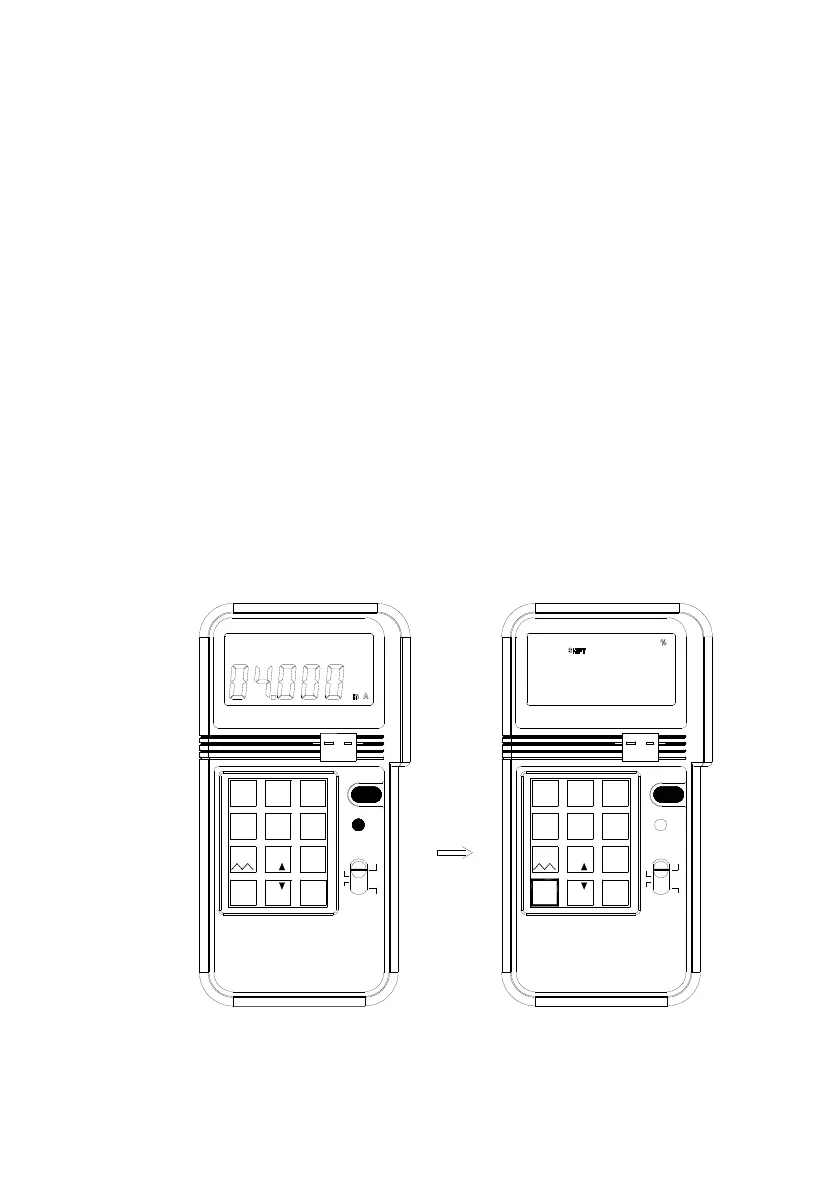
5. % input in the mA, mV, V functions
In the mA, mV, or V function, users can enter percentage. To enter percentage
(%)
1. Users press the shift button first, then SHIFT symbol will be displayed in
the LCD.
2 Press % button first, then press the number (no decimal number, the %
resolution is 1%).
3 After percentage is entered, the percentage will be displayed in the upper
LCD, and the corresponding value will be displayed in the lower LCD.
4. The corresponding value is calculated based upon the range selected.
4-20mA: 1% = 0.16mA
0-20mA: 1% = 0.2mA
0-24mA: 1% = 0.24mA
0-100mV: 1% = 1mV
0-1V: 1% = 0.01V
0-12V: 1% = 0.12V
5. To exit the percentage-input mode, press the SHIFT button again.
6. After the SHIFT button is pressed, the upper LCD will become blank,
while the lower LCD retains its last value.
mV 1V
4-20mA
CALIBRATOR
PROCESS
0-24mA
K J E T
ENTER
0
%
4
mV 1V
12V
7
.
_
°
5
° C F
%
8
%
4-20mA
1
0-20mA
2
Hz
C
°
F
°
SHIFT
6
mV
9
VmA
ON/OFF
+
-
TC
3
25%
ENTER
Hz
0
CALIBRATOR
PROCESS
°
C
°
F
ON/OFF
+
mV
4
5
°
12V
C F°
%
78
%
6
K J E T
9
V
0-20mA
12
-
TC
0-24mA
3
SHIFT
mA
.
%
_


 To Next Page