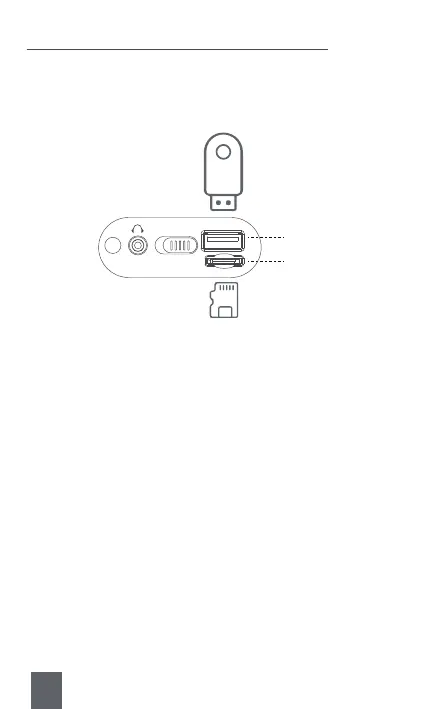
Insert the USB Flash Drive / TF card loaded with MP3 files into the<③
USB Port> or <④TF Card Slot>. Once the MP3 files are detected, the
radio will play automatically.
6. Music Played by USB Flash Drive / TF Card
③USB Port
④TF Card Slot
USB
OFFON
TF
Tips :
a. Short press <⑧Previous/Rewind> or <⑩Next/Fast-forward > to select
the song you want to play. Long press to fast forward or rewind
down.
b. Press <⑨OK> to pause or play the music.
c. Press number buttons to select one specific MP3. E.g. Continuously
press buttons 1+5 to select the 15th MP3, but if the total number of
MP3 files are not more than 15, the radio will play the current MP3.
d. Press <⑮Repeat> to repeat the current playing music. Pressing it
again will back to order play.
e. Pressing <⑰MODE> can change to other mode.
20



 To Next Page