Push the button <①ON/OFF> to turn the radio on.
Then pull out the <⑲Telescopic Antenna>.
1. System Settings
Tips :
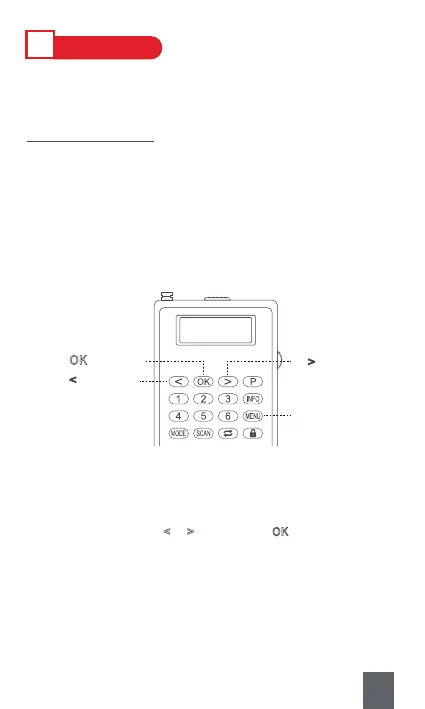
a.Press <⑬MENU> to set the system. In any setting interface, press-
ing <⑬MENU> again can exit the settings.
b.Press <⑧Previous/Rewind> or <⑩Next/Fast-forward> to select,
and <⑨OK> to confirm.
c.If there’s no operation after 30s, the radio will exit the settings
automatically.
Ⅳ
HOW TO USE
⑬Menu:
Setting Interface
⑩ > : Next
⑧ <
: Previous
⑨ OK
: Confirm
DAB
< TA >
1) TA (Traffic Announcement): On DAB mode
2) System :
A. Time (Press button <
or > to select, and OK to confirm the time and
date. Note : Number buttons is unavailable.)
B. Language (English, Deutsch, Italiano, Francais, Nederlands, Polski)
C. Factory Reset (System backs to factory default state.)
D. SW Version (View the number of software version of DAB.)
9



 To Next Page