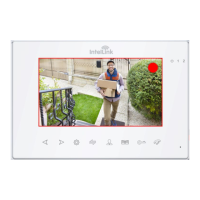
This document is an instruction manual for the IntelLink Video Intercom system, model INT27WSK, manufactured by PSA Products. It provides comprehensive details on the system's features, installation, operation, and maintenance.
Function Description:
The IntelLink Video Intercom is a security and communication system designed for residential use. It allows users to monitor their entrance, communicate with visitors, and control door access. The system supports multiple indoor monitors and door stations, along with additional CCTV cameras and PIR sensors for enhanced security. Key functionalities include hands-free intercom, door release, monitoring, call transfer between indoor units, and internal communication. The system also integrates with a mobile app for remote access and control via Wi-Fi.
Important Technical Specifications:
Indoor Monitor (INT27WSK):
- Display Screen: 7-inch TFT LCD screen.
- Definition: 1024x600 pixels.
- CCTV Camera Input: AHD & CVBS only.
- Standard: PAL/NTSC.
- Calling Mode: Two-way conversation.
- Calling Time: 120 seconds.
- Standby Current: Maximum 250mA.
- Working Current: Maximum 600mA.
- Power Supply: External switching power supply (DC 15V).
- Work Temperature: 0~+50°C.
- Mounting: Surface mount.
- Picture Format: JPEG standard format.
- Extension Memory (Optional): MicroSD card (maximum 32GB) (≥Class 10).
- Dimensions: 127.5H x 190.5W x 22D mm.
- Digital Photo Frame: Yes (Displays photos from MicroSD Card).
- Custom Ringtone: Yes (Uses ringtones).
- Missed Call: Missed call indicator (Clock function needs to be activated).
- Motion Detection: Motion picture recording when MicroSD card installed (MicroSD card not supplied).
- Memory: Supports 32G MicroSD for pictures or video recording. Picture memory when MicroSD card fitted (MicroSD card not supplied). Motion picture recording when MicroSD card installed (MicroSD card not supplied).
Outdoor Camera (Door Station INT17DS):
- Camera Sensor: 1/3 inch wide angle CMOS camera.
- View Angle: 110°.
- Definition (Hor.): 960P.
- LEDs for Night Vision: IR LEDs (120°).
- Power Consumption: 150mA max.
- Power Source: Supplied from indoor unit.
- Operation Temperature: -40~+50°C.
- Installation: Surface mounted.
- Lock: N/O, N/C Contact (30VDC 2A).
- Ingress Protection Rating: IP65.
- Components: IR LEDs, Camera, Speaker, Call button, Microphone, Screw Slot, Volume Regulator, System port, Lens Definition Switch.
- Wiring: Red (12V DC), White (Audio), Black (Ground), Yellow (Video), Orange (Relay COM), Green (Relay N/O), Brown (Relay N/C), Blue (Voltage Camera + Input), Grey (Voltage Camera - Input), Purple (Voltage Lock + Output).
System Capacity:
- Supports up to 6 monitors.
- Supports up to 2 door stations.
- Supports up to 2 extra CCTV cameras.
- Supports up to 2 PIR sensors.
Usage Features:
Installation:
- Door Station: Can be installed with an angle mount or surface mount. It is recommended not to install the camera directly facing the sun. The speaker volume can be adjusted via a regulator at the back of the door camera.
- Indoor Monitor: Should be installed at eye level (150-160cm). Avoid installing near strong radiation sources (TV, DVR, PCs) and ensure a distance of 30cm or more from AC power to avoid electrical interference.
- Wiring: Uses CAT5e or CAT6 network cables for distances up to 50 meters. For longer distances or specific video quality, 75 ohm coax video wire connection is recommended. The first monitor must be set as "MASTER" (Device 01), and subsequent monitors as "SLAVE" (Device 02-06). HD monitors can accept AHD or CVBS signals; rebooting the monitor after connecting a CVBS analog door station is necessary.
Operation:
- Visitor Call: When a visitor presses the call button, a 10-second "Ding Dong" tone is heard, and the visitor's image is displayed on the indoor monitor. Users can talk to the visitor, unlock the door, or hang up. If the call is unanswered, the monitor returns to standby after 60 seconds.
- Monitoring: Allows users to view live feed from Door Station 1, Door Station 2, CAM1, or CAM2.
- Call Transfer: Calls can be transferred to other indoor extensions.
- Internal Communication: Indoor units can communicate with each other.
- Main Menu: Accessed from standby mode, offering options for Language, Time, System Info, Ringtone, Volume, Network Setting, Digital Photo, Alarm, Media, and Record Centre.
- Standby Mode: Displays either Clock and Date or Digital Photo Frame.
- Digital Photo Frame: Cycles through photos stored in the \USER\Photo directory on the MicroSD card. Photos must be JPG format, 1024(W) x 600(H) pixels, landscape orientation, and no larger than 1MB.
- Ringtone: Ten polyphonic melodies are available. Custom melodies can be used from the \USER\RING directory on the MicroSD card (MP3 format, 1-10 ringtones). Ringtone volume is adjustable for morning, afternoon, and evening.
- Volume: Adjustable ring volume (Vol1, Vol2, Vol3 from 01-10) and talking volume. Button voice (confirmation sound) can be turned on/off.
- Mode Setting: Allows setting device ID (Master/Slave), Door2 status (enable/disable preview), Door1/Door2 unlock time (2-10 seconds, default 5 seconds), record mode (video/snapshot), motion detection (Door1, Door2, CAM1, CAM2, Disable), and message reminder (ON/OFF).
- Alarm: CAM1 and CAM2 have alarm inputs. An alarm (ALM & GND cables shorted for NO-alarm, disconnected for NC-alarm) triggers a 120-second ring and can initiate snapshot or video recording. Alarm ringing time for each camera is adjustable (0-20 seconds).
- Media: Includes Music, Photo, and File Management. Music files (MP3) can be played from the \USER\Music directory (first 30 songs displayed).
- Record Centre: Stores recorded videos and snapshot pictures in the DCIM folder on the MicroSD card.
- Colour Parameter Settings: Brightness, contrast, and saturation are adjustable (0-50, default 25). Refresh option to match video signal format.
- Mobile App (IntelLink Wifi Intercom): Allows remote access and control. Users can download the app, register an account, and pair the intercom with their mobile device via AP-mode. The system can be shared with other users through Home Management or Direct Sharing.
Maintenance Features:
- Defaulting to Factory Settings: Press and hold the settings button for 10 seconds in standby mode to reboot the system and erase all user settings.
- MicroSD Card Management: Supports formatting the MicroSD card. It is recommended to disconnect power before inserting or removing the MicroSD card to prevent electrical damage and ensure proper file detection.
- Firmware Update: Firmware updates can be performed via the MicroSD card.
- Troubleshooting: The manual provides guidance on various settings and configurations to ensure proper device functionality. For example, if the monitor has registered the wrong video format, the refresh option can be used to match the door station's video signal format.
Warranty & Liability:
- PSA Products Pty Ltd provides a 24-month warranty from the date of purchase against manufacturing defects.
- The warranty covers repair or replacement at the cost of PSA Products, excluding labor and transport costs.
- The warranty does not cover damage from misuse, alteration, or improper maintenance.
- Liability is limited to the cost of replacement.
- The warranty is in addition to consumer rights under Australian Consumer Law.
- Claims require proof of purchase and can be made by contacting PSA Products Pty Ltd.

 Need help?
 General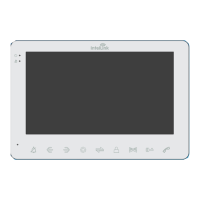

 To Next Page