9. Alarm instructions
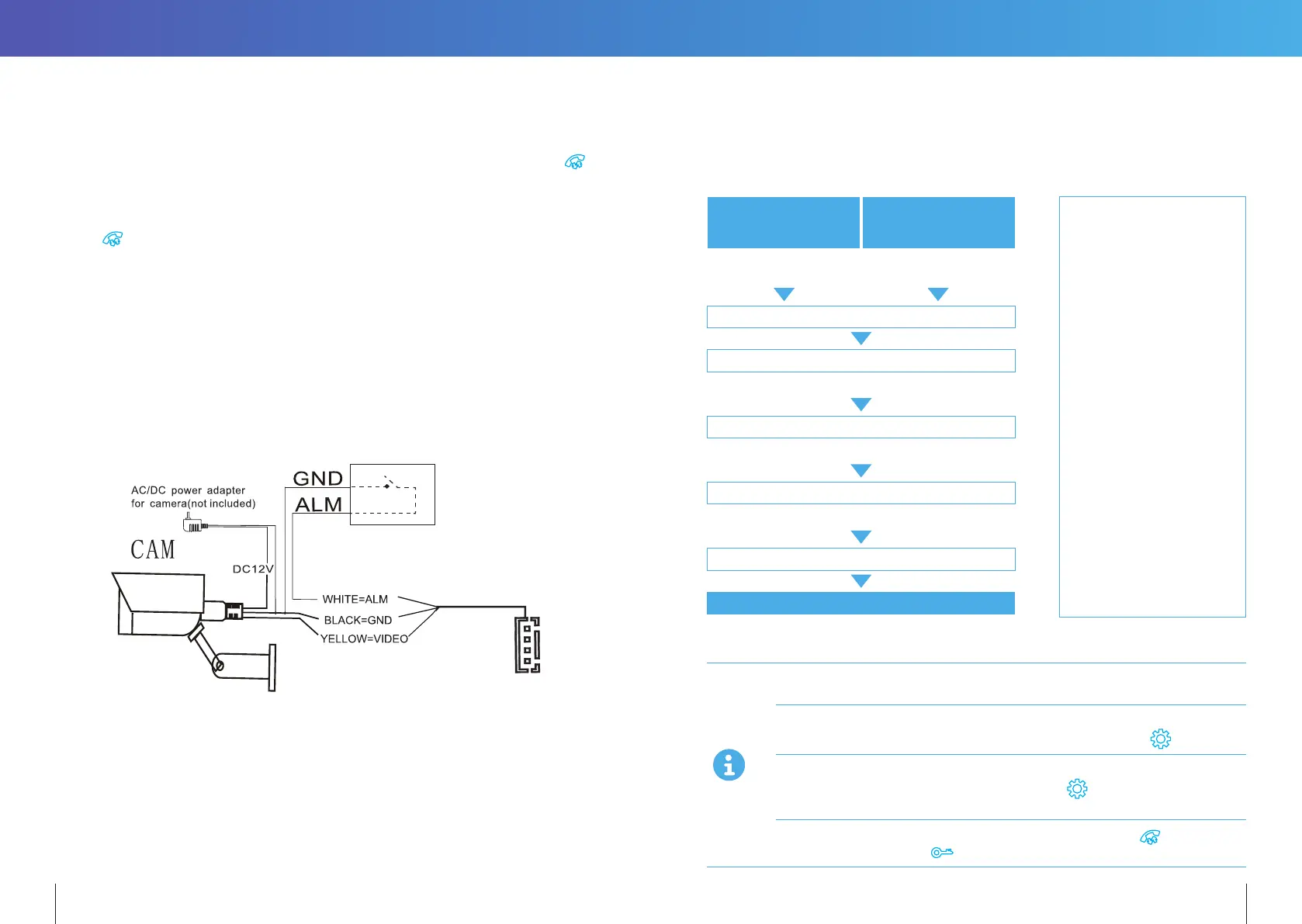
CAM1 and CAM2 each have an alarm input. If an ALM and GND cables are shorted together,
its NO-alarm will activate. The Indoor monitor will continue to ring for 120 seconds until
button is pressed. The monitor will then return to Standby mode.
For models with installed MicroSD card, an alarm will also trigger a snapshot or video
recording (depending on which setting is selected). The recording time is 120 seconds,
or until
button is pressed. The monitor will then return to Standby mode.
Connection diagram:
There is an alarm input for each of the two camera channels. Each alarm input can be
configured to accept either a Normally Closed (NC) or Normally Open (NO) alarm inputs;
or be Disabled.
A NO-alarm input will trigger an alarm event when the ALM & GND cables are shorted
together. Conversely, a NC-alarm will trigger an alarm event when the ALM & GND cables
are disconnected (open circuit).
10. OPERATION INSTRUCTIONS
VISITOR CALL
Standby Mode
The visitor presses the
CALL BUTTON
on Door Station 1
The visitor presses the
CALL BUTTON
on Door Station 2
A 1Os of continuous Ding Dong tone
is heard inside and outside
The visitor’s image automatically displayed on the screen
Press the TALK BUTTON on indoor monitor
Stop ringing
Start conversation with Door Station
The conversation duration is 120s at a time
Press the UNLOCK BUTTON on indoor monitor
release the door lock
Press the hang up button on indoor monitor
END
12 13
Note:
If the call buttons of both
Door Stations are pressed
about the same time,
preference would be given
to the Door Station whose
call button was pressed
first. Please be aware
there is no indication at
the second Door Station.
After the indoor monitor
returns to Standby Mode,
it can accept calls from the
second Door Station.
Note:
The indoor monitor
will automatically go
into Standby Mode,
if you are not at home,
or have not answered
the call within 60s.
The Monitor will stay active for 20 seconds for the viewer to confirm that the visitor has
entered the door.
For models with a MicroSD card installed and Record function active: Recording will start
from the beginning of a call, and can be manually stopped by pressing
Button.
For models with a MicroSD card installed and snapshot function active: A snapshot will
be taken at the start of the call. The user can also press
button to take another
snapshot manually.
In Monitoring mode, the monitor can listen to the door station. Press
button to
begin a conversation. Press button to unlock the door.


 To Next Page